Install
Upload it under Plugins → Add New Plugin → Upload Plugin, then activate.
Install straight from GitHub with WP-CLI:
wp plugin install https://github.com/patricedefago/gtm-integration/releases/download/v1.0.0/gtm-integration-1.0.0.zipMinimalist WordPress plugin to inject Google Tag Manager the right way (head + body) without touching your theme.
TL;DR
GTM Integration adds your Google Tag Manager container exactly where Google recommends – in<head>and right after<body>– using WordPress hooks, with no bloat, no dashboards and no theme hacking.
📘 Full tutorial (FR): Installer Google Tag Manager sur WordPress sans toucher au thème
📸 Screenshot
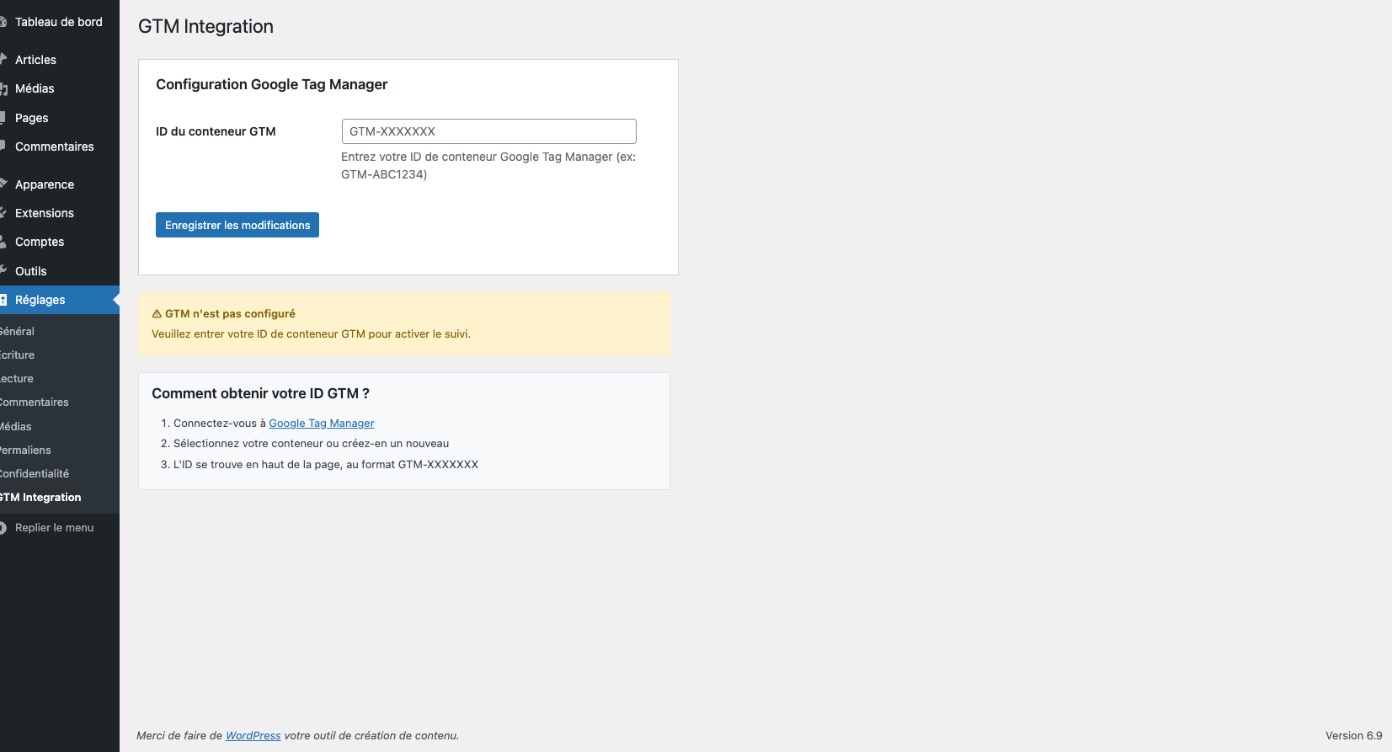
The simple settings page – just enter your GTM container ID and you're done.
✨ Features
- ✅ Injects the GTM script into
<head>usingwp_headwith high priority - ✅ Injects the noscript iframe right after
<body>usingwp_body_open() - ✅ Works with any modern WordPress theme (and includes a fallback for older ones)
- ✅ No theme file editing (
header.php,functions.php) - ✅ Ultra-lightweight: no extra dashboards, no tracking of its own, no bloat
- ✅ Fully open source (GPL-2.0-or-later)
GTM Integration is designed for people who want a clean, reliable GTM container and prefer to manage all tag logic inside Google Tag Manager itself.
🤔 Why another GTM plugin?
There are already several plugins that can load Google Tag Manager in WordPress (Google Site Kit, GTM4WP, header/footer code managers…).
So why this one?
Compared to Google Site Kit
- Site Kit is a full "Google suite" for WordPress (Search Console, Analytics/GA4, AdSense, Tag Manager, dashboards…).
- GTM Integration focuses on one single responsibility: load GTM in the right place, with no dashboards and no extra services.
Use Site Kit if you want a Google dashboard inside WordPress.
Use GTM Integration if you only want a minimal, robust GTM container and prefer to keep GA4, Search Console etc. separate.
Compared to GTM4WP and other advanced plugins
- Advanced plugins (like GTM4WP) are amazing for e-commerce, enhanced dataLayer, media tracking, etc.
- But they also come with more options and complexity.
GTM Integration is intentionally minimal:
- no pre-built dataLayer,
- no WooCommerce integration,
- fewer things to misconfigure.
It's ideal if you already know how to build your tracking in GTM and just need a clean entry point.
Compared to "Header/Footer code" plugins
Header/footer managers are great for pasting all sorts of scripts.
But for GTM specifically:
- they sometimes only target
<head>or footer, - they're not always aligned with the official GTM placement (head + body).
GTM Integration is opinionated:
- script part → always in
<head> - noscript part → always right after
<body>
No extra choices, no risky placements.
🚀 Installation
From GitHub release (recommended)
- Go to the Releases page and download the latest
gtm-integration-x.x.x.zip. - In your WordPress admin, go to Plugins → Add New → Upload Plugin and upload the zip file.
- Activate GTM Integration.
Configure GTM
- In WordPress, open Settings → GTM Integration.
- Enter your Google Tag Manager container ID (for example:
GTM-ABC1234). - Save changes.
The plugin will:
- inject the GTM script into
<head> - inject the noscript iframe after
<body>
…without you touching any theme file.
✅ Requirements
- WordPress 5.0+
- PHP 7.3+
- A valid Google Tag Manager container (
GTM-XXXXXXX)
🔍 How to verify GTM is working
- Open your GTM container and click Preview.
- Enter your site URL and start the preview.
- Visit your site in a new tab.
- The GTM debug panel should show your container and fired tags.
You can also use Tag Assistant (Chrome extension) to confirm that GTM is correctly loaded.
💡 Use cases
GTM Integration is especially useful if you:
- maintain multiple client sites and don't want to hack each theme
- are afraid to edit
header.phporfunctions.php - want a minimalist tracking setup and manage everything in GTM
- care about performance and want as few plugins/scripts as possible
🙌 Contributing & feedback
Issues and pull requests are welcome!
- Report bugs or suggest improvements via Issues
- Open a PR if you want to enhance the plugin (small, focused PRs are best)
If you use the plugin in production, I'd love to know where – it helps me understand real-world use cases.
🧾 License
This plugin is licensed under the GPL-2.0-or-later license.
See the LICENSE file for full details.
🇫🇷 Version française (résumé)
GTM Integration est une extension WordPress minimaliste qui sert à intégrer Google Tag Manager proprement dans votre site :
- script GTM dans
<head>viawp_head(priorité élevée) - bloc
noscriptjuste après<body>viawp_body_open() - aucune modification du thème (
header.php,functions.php), aucun tableau de bord, aucun "bloat".
Pourquoi ne pas utiliser simplement Site Kit ou un autre plugin ?
-
Google Site Kit = suite complète Google (Search Console, GA4, AdSense, GTM, rapports…).
→ Pratique, mais plus lourd, avec plusieurs scripts et écrans supplémentaires. -
GTM Integration = une seule mission : charger le conteneur GTM au bon endroit, de façon propre et légère, et vous laisser gérer la logique directement dans l'interface GTM.
-
Plugins header/footer = très génériques.
→ GTM Integration est pensé spécifiquement pour GTM, avec un placement conforme aux recommandations de Google (head + body).
Installation rapide (FR)
- Téléchargez l'archive depuis la page Releases de GitHub.
- Dans WordPress : Extensions → Ajouter → Téléverser une extension, puis activez le plugin.
- Allez dans Réglages → GTM Integration, entrez votre ID de conteneur (ex :
GTM-ABC1234), enregistrez.
Votre conteneur GTM est alors injecté proprement, sans toucher au thème, prêt pour GA4, Google Ads et vos tags personnalisés.
👉 Tutoriel détaillé (FR) : Installer Google Tag Manager sur WordPress sans toucher au thème
Releases
1 release. Each count is every asset in that release; expand a row for the breakdown.