Install
Upload it under Plugins → Add New Plugin → Upload Plugin, then activate.
Install straight from GitHub with WP-CLI:
wp plugin install https://github.com/paradonk/webinar-cards/releases/download/v1.1.0/webinar-cards-v1.1.0.zipA WordPress plugin that replaces hardcoded webinar listings with dynamic webinar posts managed from the admin area. Each card displays a video thumbnail that plays inline on click — no page redirect. Supports both YouTube and Vimeo.
Version: 1.1.4 | Requires: WordPress 6.0+ | Tested up to: 6.9.4 | PHP: 7.4+ | License: GPLv2
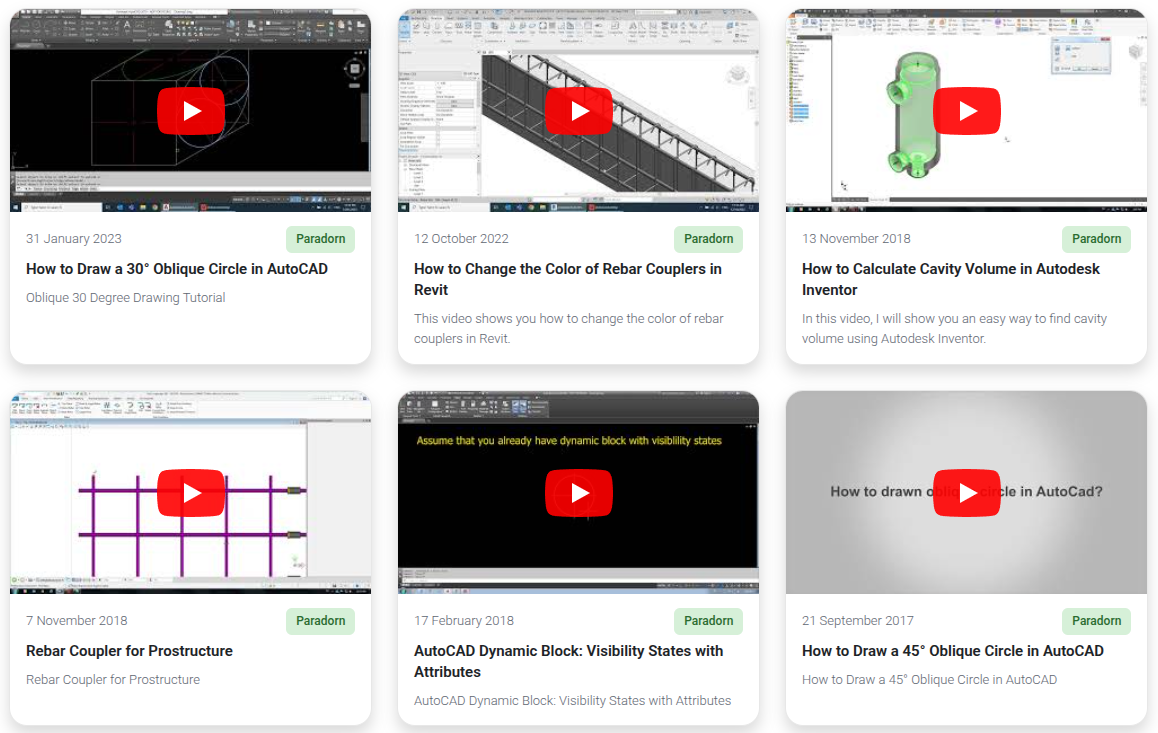
Installation
- Upload the
webinar-cardsfolder to/wp-content/plugins/. - Activate the plugin through WordPress Admin → Plugins.
- Add webinars under the new Webinars menu.
- Fill in the YouTube or Vimeo URL, Speaker, and Date in the Webinar Details meta box.
- Add a short description using the Excerpt field (enable via Screen Options if hidden).
- Place
[webinar_cards]in any page, post, or Elementor shortcode widget.
Shortcode
[webinar_cards]Attributes
| Attribute | Default | Description |
|---|---|---|
columns |
3 |
Desktop columns (1–6) |
tablet_columns |
2 |
Tablet columns (1–4) |
mobile_columns |
1 |
Mobile columns (1–2) |
posts_per_page |
12 |
Maximum number of cards to show |
category |
(all) | Filter by Webinar Category slug(s), comma-separated |
Examples
[webinar_cards]
[webinar_cards columns="4" tablet_columns="2" mobile_columns="1"]
[webinar_cards posts_per_page="6"]
[webinar_cards category="marketing"]
[webinar_cards category="marketing,sales" columns="2"]
Features
| Feature | Description |
|---|---|
| Custom post type | Manage webinars from the WordPress admin |
| Meta fields | YouTube/Vimeo URL, Speaker, Date |
| Excerpt | Short description shown on the card |
| Categories | Webinar Categories taxonomy with slug-based shortcode filtering |
| Responsive grid | Desktop / tablet / mobile column control via shortcode |
| YouTube thumbnails | Pulled automatically — no API key required |
| Vimeo thumbnails | Fetched via oEmbed API, cached 30 days per video |
| Inline playback | Video plays inside the card on click (fullscreen available) |
| Output caching | 1-hour transient cache, auto-invalidated on content change |
| Auto-updater | Self-hosted — no wordpress.org required (SHA-256 verified) |
Email Gate
Restrict video access to specific email domains or addresses via Webinars → Access Settings.
| Behaviour | Detail |
|---|---|
| Gate trigger | Guests who click a video are prompted for their email |
| Allow by domain | e.g. company.com — any address at that domain is granted access |
| Allow by address | Specific email addresses can be individually whitelisted |
| Access token | Secure 24-hour httponly cookie |
| Cache compatibility | JS-readable wbc_granted cookie ensures the gate works with NitroPack, LiteSpeed Cache, WP Rocket, etc. |
| Logged-in users | Always bypass the gate automatically |
FAQ
Why doesn't a webinar appear in the grid? Webinars are ordered by the Date field. Webinars without a date are still shown but sorted to the bottom.
The YouTube thumbnail has black bars — how do I fix it?
The plugin uses mqdefault.jpg (always 16:9). If bars appear, check that the YouTube URL is correct and the video is publicly accessible.
Can I show all webinars with no limit?
Set posts_per_page to a large number such as 100.
Where do I find the category slug? Go to Webinars → Categories. The slug is shown in the Slug column.
Files
webinar-cards/
├── webinar-cards.php                      # Plugin entry point
├── uninstall.php                          # Cleanup on uninstall
├── includes/
│   ├── class-webinar-cards.php            # Core singleton
│   ├── class-webinar-cards-cpt.php        # Custom post type & taxonomy
│   ├── class-webinar-cards-meta.php       # Meta boxes (URL, speaker, date)
│   ├── class-webinar-cards-shortcode.php  # Shortcode rendering & cache
│   ├── class-webinar-cards-access.php     # Email gate logic
│   ├── class-webinar-cards-settings.php   # Access Settings admin page
│   ├── class-webinar-cards-helpers.php    # Shared utilities
│   ├── class-webinar-cards-help.php       # Shortcode Guide admin page
│   └── class-webinar-cards-updater.php    # Auto-updater
└── assets/                                # CSS and JS
Changelog
1.1.4
- Fix: NitroPack page cache is now reliably purged when a webinar is saved. NitroPack only registers its integration hooks on non-admin (front-end) requests, so the previous
do_action()calls from admin saves were silent no-ops. The purge now also runs via a WP-Cron event that fires outside admin context where NitroPack's hooks are active.
1.1.3
- Fix: NitroPack cache purge now triggers correctly on every webinar save. The
has_action()guard was causing the purge to be skipped on admin requests because NitroPack registers its integration hooks on front-end requests only.
1.1.2
- Fix: NitroPack page cache is now automatically purged when a webinar is saved or deleted, so new cards appear on the site immediately without a manual cache clear.
1.1.1
- Fix: Registration link now redirects the user back to the originating page after account creation.
1.1.0
- New: Email gate — restrict video access by allowed domain or specific email address.
- New: Access Settings page (Webinars → Access Settings) to manage gate rules.
- New: Secure 24-hour access token (httponly cookie) + JS-readable grant cookie for page-cache compatibility.
- New: Gate modal with email input, inline error messages, and sign-in / register fallback links.
- Fix: Webinars without a Date field were excluded after cache expiry (meta_key inner-join bug) — all published webinars now appear, undated ones sort to the bottom.
1.0.0
- Initial release: custom post type, Webinar Categories taxonomy, responsive grid shortcode.
- YouTube and Vimeo inline embed on card click (autoplay, fullscreen-capable).
- YouTube
mqdefaultthumbnail (16:9, no black bars); Vimeo thumbnail via oEmbed, cached 30 days. - Shortcode output caching via transient (1 hour, auto-invalidated).
- N+1 query prevention via
update_meta_cache(). - Self-hosted auto-updater with optional SHA-256 checksum verification.
Releases
1 release. Each count is every asset in that release; expand a row for the breakdown.