Install
This is the repository archive. It installs, but the folder name will carry the branch suffix and updates will not flow.
Install straight from GitHub with WP-CLI:
wp plugin install https://github.com/paradonk/linkedin-page-feed/archive/refs/heads/main.zipA WordPress plugin that shows the latest posts from a LinkedIn Company Page as a card grid, using the official LinkedIn REST API.
Features
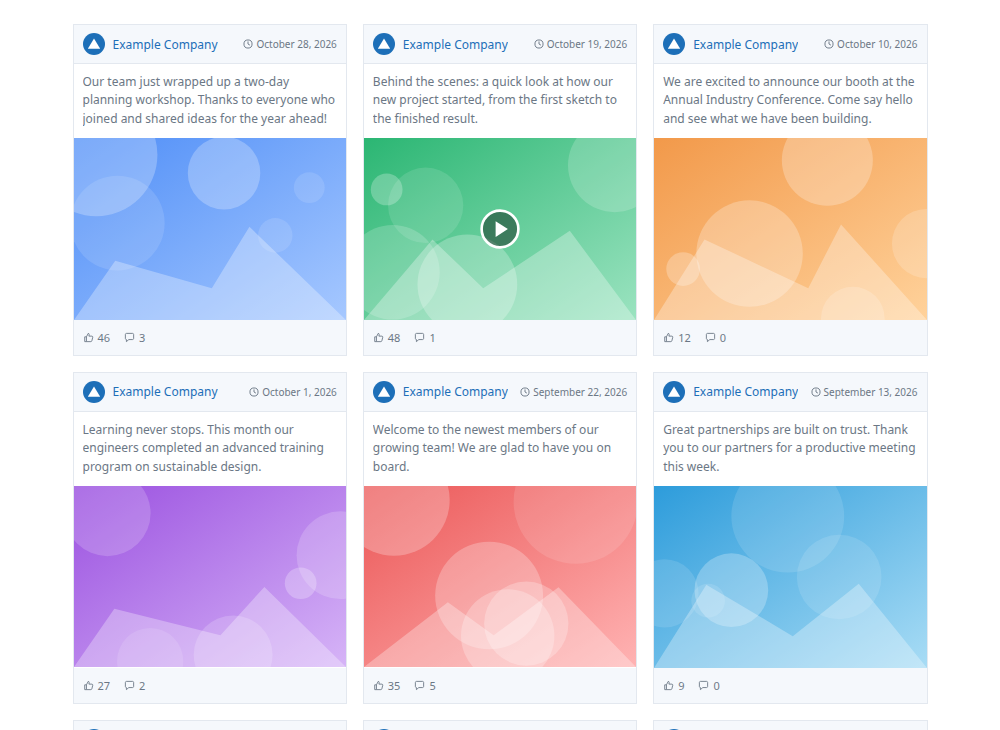
[linkedin_feed]shortcode — works in the block editor, Classic editor, Elementor and any page builder with a Shortcode widget- Card layout: Page logo and name, date, post text (3 lines), image or video thumbnail with play button, like and comment counts
- Whole card links to the post on LinkedIn
- Responsive grid: 1–6 columns, collapses to 2 / 1 on smaller screens
- One-click OAuth connection from the WordPress admin, with automatic token refresh
- Images, video thumbnails and the logo are stored once in
wp-content/uploads/— LinkedIn's image URLs expire and its image API has a low daily limit - Cached feed (default 60 min); if LinkedIn is unreachable the last good posts are shown and retried after 5 minutes
- Errors are only visible to administrators; visitors never see a broken feed
- No external libraries
Requirements
- WordPress 6.0+
- PHP 7.4+
- Site served over HTTPS (LinkedIn only allows
httpredirect URLs for localhost) - A LinkedIn developer app with the Community Management API product, granting the scopes
r_organization_socialandrw_organization_admin - A LinkedIn account that is an admin of the Page you want to show
Installation
- Download this repository as a ZIP (or build one containing the
linkedin-page-feedfolder). - In WordPress go to Plugins → Add New → Upload Plugin, upload the ZIP and activate it.
Setup
1. LinkedIn app
In the LinkedIn Developer Portal, open your app's Auth tab:
- Under Authorized redirect URLs, add the URL shown on the plugin's settings page. It looks like:
https://your-site.com/wp-admin/admin-post.php?action=lpf_oauth_callbackIt must match exactly (protocol,
www, subfolder). - Copy the Client ID and Primary Client Secret.
2. WordPress
Go to Settings → LinkedIn Feed:
| Setting | Description |
|---|---|
| Client ID | From the LinkedIn app's Auth tab |
| Client secret | From the LinkedIn app's Auth tab. Leave blank when saving to keep the stored one |
| Default Page ID | The numeric Page (organization) ID used when the shortcode has no org |
| Logo URL | Optional. Overrides the Page logo shown on the cards |
| API version | LinkedIn API version, YYYYMM (default 202609) |
| Cache (minutes) | How long fetched posts are reused (minimum 5) |
Save, then click Connect LinkedIn and approve access. After connecting, the settings page lists every Page your account administers, with its ID and a ready-made shortcode.
To keep the secret out of the database, define it in wp-config.php instead:
define( 'LPF_CLIENT_SECRET', 'your-client-secret' );Finding a Page ID
- Open the Page on LinkedIn as an admin — the URL is
linkedin.com/company/<ID>/admin/ - Or connect the plugin and read it from the Your Pages table
Usage
[linkedin_feed]
[linkedin_feed org="1234567" count="12" cols="4"]| Attribute | Default | Description |
|---|---|---|
org |
Default Page ID | LinkedIn Page (organization) ID |
count |
24 |
Number of posts, 1–100 |
cols |
3 |
Grid columns, 1–6 |
Elementor: drag a Shortcode widget onto the page and paste the shortcode.
Styling
The feed uses CSS custom properties that you can override in your theme or in Appearance → Customize → Additional CSS:
.lpf-grid {
  --lpf-accent: #1d6fb8;  /* Page name, links */
  --lpf-muted:  #6b7785;  /* text, date, counts */
  --lpf-bar:    #f5f8fc;  /* header and footer background */
  --lpf-border: #e3e8ef;  /* card border */
}
The font is inherited from your theme. Main class names: .lpf-card, .lpf-head, .lpf-text, .lpf-media, .lpf-foot.
How it works
| Data | LinkedIn endpoint |
|---|---|
| Posts | GET /rest/posts?q=author |
| Images | GET /rest/images?ids=List(...) (batch) |
| Video thumbnails | GET /rest/videos?ids=List(...) (batch) |
| Like / comment counts | GET /rest/organizationalEntityShareStatistics |
| Page name and logo | GET /rest/organizations/{id} (cached for a week) |
Each media item is downloaded only once. After that, a cache refresh makes just two API calls (posts and statistics).
Stored data:
- Options:
lpf_settings,lpf_token,lpf_feed_cache,lpf_orgs,lpf_media - Files:
wp-content/uploads/linkedin-page-feed/
The access token (60 days) is refreshed automatically while the refresh token is valid (about one year). After that, click Reconnect in the settings.
Limitations
- Document (PDF/carousel) posts and polls are shown as text only
- Only the first image of multi-image posts is shown
- The like count is LinkedIn's
likeCountstatistic - Text is shown as plain text; hashtags and mentions are kept as words, not links
- The first load after connecting downloads all images and may take a few seconds
Uninstall
Deleting the plugin from Plugins removes all its options and the stored images. Deactivating keeps them.
License
GPL-2.0-or-later