Install
This is the repository archive. It installs, but the folder name will carry the branch suffix and updates will not flow.
Install straight from GitHub with WP-CLI:
wp plugin install https://github.com/pantheon-systems/wp-tls-compatibility-checker/archive/refs/heads/main.zipOn Packagist as pantheon-systems/wp-tls-compatibility-checker:
composer require pantheon-systems/wp-tls-compatibility-checkerA scanner for outgoing HTTP requests in WordPress code to check TLS 1.2/1.3 compatibility.
Installation
Via Composer
composer require pantheon-systems/wp-tls-compatibility-checkerVia Git Updater
WP TLS Compatibility Checker supports Andy Fragen's Git Updater method of managing plugins.
- Download and install Git Updater on your WordPress site.
- From the Git Updater admin pages, navigate to Install Plugin and use the following values:
Plugin URI: pantheon-systems/wp-tls-compatibility-checker
Repository Branch: main
Remote Repository Host: GitHub
GitHub Access Token: (optional, leave blank)
Manually
- Download the [latest release on GitHub](https://.
- Unzip the archive into your WordPress plugins directory (usually
/wp-content/plugins/). - Upload the plugin to your WordPress site.
- Activate the plugin.
Usage
There are two ways to use the TLS Checker: via the WordPress admin or via WP-CLI. The plugin adds a new TLS Compatibility page to the Tools menu. This page allows you to run a TLS scan on your site against /wp-content and all subdirectories. When the scan is complete, a list of URLs that are not compatible with TLS 1.2 or higher will be displayed.
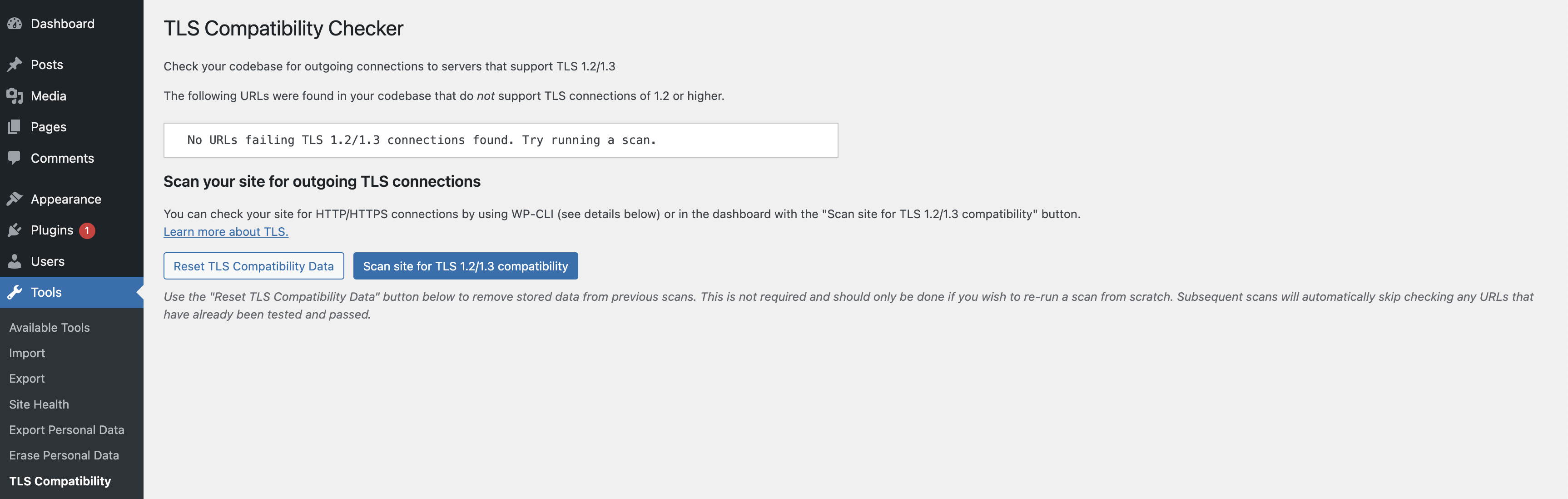
You can also run the scan using the WP-CLI command described below. WP-CLI allows you to specify directories to scan, and to output the results in different formats (table, JSON, CSV, or YAML).
In either case, both passing and failing urls are stored to the database. Subsequent scans will automatically skip the TLS check for URLs that are known to have passed previously (while still testing URLs that were previously failing). This data can be reset at any time either by using the tls-checker reset command from WP-CLI or in the admin with the "Reset TLS Compatibility Data" button.
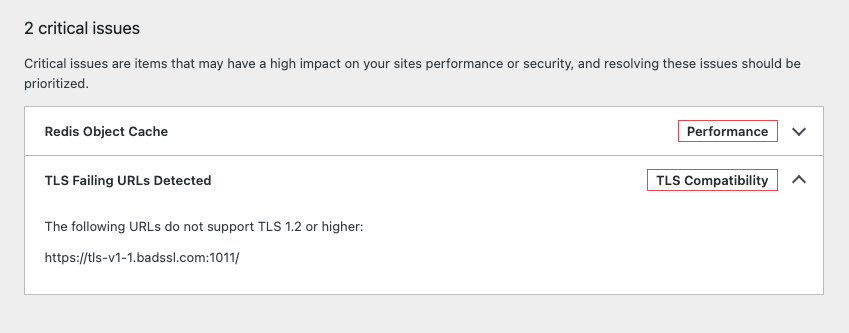
After a scan has been run, if there are any URLs detected that fail the TLS 1.2/1.3 check, an alert will be displayed on your Site Health page with a list of the failing URLs.
Filters
The TLS Compatibility Checker plugin contains two filters that can be used to either explicitly add URLs to scan or exclude URLs from scanning.
pantheon.tls_checker.skip_urls
This filter can be used to exclude URLs from scanning. The filter accepts an array of URLs to skip. For example:
add_filter( 'pantheon.tls_checker.skip_urls', function( $skip_urls ) {
    $skip_urls[] = 'https://example.com';
    return $skip_urls;
} ) ;
pantheon.tls_checker.additional_urls
This filter can be used to add URLs to scan. The filter accepts an array of URLs to add. For example:
add_filter( 'pantheon.tls_checker.additional_urls', function( $additional_urls ) {
    $additional_urls[] = 'https://example.com';
    return $additional_urls;
} ) ;
Extending the plugin
All the functions in inc/core.php are globally declared, allowing you to use any of them in your own code.
WP-CLI Commands
The TLS Checker can be run from the command line with WP-CLI.
run
Runs the TLS checker scan across all PHP files in the given directories (defaults to /mu-plugins, /themes and /plugins). You can specify a directory by passing a --directory flag, e.g.:
wp tls-checker run --directory=/path/to/my/directoryExamples
wp tls-checker scanwp tls-checker scan --directory=/private/scripts/quicksilverOr, in a Pantheon environment using Terminus:
terminus wp -- <site>.<env> tls-checker scanreport
Returns a full report of checked URLs and whether they passed or failed the TLS check. Supports multiple formats (table, JSON, CSV, YAML).
Examples
wp tls-checker reportwp tls-checker report --format=json | jqwp tls-checker report --format=csvOr, in a Pantheon environment using Terminus:
terminus wp -- <site>.<env> tls-checker reportreset
Resets the stored passing and failing URLs so the next scan will re-check all discovered URLs.
Examples
wp tls-checker resetterminus wp -- <site>.<env> tls-checker resetHow do I know it worked?
If the scan doesn't find anything bad, you should be good to go. If it does, it will list the URLs that it found that weren't compatible. However, if you want to validate that it's working, you can create a new plugin with the following code:
<?php
/**
 * Plugin Name: TLS checker bad plugin
 * Description: Makes a request against a known bad (non-TLS 1.2+) URL
 * Version: 1.3
 * Author: Pantheon Systems
 */
add_action( 'admin_init', function() {
    print_r( wp_remote_get( 'https://tls-v1-1.badssl.com:1011/' ) );
});
When you run the command, the URL above should be returned as a host that does NOT support TLS 1.2 or higher.
Releases
1 release.
These releases are tags only. The author does not attach a packaged zip, so there are no download counts to report.