Homely Property Slider
A professional, highly customizable property gallery slider widget for Elementor. Specifically engineered for real estate and high-end listings, it features a primary focal slider synchronized with a versatile thumbnail navigation track.
★ 0stars
0forks
Install
No release zip yet. The repository archive installs, but the folder name will carry the branch suffix and updates will not flow:
wp plugin install https://github.com/ormahbub/homely-property-slider/archive/refs/heads/main.zipHomely Property Slider for Elementor
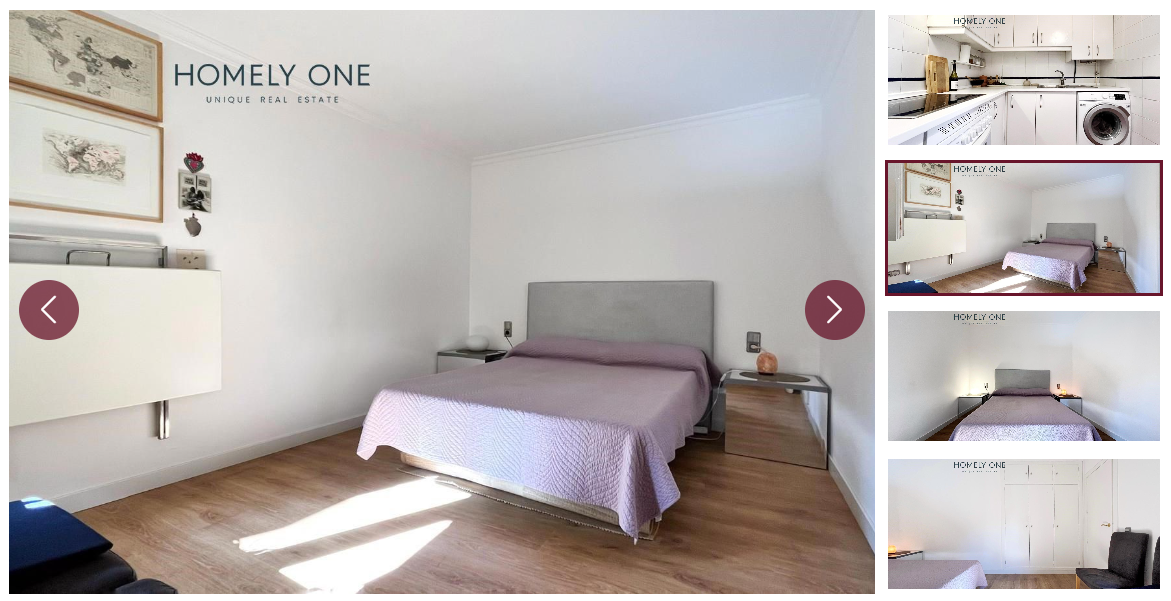
A professional, highly customizable property gallery slider widget for Elementor. Specifically engineered for real estate and high-end listings, it features a primary focal slider synchronized with a versatile thumbnail navigation track.
🚀 Version 1.5.2 Highlights
- Full Style Engine: Total control over typography, colors, and spacing directly from the Elementor Style tab.
- Custom Icon Support: Choose any icon from the Elementor Icon Library for navigation (Next/Prev).
- Flexible Layouts: Switch thumbnail positions between Left and Right with a single click.
Features
- Dynamic Data Support: Native compatibility with Elementor Dynamic Tags (JetEngine, ACF Gallery, PODS, etc.).
- Dual-Slider Sync: Primary main slider flawlessly synced with a vertical or horizontal thumbnail track.
- Interactive Thumbnails: Includes click-to-sync, hover opacity states, and active border styling.
- Smart Responsive Design: Seamlessly transitions from a vertical desktop sidebar to a horizontal mobile slider.
- Icon Hover States: Professional hover animations and color transitions for navigation elements.
- Performance Optimized: Leverages Elementor's native Swiper.js library to keep your site fast.
Installation
- Download the plugin folder
homely-property-slider. - Upload the folder to your
/wp-content/plugins/directory via FTP, or upload as a.zipvia the WordPress Dashboard. - Activate the plugin through the 'Plugins' menu in WordPress.
Usage
- Open any page or template in the Elementor Editor.
- Search for the Property Gallery Slider widget.
- Content Tab: Select images manually or use the Dynamic Tags icon to pull from custom fields. Set your thumbnail position and visibility.
- Style Tab: Customize the image border-radius, arrow colors (Normal & Hover), and thumbnail aspect ratios.
Requirements
- WordPress 5.8+
- Elementor (Free or Pro)
- PHP 7.4+
Technical Details
- Elementor Icons Manager: Integrated with the native
Icons_Managerclass for full SVG and FontAwesome support. - Observer Mode: Pre-configured with
observerandobserveParentsto prevent rendering issues in tabs or accordions. - Scoped Styling: All CSS is scoped to the widget ID to prevent conflicts with your theme.
Author: Mahbub
Version: 1.5.2
License: GPL-2.0+