Install
This is the repository archive. It installs, but the folder name will carry the branch suffix and updates will not flow.
Install straight from GitHub with WP-CLI:
wp plugin install https://github.com/origgami/cmb2-multidates-picker/archive/refs/heads/master.zipNo built-in updater. New versions won't appear under Dashboard → Updates. Install new releases yourself, or let Git Updater track the repository.
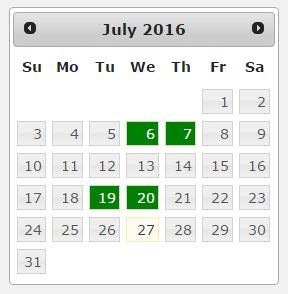
Creates a CMB2 field that enables a multiple date calendar. It uses a plugin called MultiDatesPicker v1.6.3 for jQuery UI
Usage
Create your cmb2 metabox like you are used to, but on your field, use the attribute type => 'multidates'
$prefix = '_mdpt_';
$cmb_demo = new_cmb2_box(array(
    'id'             => $prefix . 'metabox',
    'title'          => __('Test Metabox', 'cmb2'),
    'object_types'   => array('page',), // Post type
));
$cmb_demo->add_field(array(
    'name'   => __('Test Text', 'cmb2'),
    'desc'   => __('field description (optional)', 'cmb2'),
    'id'     => $prefix . 'dates',
    'type'   => 'multidates',

    //Any value from http://multidatespickr.sourceforge.net or http://api.jqueryui.com/datepicker/
    'multidates_params' => array(
        //'maxPicks'     => 3,
        //'dateFormat'   => "y-m-d",
    ),
));
Options
As it uses MultiDatesPicker v1.6.3 for jQuery UI, you can use all of the parameters from both MultiDatesPicker and also JqueryUI Datepicker itself. These are some interesting parameters i could check, but like i said, there are a bunch of them
'multidates_params' => array(
    //'maxPicks'     => 3,
    //'dateFormat'   => "y-m-d", //Default is "yy-mm-dd"
    //pickableRange: 7,
)
Screenshots
This is the new field you get using this plugin