Install
This is the repository archive. It installs, but the folder name will carry the branch suffix and updates will not flow.
Install straight from GitHub with WP-CLI:
wp plugin install https://github.com/origgami/cmb2-grid/archive/refs/heads/master.zipOn Packagist as origgami/cmb2-grid:
composer require origgami/cmb2-gridNo built-in updater. New versions won't appear under Dashboard → Updates. Install new releases yourself, or let Git Updater track the repository.
A grid system for Wordpress CMB2 library that allows the creation of columns for a better layout in the admin.
Installation
For now you have to install this as a WordPress plugin:
- Download the plugin
- Place the plugin folder in your
/wp-content/plugins/directory - Activate the plugin in the Plugin dashboard
Usage
Create your cmb2 metabox like you always do:
$prefix = '_yourprefix_demo_';
$cmb = new_cmb2_box(array(
    'id'             => $prefix . 'metabox',
    'title'          => __('Test Metabox', 'cmb2'),
    'object_types'   => array('page',), // Post type
));

$field1 = $cmb->add_field(array(
    'name'       => __('Test Text', 'cmb2'),
    'desc'       => __('field description (optional)', 'cmb2'),
    'id'         => $prefix . 'text',
    'type'       => 'text',
));

$field2 = $cmb->add_field(array(
    'name'       => __('Test Text2', 'cmb2'),
    'desc'       => __('field description2 (optional2)', 'cmb2'),
    'id'         => $prefix . 'text2',
    'type'       => 'text',
));
Now, create your columns like this:
if(!is_admin()){
    return;
}
$cmb2Grid = new \Cmb2Grid\Grid\Cmb2Grid($cmb);
$row = $cmb2Grid->addRow();
$row->addColumns(array($field1, $field2));
You can also use custom bootstrap column classes if you want, like this
$row->addColumns(array(
   array($field1, 'class' => 'col-md-8'),
   array($field2, 'class' => 'col-md-4')
));
FAQ
- It works on group fields also
- If you want, you can opt to use the metabox and the field IDs also.
- Currently the grid system is using a lite version of Twitter Bootstrap
- You can create as much rows as you want
- You have to put the fields in the columns in the same order they were created
- You can follow exactly what is in Test/Test.php file to see it in action
Screenshots
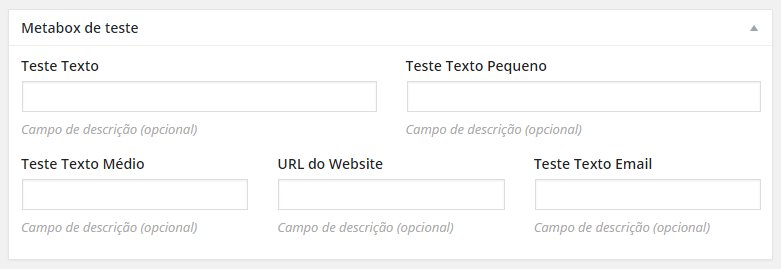
This is what you get using columns