Install
This is the repository archive. It installs, but the folder name will carry the branch suffix and updates will not flow.
Install straight from GitHub with WP-CLI:
wp plugin install https://github.com/openpay-innovations/openpay-widgets-woocommerce/archive/refs/heads/master.zip
Introduction
Objectives and Target Audience
This guide describes the process of installing and configuring the Openpay Widget / Extension to WooCommerce 5.X. You should have an existing WooCommerce installed.
Widgets explain how Openpay is a flexible, interest-free payment method. It showcases the minimum and maximum order value, allowing the user to choose an option to pay weekly or fortnightly, over available months.
What is Openpay Widgets?
Openpay Widgets is a WooCommerce plugin with a predefined set of configuration options.
Placement of the Widgets
Openpay Widget plugin is a set of widgets, when installed and activated will show the widgets on the following pages:
- Info Belt displayes at the Top section of the HomePage
- Product Catalog / Listing Page
- Product Detail Page
- Cart Page
- Checkout Page
- Landing Page
Compatibility
- PHP 5.6 or later
- WooCommerce 5.x
Pre-requisite
Please install the Openpay Payment Plugin before installing the Widgets plugin
Requirements
- At least 5.6 or the later version of PHP
- cURL extension for PHP
- JSON extension for PHP
- Multibyte String extension for PHP
- Worpress & WooCommerce should be pre-installed on your web server. The extension has been tested on WooCommerce version 5.X
- SSL: A valid security certificate is required to work over a secure channel (HTTPS) from the WooCommerce Admin Panel or while submitting the form data from the storefront. Self-signed SSL certificates are not supported
- Curl (version 7.20.0 - 7.4.0)
Installation
Upload the widget plugin files to the plugins directory
Admin Setup
To set up Openpay Widgets, fill out the fields as per your Openpay account configuration. (This information will be provided by your Openpay Ecommerce Manager or Account Manager).
Check with Openpay / Ecommerce Manager for your Plan Tiers configuration. Below are the configuration page from where you can choose different options available for each widget.
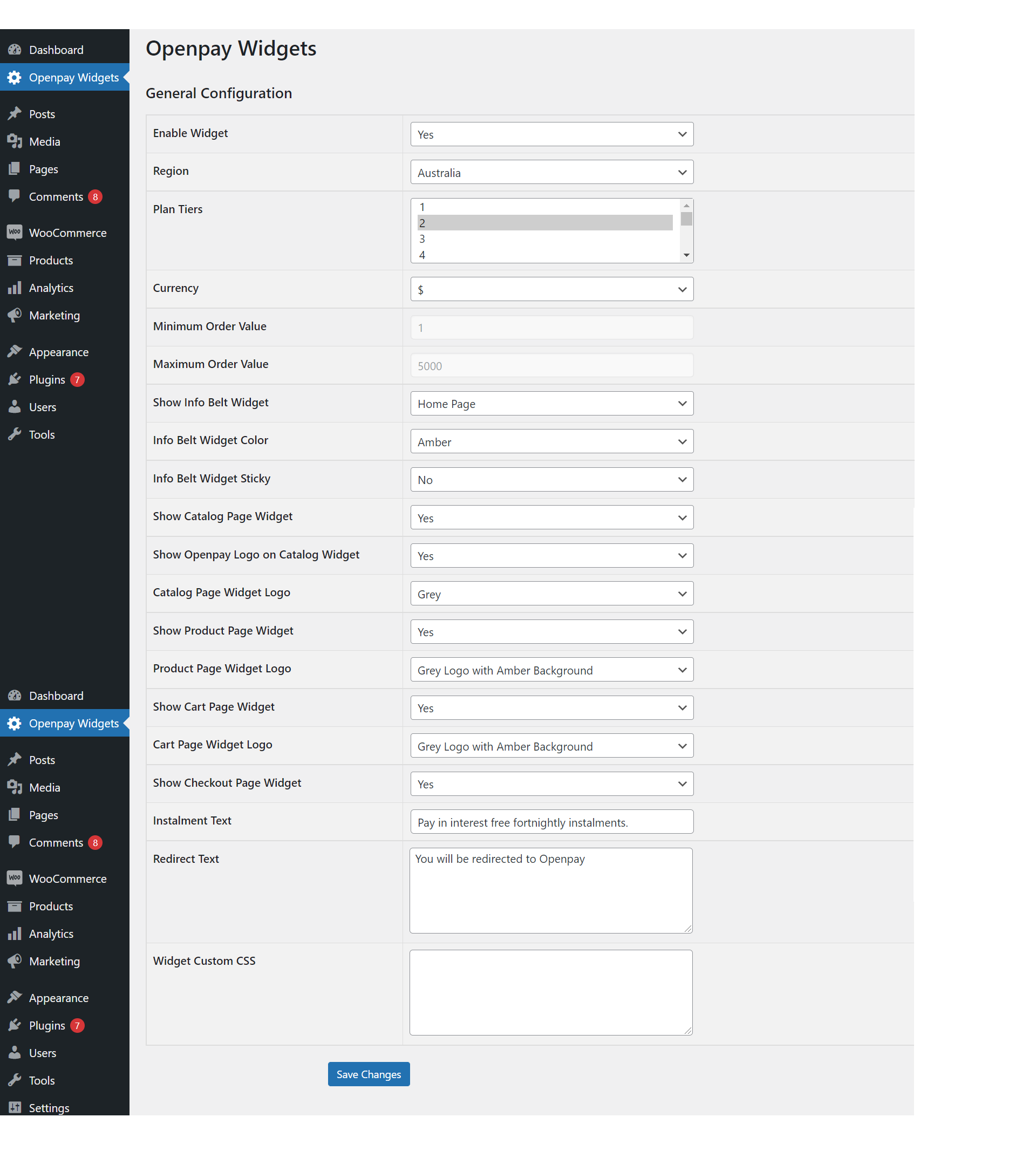
License
Copyright 2021 Openpay

Licensed under the Apache License, Version 2.0 (the "License");
you may not use this file except in compliance with the License.
You may obtain a copy of the License at

   http://www.apache.org/licenses/LICENSE-2.0

Unless required by applicable law or agreed to in writing, software
distributed under the License is distributed on an "AS IS" BASIS,
WITHOUT WARRANTIES OR CONDITIONS OF ANY KIND, either express or implied.
See the License for the specific language governing permissions and
limitations under the License.