Install
Upload it under Plugins → Add New Plugin → Upload Plugin, then activate.
Install straight from GitHub with WP-CLI:
wp plugin install https://github.com/ookpassant/pressed-hog/releases/download/v0.2.1/pressedhog0.2.1.zipPressed Hog – PostHog Analytics for WordPress
A WordPress plugin that installs PostHog product analytics on your site: tracking snippet, session replay, surveys, user identification, WooCommerce events, feature flags, cookie consent, an ad-blocker-resistant reverse proxy, and analytics inside wp-admin. Works with PostHog Cloud (US/EU) and self-hosted instances.
New here? Start with the step-by-step walkthrough — it covers installation through your first events with screenshots.
Features
-
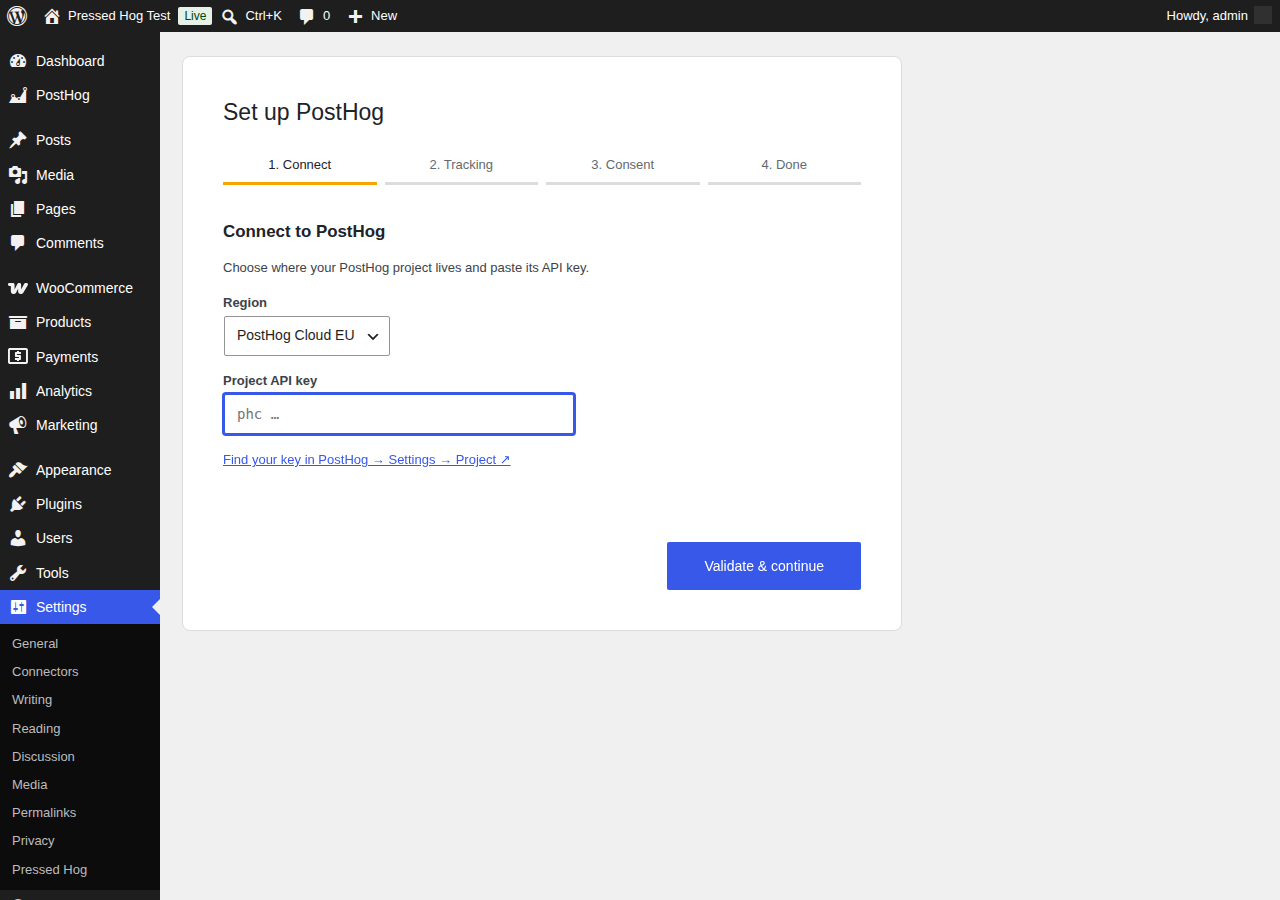
Guided setup wizard — activation redirects to a 4-step wizard: pick your region (US/EU/self-hosted), paste your project API key (validated live against your PostHog host from the server), choose tracking and consent options, then send a test event to confirm end-to-end delivery. Re-run it any time from the Plugins screen.
-
Tracking toggles — pageview capture, autocapture, session replay, and popover surveys are each switchable.
-
Identify logged-in users — optionally call
posthog.identify()with the WordPress user ID, email, and display name, so PostHog persons map to real accounts. -
Role exclusions — logged-in users with excluded roles (administrators and editors by default) never get the snippet.
-
Consent modes
- None — track immediately.
- Built-in banner — a lightweight accept/decline cookie banner; PostHog starts opted-out and only captures after acceptance.
- External — integrate any consent plugin: tracking starts when a configurable cookie matches, or when your plugin calls
window.pressedHog.grantConsent()/window.pressedHog.denyConsent().
-
WooCommerce events —
product_added_to_cart(classic and block themes),checkout_started, andorder_completed(with totals and line items, deduplicated per order and gated on the order key). -
Reverse proxy — optionally serve PostHog through your own domain (
yoursite.com/phog/…, prefix configurable). A rewrite rule relays requests server-side to your PostHog host, forwarding the visitor's IP viaX-Forwarded-For. Ad-blockers that block PostHog's domains can't block first-party requests. Requires pretty permalinks. -
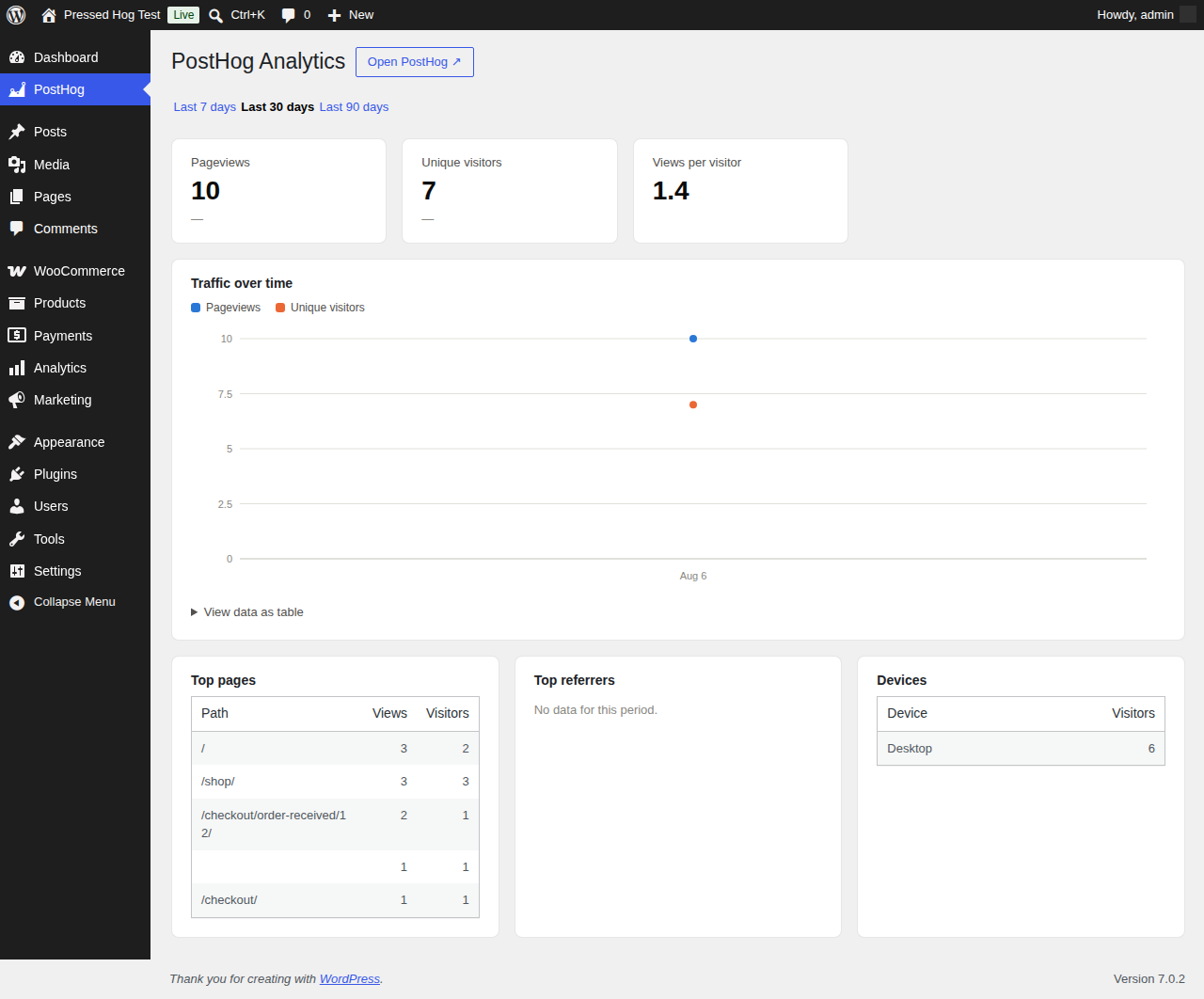
In-dashboard analytics — a "PostHog" admin page with pageviews, unique visitors, deltas vs the previous period, a traffic chart, top pages, referrers, and devices over 7/30/90 days, queried server-side from PostHog's Query API with 5-minute caching. Includes a WP dashboard widget and an optional embedded PostHog shared dashboard.
-
QR codes & trackable links — a "QR Codes" page (under the PostHog menu) where you paste any URL of your own and get a campaign-tagged link back: UTM parameters (
utm_source/utm_medium/utm_campaign) plus a uniquephg_qrid, so each QR is individually attributable on the$pageviewevent in PostHog. QR codes are generated entirely in the browser — the URL is never sent to a third-party QR service — and downloadable as PNG or SVG. Saved links are listed on the page and exportable as a CSV spreadsheet. -
Feature flags, server-side — gate content with a shortcode or PHP helpers, evaluated against PostHog's
/decideendpoint with a 60-second cache:[posthog_flag key="new-pricing"]Shown when the flag is on[/posthog_flag] [posthog_flag key="experiment" variant="test"]Shown for the "test" variant[/posthog_flag]if ( pressed_hog_is_feature_enabled( 'new-pricing' ) ) { /* ... */ } $variant = pressed_hog_get_feature_flag( 'experiment' );
Quick start
- Download this repository as a zip (or clone it into
wp-content/plugins/pressed-hog). - Activate Pressed Hog – PostHog Analytics in wp-admin.
- The setup wizard opens automatically — pick your region, paste your project API key (
phc_…), and follow the steps.
Everything the wizard configures (plus role exclusions, the proxy, and the dashboard connection) is editable later at Settings → Pressed Hog. See the walkthrough for the full tour.
Requirements
- WordPress 6.0+, PHP 7.4+
- A PostHog project (Cloud US/EU or self-hosted)
- Pretty permalinks (Settings → Permalinks) if you enable the reverse proxy
- A personal API key with read-only Query scope if you enable the in-dashboard analytics
Developer reference
Hooks
| Hook | Type | Purpose |
|---|---|---|
pressed_hog_is_active |
filter | Whether the snippet is output for the current request. |
pressed_hog_init_config |
filter | The posthog.init() config array before output. |
Consent JavaScript API
In external consent mode, your consent plugin unlocks or blocks tracking with:
window.pressedHog.grantConsent();  // opt in, runs identify if enabled
window.pressedHog.denyConsent();   // opt out
or by setting the configured consent cookie to the configured value.
Template helpers
pressed_hog_is_feature_enabled( string $flag_key, ?string $distinct_id = null ): bool
pressed_hog_get_feature_flag( string $flag_key, ?string $distinct_id = null ): bool|string
Security model
- The project API key (
phc_…) is public by design — it ships in every page's source, like any PostHog install. - The personal API key (
phx_…) for the dashboard is stored inwp_options(non-autoloaded, so it stays out of the object cache on public requests), used only server-side, and never printed on the front end or in the setup wizard's page HTML. Create it with the read-only Query scope. - All admin AJAX endpoints require the
manage_optionscapability and a nonce. The wizard's key-check accepts only HTTPS hosts and useswp_safe_remote_post, so it can't be used to probe the internal network (including cloud metadata endpoints). - The reverse proxy only relays to your configured PostHog host, and only for a fixed allow-list of PostHog paths (
e,i,decide,capture,batch,static, …) and methods, with a request-body size cap and a short upstream timeout. It cannot be pointed at arbitrary hosts or paths, or used as an open/fetch proxy. For very high-traffic sites, put a CDN-level proxy in front rather than relying on PHP. - The
order_completedpayload requires the order key from the URL (like WooCommerce's own thank-you page), so order IDs can't be enumerated for totals. - Anonymous feature-flag identifiers are read from the posthog-js cookie but reject purely-numeric values, so a visitor can't evaluate flags as another logged-in user (who is keyed by WordPress user ID).
- All settings pass through a sanitizer; all output is escaped or JSON-encoded.
This security posture was checked with an adversarial multi-agent review (independent finders per attack surface, each finding re-verified by a skeptical pass); the hardening above is the result. SSRF/open-proxy, HTTP header injection, XSS, and SQL/HogQL injection were specifically examined and found not exploitable.
Structure
pressed-hog.php                                Bootstrap, defaults, option access
includes/class-pressed-hog-settings.php        Settings page (Settings API)
includes/class-pressed-hog-wizard.php          Setup wizard (validation, save, test event)
includes/class-pressed-hog-tracker.php         Snippet output, identify, consent gating
includes/class-pressed-hog-flags.php           Server-side flags, shortcode, helpers
includes/class-pressed-hog-woocommerce.php     WooCommerce event payloads
includes/class-pressed-hog-proxy.php           Reverse proxy (rewrite rule + relay)
includes/class-pressed-hog-analytics.php       Analytics page, widget, Query API client
includes/class-pressed-hog-links.php           QR codes & trackable links (store, CSV export)
assets/js/consent.js                           Banner + consent API
assets/js/woocommerce.js                       Client-side WooCommerce captures
assets/js/links.js                             In-browser QR encoder + links UI
assets/js/wizard.js, assets/js/analytics.js    Admin UIs
uninstall.php                                  Removes options and cached data
readme.txt                                     WordPress.org plugin readme
docs/WALKTHROUGH.md                            Step-by-step setup guide
License
GPLv2 or later. PostHog is a registered trademark of PostHog, Inc.; this plugin is an independent integration and is not affiliated with or endorsed by PostHog, Inc.
Releases
1 release. Each count is every asset in that release; expand a row for the breakdown.