Install
This is the repository archive. It installs, but the folder name will carry the branch suffix and updates will not flow.
Install straight from GitHub with WP-CLI:
wp plugin install https://github.com/onlinecompiler-io/onlinecompiler-wordpress/archive/refs/heads/main.zipOnlineCompiler.io Code Runner: an online compiler for WordPress
A WordPress plugin that turns code examples into runnable code blocks. Add a Code runner block to a post or page (or the [onlinecompiler] shortcode in the classic editor), and readers get a code editor with a Run button in the page: they edit the code and its input and run it, with no account. Python, C, C++, Java, JavaScript, TypeScript, Go, Rust, PHP, SQL and 46 languages in all.
The code runs on OnlineCompiler.io, a code execution API, in an isolated sandbox with no network access, not on your WordPress server. Syntax highlighters only show code; this plugin runs it.
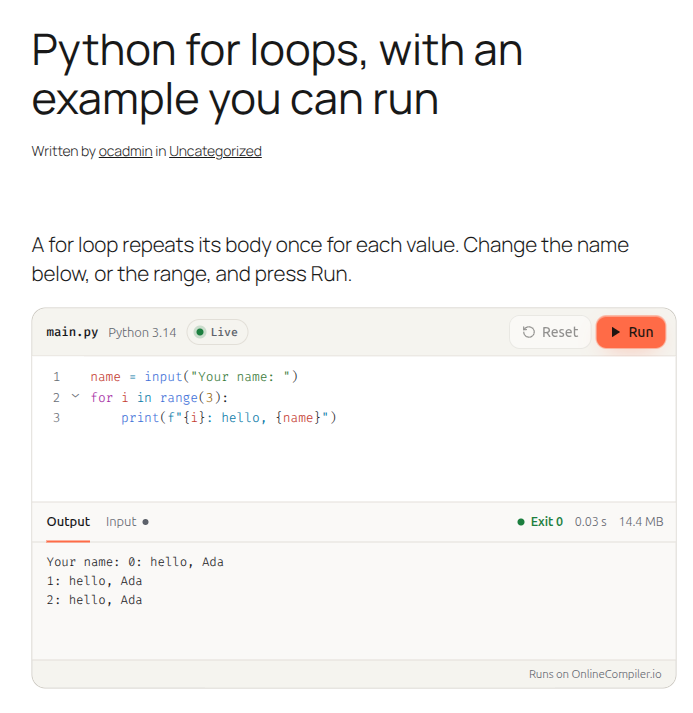
Good for: programming tutorials and blogs, online courses and coding lessons, teachers' exercises with tests students judge their code against, and runnable documentation.
Install
- Download this repository as a ZIP (Code, Download ZIP).
- In WordPress, go to Plugins, Add New Plugin, Upload Plugin, choose the ZIP and activate it.
- Create a free widget key on the Widgets page of your OnlineCompiler.io dashboard (sign in with Google). Set its allowed domain to your site's domain.
- Paste the key in Settings, OnlineCompiler.io.
Requires WordPress 6.3 or later and PHP 7.4 or later.
Use it
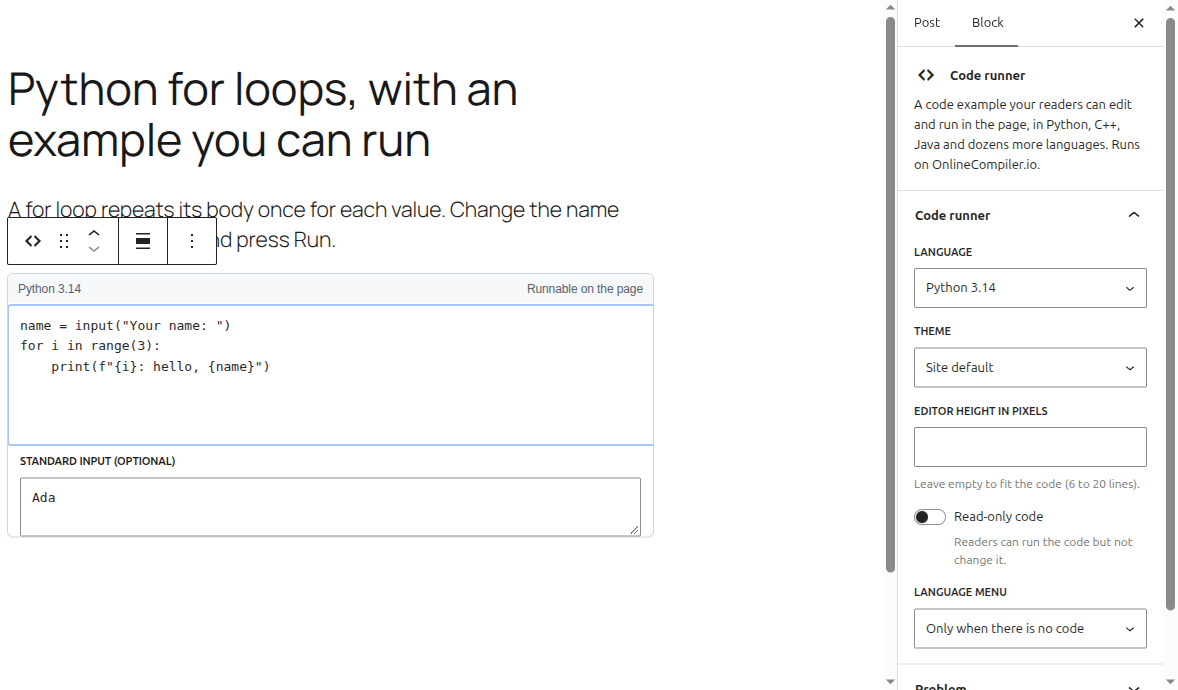
Block editor: add a Code runner block, write the code and, if the program reads input, its standard input. The sidebar sets the language, theme, height, read-only code and the language menu. Put a stored problem's id under Problem to show that problem instead, with its statement, starter code and sample tests.
Shortcode:
[onlinecompiler lang="python" stdin="Ada"]
name = input()
print(f"Hello, {name}")
[/onlinecompiler]| Attribute | What it does |
|---|---|
lang |
A compiler id (python-3.14, g++-15) or a short name (python, cpp, java, js, sql). The site default if left out. |
stdin |
The program's starting input; \n for a new line. |
theme |
auto, light or dark. |
height |
The editor's height in pixels. |
readonly |
1 so readers can run the code but not change it. |
lang_select |
true or false to show or hide the language menu. |
problem |
The id of a problem stored in your account. |
locale |
pt or es for the buttons and messages. |
For code full of < and &, use the block: the classic editor can change such code when it saves.
How it works
The plugin writes the markup the OnlineCompiler.io widget reads (a div with class runcode holding the code in a pre) and loads https://onlinecompiler.io/widget.js on the pages that have one. The block is rendered on the server from its attributes, so WordPress's text filters never touch the code. The code is in the page as text before the widget loads, so search engines index it.
What is sent where is listed under "External services" in readme.txt.
Files
| File | |
|---|---|
onlinecompiler.php |
Plugin header; registers the widget script |
includes/render.php |
The HTML of one code runner, shared by the block and the shortcode |
includes/block.php, blocks/code-runner/ |
The block: block.json, and an editor script in plain JavaScript (no build step) |
includes/shortcode.php |
[onlinecompiler], which undoes what the classic editor does to code |
includes/settings.php |
Settings, OnlineCompiler.io |
includes/languages.php |
The compiler ids, copied from the compiler list |
FAQ
How do I add an online compiler to WordPress? Install the plugin, paste a free widget key in Settings, OnlineCompiler.io, and add a Code runner block. Choose the language in the block's sidebar.
Do readers need an account? No. Only the site owner needs an OnlineCompiler.io account, for the widget key.
Does the code run on my server? No. Each run gets a fresh sandbox on OnlineCompiler.io with no network access, thrown away afterwards.
Does it slow the page? The widget script loads only on pages with a Code runner, deferred, and each runner connects when it scrolls into view (a stored problem connects when the page loads).
Can readers' code be checked against tests? Yes: show a problem stored in your OnlineCompiler.io account, and readers judge their code against its sample tests. Grading against hidden tests needs a session from your own server, which the plugin doesn't create (widget docs).
Is it free? The plugin is free and open source. Running code uses your OnlineCompiler.io account, which has a free plan with no credit card (pricing).
Languages
Python, C, C++ (and C++20), Java, JavaScript (Node.js), TypeScript (Deno), C#, F#, Visual Basic, Go, Rust, PHP, Ruby, Kotlin, Swift, Dart, Scala, Groovy, Clojure, Haskell, OCaml, Elixir, Erlang, Racket, Common Lisp, Prolog, R, Julia, Octave, Fortran, COBOL, Pascal, Ada, D, Nim, Zig, Crystal, Perl, Lua, Bash, PowerShell, Objective-C, FreeBASIC, Assembly (NASM), SQL (SQLite) and DuckDB.
Related
- Widget documentation: every option, tests on the page and the JavaScript API.
- OnlineCompiler.io API: run code and judge it against test cases from your own app.
- onlinecompiler-io on GitHub: the Python and Node clients, the MCP server and starter templates.
License
GPL-2.0-or-later. See LICENSE.