CleverTap Gravity Forms Integration WP Registry grade A. No security issues foundWP RegistryNo security issues foundOpen the reportA
This plugin automatically sends user data from Gravity Forms submissions to CleverTap as a profile update and event.
Install
This is the repository archive. It installs, but the folder name will carry the branch suffix and updates will not flow.
Install straight from GitHub with WP-CLI:
wp plugin install https://github.com/onamfc/gravity-forms-clevertap-integration/archive/refs/heads/main.zip
 →

CleverTap Integration for Gravity Forms
This plugin automatically sends user data from Gravity Forms submissions to CleverTap as a profile update and event — without needing to manually add hooks for each form.
When a user submits a form, the plugin:
- Updates their CleverTap profile with custom properties mapped from form fields
- Schedules a custom event (configurable per form) to fire 4 minutes later
Features
- Zero-code setup for form-to-CleverTap syncing
- Flexible property mapping - send any form field to CleverTap as a custom property
- Supports legacy tag functionality for backward compatibility
- Supports custom event name per form
- Uses email as the unique identity
- Deferred (delayed) event sending via WordPress cron
- Optional debug logging to Gravity Forms and PHP logs
Setup Instructions
1. Plugin Configuration
- Upload the plugin to your WordPress installation
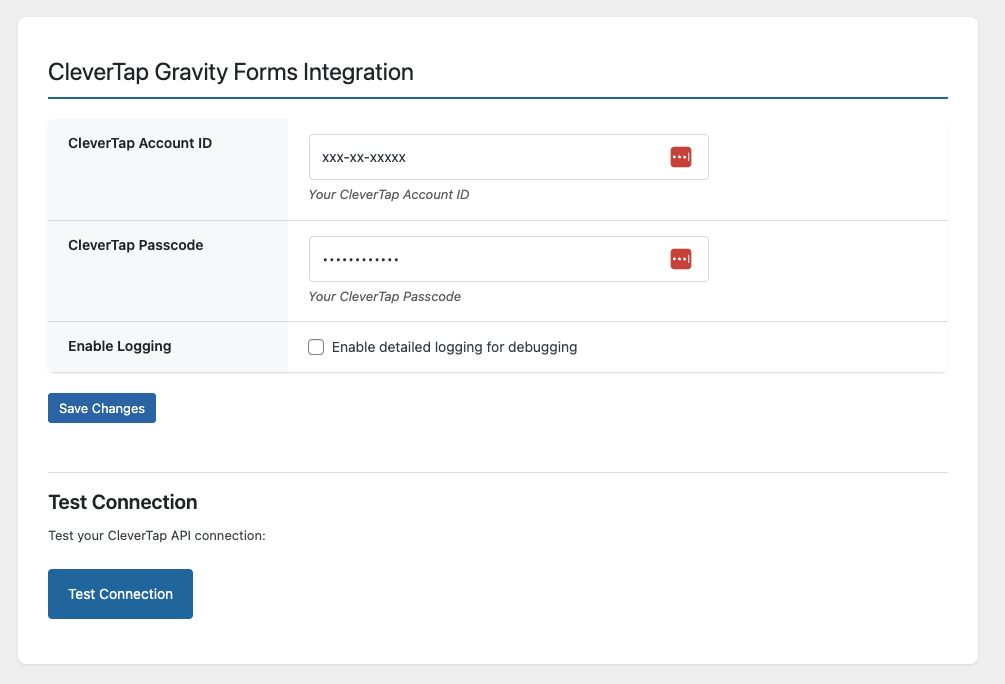
- Navigate to Settings > CleverTap Integration
- Enter your:
- CleverTap Account ID
- CleverTap Passcode
- (Optional) Enable debug logging
2. Form Settings
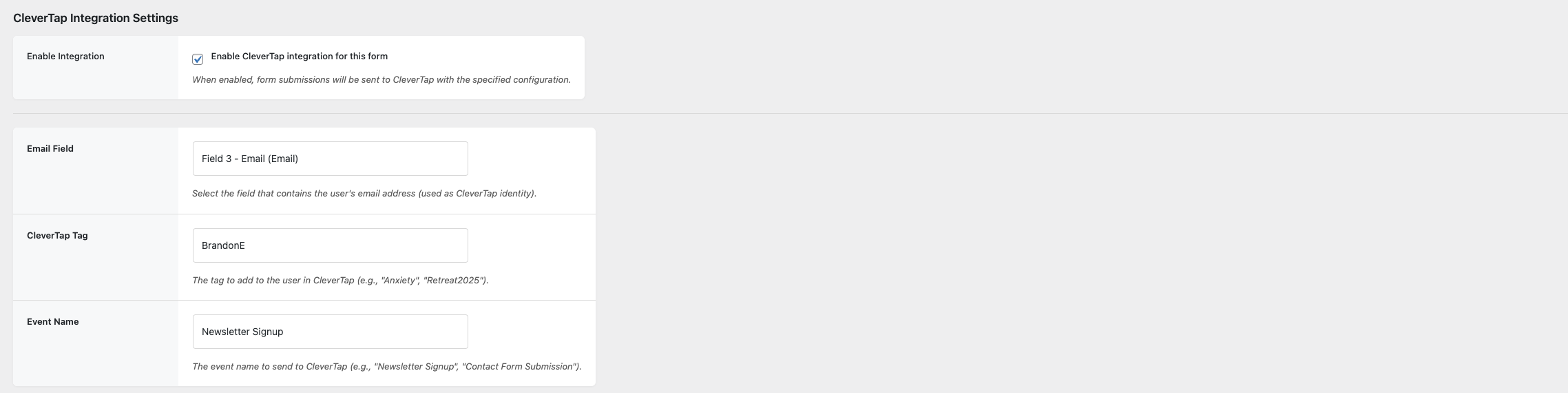
- Open the form you would like to connect to CleverTap and select Settings -> CleverTap Integration
- Enable the integration for this form
- Select the email field from the form (This is used as the identity for the user in CleverTap)
- Set the name for the Tag. This will be sent as the value for a 'Form Signups' key in the user properties.
- Set the name for the Event. This is the event that you would like to trigger after the user properties have been updated.
3. Property Mapping
Map form fields to CleverTap profile properties. Each property will be sent to CleverTap when the form is submitted.
- Click the "Add Property Mapping" button to add a new mapping
- Enter the property name and associate it with a field form

4. Event Data Mapping
Map form fields to custom event data that will be sent with the CleverTap event. This allows you to include additional context with your events.
- Click the "Add Event Data Mapping" button to add a new mapping
- Enter the data as a Key => Value pair. For example, campaign => Facebook

Database
This plugin uses a table wp_ctgf_form_configs to store form configurations including:
form_idemail_field(the Gravity Forms field ID that holds the email address)tag(legacy support - value to send to CleverTap as a tag)event_name(custom event name to send to CleverTap)property_mappings(JSON array of custom property mappings)active(1 = enabled, 0 = disabled)
Each row represents a complete form configuration.
Example Configuration:
| form_id | email_field | tag | event_name | property_mappings | active |
|---|---|---|---|---|---|
| 5 | 1 | Retreat 2025 | Retreat Registration | [{"property_name":"Phone","form_field":"3"}] |
1 |
The table also includes:
event_mappings(JSON array of custom event data mappings)
Example Event Mappings:
[
  {"event_key":"lead_source","form_field":"5"},
  {"event_key":"campaign","form_field":"6"},
  {"event_key":"referrer","form_field":"7"}
]
Data Sent to CleverTap
Profile Update
{
  "d": [
    {
      "identity": "user@example.com",
      "type": "profile",
      "profileData": {
        "Phone": "+1234567890",
        "Company": "Acme Corp",
        "Form Signups": {
          "$add": ["Retreat 2025"]
        }
      }
    }
  ]
}
Event
{
  "d": [
    {
      "identity": "user@example.com",
      "type": "event",
      "evtName": "Retreat Registration",
      "evtData": {
        "form_id": 5,
        "tag": "Retreat 2025",
        "lead_source": "Google Ads",
        "campaign": "Summer 2024",
        "referrer": "facebook.com"
      }
    }
  ]
}
Developer Notes
- Flexible property mapping system allows sending any form field to CleverTap
- Flexible event data mapping system allows sending custom event data
- Supports delayed jobs via
wp_schedule_single_event - Logging can be toggled with the
ctgf_enable_loggingoption - Delayed jobs hook into
ctgf_send_delayed_eventwith custom event names - Database schema automatically migrates to support property mappings
- Database schema automatically migrates to support event data mappings
Debugging
To enable debug logs:
- Go to Settings > CleverTap Integration
- Enable Debug Logging
Logs will be sent to:
- PHP
error_log - Gravity Forms debug logs (if enabled)
Contributions
Want to add support for more fields or events? Pull requests and enhancements are welcome in private forks.
Releases
5 releases.
These releases are tags only. The author does not attach a packaged zip, so there are no download counts to report.