WPBakery Custom Param Collection WP Registry grade A. No security issues foundWP RegistryNo security issues foundOpen the reportA
Collection of WPBakery custom params for element edit modal.
Install
This is the repository archive. It installs, but the folder name will carry the branch suffix and updates will not flow.
Install straight from GitHub with WP-CLI:
wp plugin install https://github.com/olegapanovich/wpbakery-custom-param-collection/archive/refs/heads/main.zipOn Packagist as wpbakery-custom-param-collection/wpbakery-custom-param-collection:
composer require wpbakery-custom-param-collection/wpbakery-custom-param-collectionDescription
This is a collection of additional custom element param types for WPBakery Page Builder wordpress plugin. By default, WPBakery already has a lot of [pre-defined element param types](https://kb.wpbakery.com/docs/inner-api/vc_map/#vc_map()-paramsArray), but if you need even more customization with your WPBakery editor custom elements, this is a great collection of additional element params for it.
How To Install
1. As a regular WordPress plugin.
Clone this repo to your wp-content/plugins folder of your wordpress project.
git clone https://github.com/OlegApanovich/wpbakery-custom-param-collection.gitThen go to wordpress dashboard plugins section, and activate the newly installed "WPBakery Custom Param Collection" plugin there. That's it. Now you can specify any custom parameters from the list below in your custom WPBakery element, and they will appear in your element edit popup.
Alternatively, if you have WP-CLI set up, you can install and activate the plugin using a terminal command.
wp plugin install https://github.com/OlegApanovich/wpbakery-custom-param-collection/archive/refs/heads/main.zip --activate --force2. Include in WordPress theme/plugin
Clone this repo to your theme/plugin folder.
git clone https://github.com/OlegApanovich/wpbakery-custom-param-collection.gitThen, if you include to the theme, add this code to your functions.php file, or if you use a plugin, add it to the main plugin file.
add_action( 'admin_init', function() {
    include __DIR__ .  '/wpbakery-custom-param-collection/wpbakery-custom-param-collection.php';
} );
Please note that if you include it in your theme/plugin, then disable wpbakery-custom-param-collection plugin, otherwise you will get a fatal error.
3. As a composer dependency
Execute this command.
composer require wpbakery-custom-param-collection/wpbakery-custom-param-collection:"*"Then, if you include to the theme, add this code to your functions.php file, or if you use a plugin, add it to the main plugin file.
add_action( 'admin_init', function() {
    if ( class_exists( \Wpbackery_Custom_Param_Collection::class ) ) {
        \Wpbackery_Custom_Param_Collection::boot();
    }
} );
Please note that if you include it in your theme/plugin, then disable wpbakery-custom-param-collection plugin, otherwise you will get a fatal error.
Collection List
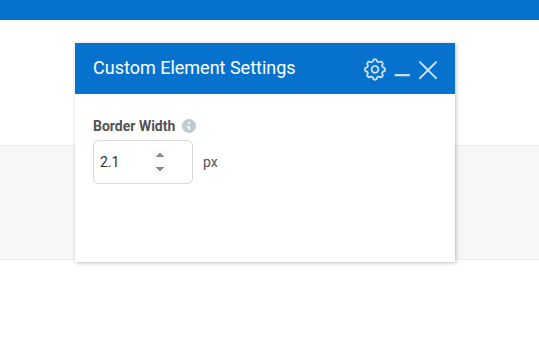
1. Number
type : custom_number
Description: Regular input with a type number.
Screnshot:
Param Attributes:
| Name | Type | Requred | Description |
|---|---|---|---|
| param_name | string | yes | Param slug. |
| value | string | no | Predefind value. Can be float like '0.1'. |
| min | string | no | Minimum value for input. Can be float like '0.1'. |
| max | string | no | Maximum value for input. Can be float like '0.1'. |
| step | string | no | The Input step when you click the up/down buttons. Can be float like '0.1'. |
| title | string | no | Additional title in the end of input |
Exemple:
add_action( 'vc_before_init', 'integrate_custom_param' );
function integrate_custom_param() {
    vc_map( [
        "name" => __( "Custom Element", "my-text-domain" ),
        "base" => "bartag",
        "category" => __( "Content", "my-text-domain"),
        "params" => [
            [
                'type'        => 'custom_number',
                'value'       => '2.1',
                'min'         => '0.1',
                'max'         => '5.5',
                'step'        => '0.1',
                'heading'     => esc_html__( 'Border Width', 'my-text-domain' ),
                'param_name'  => 'marker_border_width',
                'title'       => esc_html__( 'px', 'my-text-domain' ),
                'description' => esc_html__( 'Set custom border width in px from.', 'my-text-domain' ),
            ]
        ]
    ] );
}
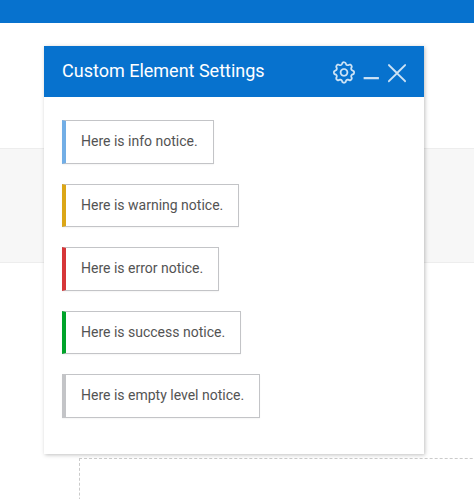
2. Notice
type : custom_notice
Description The native wordpress notice looks like text output to the element edit window.
Screnshot:
Param Attributes:
| Name | Type | Requred | Description |
|---|---|---|---|
| param_name | string | yes | Param slug. |
| notice | string | no | Notice text. |
| level | string | no | On a level depends the color of the notice UI. There are 4 value levels available (info, warning, error, success). If the level is not specified, the notice will be grey. |
Exemple:
add_action( 'vc_before_init', 'integrate_custom_param' );
function integrate_custom_param() {
    vc_map( [
        "name" => __( "Custom Element", "my-text-domain" ),
        "base" => "bartag",
        "category" => __( "Content", "my-text-domain"),
        "params" => [
            [
                'type'        => 'custom_notice',
                'param_name'  => 'custom_notice_info',
                'level'       => 'info',
                'notice'      => __('Here is info notice.', 'my-text-domain'),
            ],
            [
                'type'        => 'custom_notice',
                'param_name'  => 'custom_notice_warning',
                'level'       => 'warning',
                'notice'      => __('Here is warning notice.', 'my-text-domain'),
            ],
            [
                'type'        => 'custom_notice',
                'param_name'  => 'custom_notice_error',
                'level'       => 'error',
                'notice'      => __('Here is error notice.', 'my-text-domain'),
            ],
            [
                'type'        => 'custom_notice',
                'param_name'  => 'custom_notice_success',
                'level'       => 'success',
                'notice'      => __('Here is success notice.', 'my-text-domain'),
            ],
            [
                'type'        => 'custom_notice',
                'param_name'  => 'custom_notice_empty',
                'notice'      => __('Here is empty level notice.', 'my-text-domain'),
            ],
        ]
    ] );
}
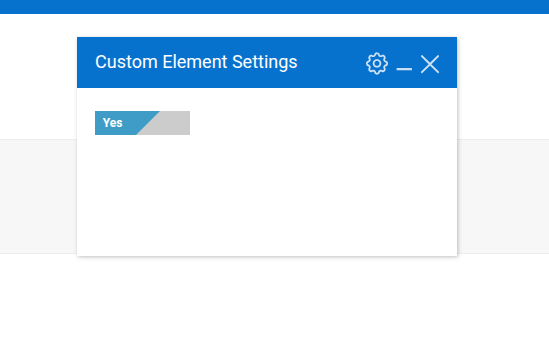
3. Switcher
type : custom_switcher
Description: Yes/no type switcher.
Screnshot:
Param Attributes:
| Name | Type | Requred | Description |
|---|---|---|---|
| param_name | string | yes | Param slug. |
| option | array | yes | Switcher options |
| value | string | no | Set here the value the same as the options key if you wanna switch on by default. |
Exemple:
add_action( 'vc_before_init', 'integrate_custom_param' );
function integrate_custom_param() {
    vc_map( [
        "name" => __( 'Custom Element', 'my-text-domain' ),
        'base' => 'bartag',
        'category' => __( 'Content', 'my-text-domain'),
        'params' => [
            [
                'type'        => 'custom_switcher',
                'param_name'  => 'custom_switcher_example',
                'options'     => [
                    'open_value' => [
                        'label' => '',
                        'on'    => __( 'Yes', 'my-text-domain' ),
                        'off'   => __( 'No', 'my-text-domain' ),
                    ],
                ],
                'value' => 'open_value',
            ],
        ]
    ] );
}
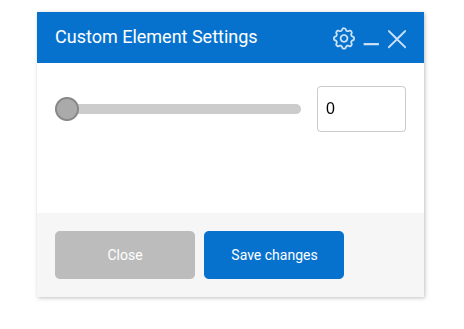
4. Number Slider
type : custom_number_slider
Description: Regular input with a type number and a slider that helps regulate the input value.
Screnshot:
Param Attributes:
| Name | Type | Requred | Description |
|---|---|---|---|
| param_name | string | yes | Param slug. |
| value | string | no | Predefind value. Can be float like '0.1'. |
| min | string | no | Minimum value for input. Can be float like '0.1'. |
| max | string | no | Maximum value for input. Can be float like '0.1'. |
| step | string | no | The Input step when you click the up/down buttons. Can be float like '0.1'. |
| title | string | no | Additional title in the end of input |
Exemple:
add_action( 'vc_before_init', 'integrate_custom_param' );
function integrate_custom_param() {
    vc_map( [
        "name" => __( 'Custom Element', 'my-text-domain' ),
        'base' => 'bartag',
        'category' => __( 'Content', 'my-text-domain'),
        'params' => [
            [
                'type'        => 'custom_number_slider',
                'param_name'  => 'custom_number_slider_example',
                'heading' => 'Here some title',
                'title' => 'px',
                'min' => 11,
                'max' => 100,
                'step' => 1,
            ],
        ]
    ] );
}
5. WYSIWYG TinyMCE
type : custom_wysiwyg
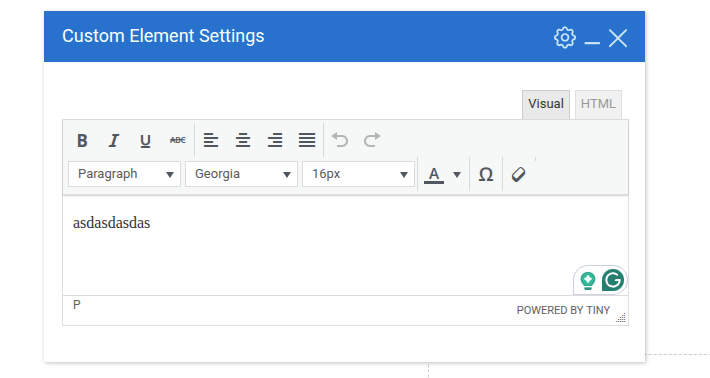
Description: By default, WPBakery supports only one WYSIWYG TinyMCE parameter type — textarea_html — per element. With this custom parameter, you can add as many WYSIWYG TinyMCE parameters to a single element as you want.
Screnshot:
Param Attributes:
| Name | Type | Required | Description |
|---|---|---|---|
| param_name | string | yes | Param slug. |
| value | string | yes | Even if you don't want a predefined value here, specify at least an empty string. |
| minimal | "true" or "false" | no | Display TinyMCE editor with minimal options. Default: "false". |
| scope | array | no | Disable or override TinyMCE features. Default: [ 'use_tabs' => 'true', 'use_menubar' => 'true', 'use_media' => 'true', 'use_link' => 'true', 'use_lists' => 'true', 'use_blockquote' => 'true', 'use_textcolor' => 'true', 'use_background' => 'true', 'use_rootblock' => 'p' ]. |
Exemple:
add_action( 'vc_before_init', 'integrate_custom_param' );
function integrate_custom_param() {
    vc_map( [
        "name" => __( 'Custom Element', 'my-text-domain' ),
        'base' => 'bartag',
        'category' => __( 'Content', 'my-text-domain'),
        'params' => [
            [
                'type'       => 'custom_wysiwyg',
                'param_name' => 'custom_wysiwyg_example',
                'value'      => '',
                'scope'      => [
                    'use_menubar'    => 'false',
                    'use_media'      => 'false',
                ]
            ],
        ]
    ] );
}
6. Divider
type : custom_divider
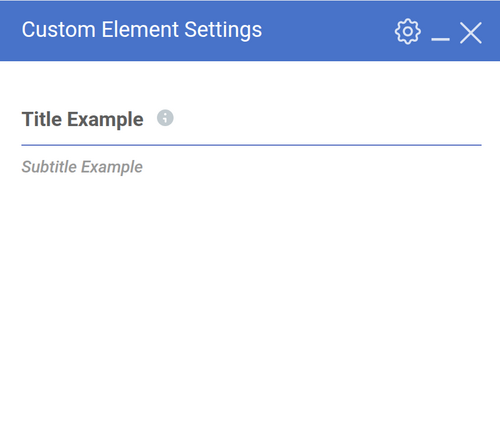
Description: Divider help group param visually, divide them with line separator with title.
Screnshot:
Param Attributes:
| Name | Type | Required | Description |
|---|---|---|---|
| param_name | string | yes | Param slug. |
| title | string | no | Title above separator line. |
| subtitle | string | no | Subtitle under separator line. |
| title_description | string | no | Analog description for a regular parameter. Visible as a tooltip near the title. |
| color | string | no | Separator line color. |
Exemple:
add_action( 'vc_before_init', 'your_name_integrate' );
function your_name_integrate() {
    vc_map( [
        "name" => __( 'Custom Element', 'my-text-domain' ),
        'base' => 'bartag',
        'category' => __( 'Content', 'my-text-domain'),
        'params' => [
            [
                'type'              => 'custom_divider',
                'param_name'        => 'custom_divider_example',
                'title'             => __( 'Title Example', 'my-text-domain' ),
                'title_description' => __( 'Group Description', 'my-text-domain' ),
                'subtitle'          => __( 'Subtitle Example', 'my-text-domain' ),
                'color'             => '#4873c9',
            ],
        ]
    ] );
}
Bonus
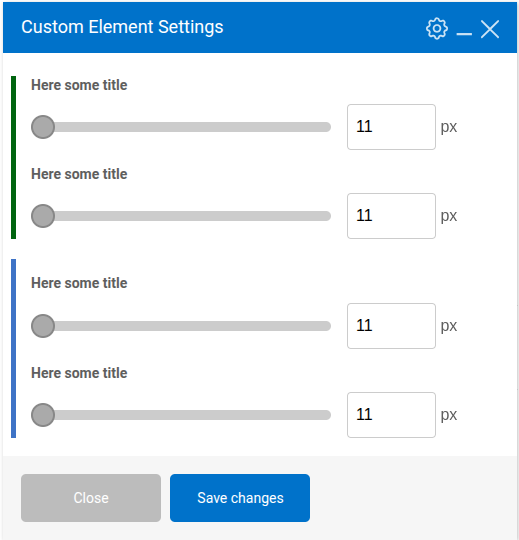
Additionally to custom parameter collection, we provide functionality to group parameters together. In the edit element popup, this will be visible as a border on the right side of the parameter. To enable this, you need to provide an additional parameter attribute called 'wcp_group_color' with the value of color hash.
Screnshot:
Exemple:
add_action( 'vc_before_init', 'integrate_custom_param' );
function integrate_custom_param() {
    vc_map( [
        "name" => __( 'Custom Element', 'my-text-domain' ),
        'base' => 'bartag',
        'category' => __( 'Content', 'my-text-domain'),
        'params' => [
            [
                'type'        => 'custom_number_slider',
                'param_name'  => 'custom_number_slider_example',
                'heading' => 'Here some title',
                'wcp_group_color' => '#006400',
                'title' => 'px',
                'min' => 11,
                'max' => 100,
                'step' => 1,
            ],
            [
                'type'        => 'custom_number_slider',
                'param_name'  => 'custom_number_slider_example_2',
                'wcp_group_color' => '#006400',
                'heading' => 'Here some title',
                'title' => 'px',
                'min' => 11,
                'max' => 100,
                'step' => 1,
            ],

            [
                'type'        => 'custom_number_slider',
                'param_name'  => 'custom_number_slider_example3',
                'heading' => 'Here some title',
                'wcp_group_color' => '#cccccc',
                'wcp_group_margin_top' => '20',
                'title' => 'px',
                'min' => 11,
                'max' => 100,
                'step' => 1,
            ],
            [
                'type'        => 'custom_number_slider',
                'param_name'  => 'custom_number_slider_example_4',
                'wcp_group' => true,
                'heading' => 'Here some title',
                'wcp_group_color' => '#cccccc',
                'title' => 'px',
                'min' => 11,
                'max' => 100,
                'step' => 1,
            ],
        ]
    ] );
}
Releases
13 releases.
These releases are tags only. The author does not attach a packaged zip, so there are no download counts to report.