Mailpit for WordPress
Routes all outgoing WordPress mail (wp_mail) through a local Mailpit SMTP server for testing.
by Istiaq Nirab · github.com/ok9xnirab/mailpit-wordpress · website
Install
No release zip yet. The repository archive installs, but the folder name will carry the branch suffix and updates will not flow:
wp plugin install https://github.com/ok9xnirab/mailpit-wordpress/archive/refs/heads/main.zipRoutes all outgoing WordPress mail (wp_mail()) through a local Mailpit SMTP server, so you can inspect emails during development without sending anything to real inboxes. Works with any plugin that uses wp_mail(), including WooCommerce.
[!WARNING] Development use only. Don't activate this plugin on a production site. Real emails would be captured by Mailpit instead of being delivered.
Requirements
- WordPress 5.9+
- PHP 7.4+
- Mailpit running locally (default SMTP port
1025, web UI port8025). Tested with Mailpit v1.30.
Installation
1. Run Mailpit
Pick one (see the Mailpit install docs for more options):
# macOS (Homebrew)
brew install mailpit
brew services start mailpit        # or just run: mailpit

# Linux
sudo sh < <(curl -sL https://raw.githubusercontent.com/axllent/mailpit/develop/install.sh)
mailpit

# Docker (any OS)
docker run -d --name mailpit -p 8025:8025 -p 1025:1025 axllent/mailpit
Windows users can download a binary from the Mailpit releases page or use Docker.
2. Install the plugin
With git:
cd wp-content/plugins
git clone https://github.com/Ok9xNirab/mailpit-wordpress.git
wp plugin activate mailpit-wordpress
From a ZIP:
- Download the repository as a ZIP (Code → Download ZIP).
- In WordPress, go to Plugins → Add New Plugin → Upload Plugin and upload it.
- Activate Mailpit for WordPress.
[!NOTE] GitHub ZIPs extract to a folder named
mailpit-wordpress-main. This works, but you can rename the folder tomailpit-wordpressif you want a cleaner slug.
3. Send a test email
wp mailpit testOr use Tools → Mailpit → Send test email, then open http://localhost:8025.
Configuration
The defaults match a standard local Mailpit install, so usually nothing needs to change.
Admin UI
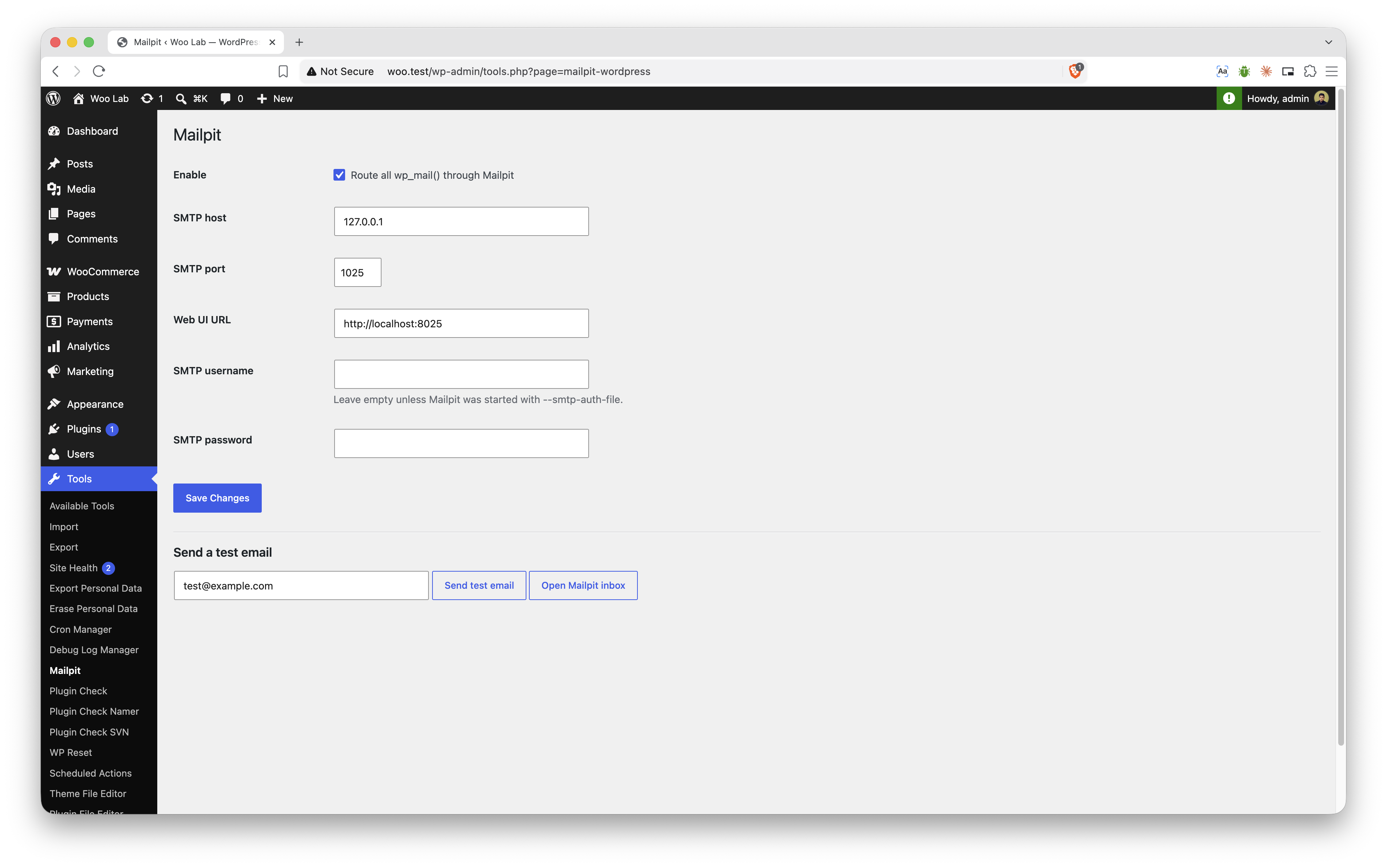
Tools → Mailpit lets you:
- Turn routing on or off
- Set the SMTP host, SMTP port and web UI URL
- Set an SMTP username and password (only needed if Mailpit runs with
--smtp-auth-file) - Send a test email and open the Mailpit inbox
wp-config.php constants
Constants override saved settings, and the matching fields on the settings page are disabled:
define( 'MAILPIT_HOST', '127.0.0.1' );
define( 'MAILPIT_SMTP_PORT', 1025 );
define( 'MAILPIT_UI_URL', 'http://localhost:8025' );
define( 'MAILPIT_USERNAME', '' );
define( 'MAILPIT_PASSWORD', '' );| Setting | Constant | Default |
|---|---|---|
| Host | MAILPIT_HOST |
127.0.0.1 |
| SMTP port | MAILPIT_SMTP_PORT |
1025 |
| Web UI | MAILPIT_UI_URL |
http://localhost:8025 |
| Username | MAILPIT_USERNAME |
(empty — no auth) |
| Password | MAILPIT_PASSWORD |
(empty) |
WP-CLI
wp mailpit test                      # send to the site admin email
wp mailpit test someone@example.com  # send to a specific address
How it works
The plugin hooks phpmailer_init at the latest priority and switches PHPMailer to plain SMTP (no TLS) pointed at Mailpit. Send failures from wp_mail_failed are stored for an hour and shown on the settings page and in WP-CLI output.
Troubleshooting
- Test email fails / connection refused: make sure Mailpit is running (
lsof -iTCP:1025 -sTCP:LISTEN, ordocker psfor Docker). - Mail still goes elsewhere: another SMTP plugin (WP Mail SMTP, etc.) may override PHPMailer or replace
wp_mail(). Deactivate it while using this plugin. - WordPress runs in Docker/Lando/DDEV:
127.0.0.1points at the WordPress container, not Mailpit. SetMAILPIT_HOSTto the Mailpit service name (for examplemailpit), orhost.docker.internalif Mailpit runs on the host.
Uninstall
Deleting the plugin from the admin removes its saved option (mailpit_wp_settings) and cached error transient.
Contributing
Bug reports and pull requests are welcome. Please open an issue first for larger changes. Code follows the WordPress Coding Standards.
License
GPL-2.0-or-later, the same license as WordPress.