Install
This is the repository archive. It installs, but the folder name will carry the branch suffix and updates will not flow.
Install straight from GitHub with WP-CLI:
wp plugin install https://github.com/ocreaper/wp-server-timing/archive/refs/heads/master.zipNo built-in updater. New versions won't appear under Dashboard → Updates. Install new releases yourself, or let Git Updater track the repository.
WordPress Server Timing
Add Server-Timing header information from within your WordPress sites.
Requirements
- PHP 7
Installation
- Copy the
wp-server-timingfolder towp-content/plugins. - Activate the plugin through the WordPress admin panel.
Usage
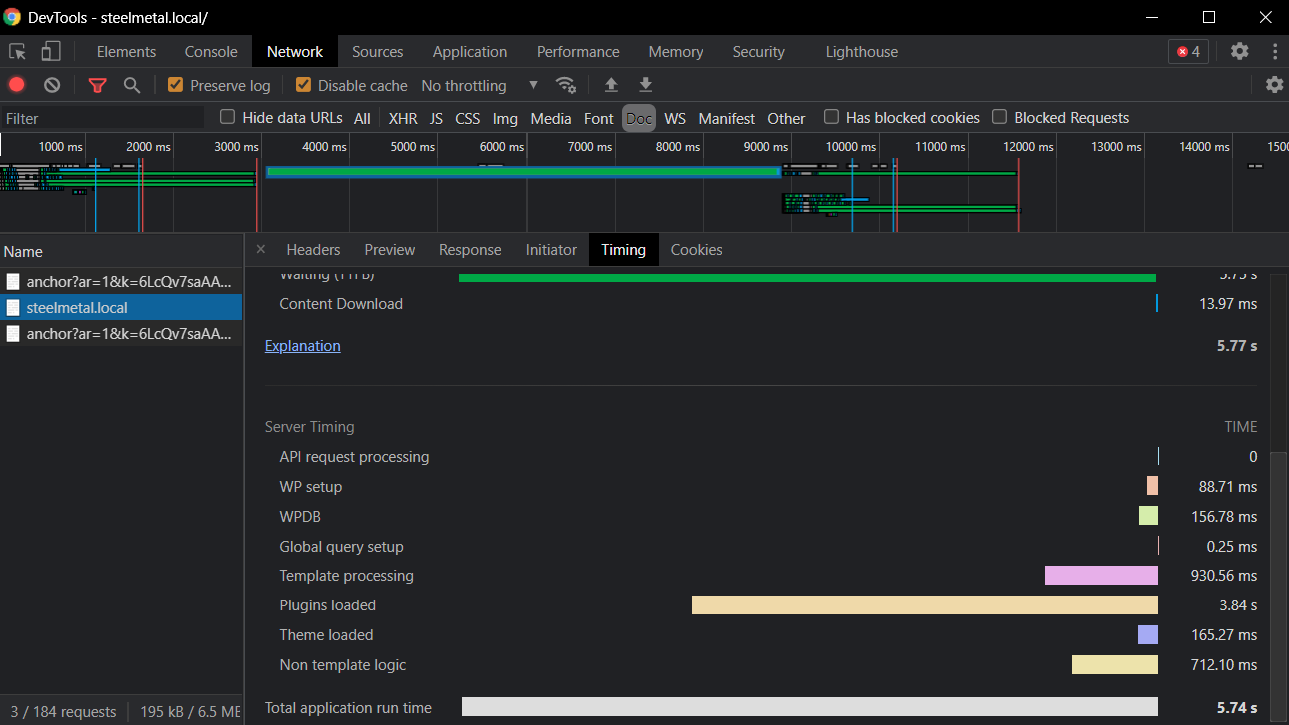
By default, the plugin measures only nine things, to keep it as light-weight as possible:
- WP setup (time between request start to WP internal timer start)
- Plugins loaded (time of loading all plugins including mu-plugins)
- Global query setup (time between plugins loaded and theme loading)
- Theme loaded (time of loading the theme and running on-the-fly functions.php logic)
- Non template logic (time between theme load and wp_loaded hook)
- Template processing (basically time of rendering the current template)
- API request processing (if API request is sent, otherwise 0)
- WPDB (time of all DB query if
SAVEQUERIESis set to truthy) - Total application run time
Once the package is successfully installed, you can see your timing information in the developer tools of your browser. Here's an example from Chrome:
Contributing
Please see CONTRIBUTING.md!
Changelog
Please see CHANGELOG.md!
License
The MIT License (MIT). Please see License File for more information.
Releases
1 release.
Tag
Published
0.1.0
latest
Jul 20, 2021 5 years ago
These releases are tags only. The author does not attach a packaged zip, so there are no download counts to report.