Install
This is the repository archive. It installs, but the folder name will carry the branch suffix and updates will not flow.
Install straight from GitHub with WP-CLI:
wp plugin install https://github.com/novissium/novifix/archive/refs/heads/main.zipNo built-in updater. New versions won't appear under Dashboard → Updates. Install new releases yourself, or let Git Updater track the repository.
Use your global color variables in Elementor background gradients.
In the Elementor editor (Editor V4), every color field offers your color variables, except one: the color stops of a background gradient. There you only get the manual color picker, so you end up looking up hex values again and again. Elementor knows about it (discussion #32289), but there is no date for a fix yet.
NoviFix closes that gap until Elementor does.
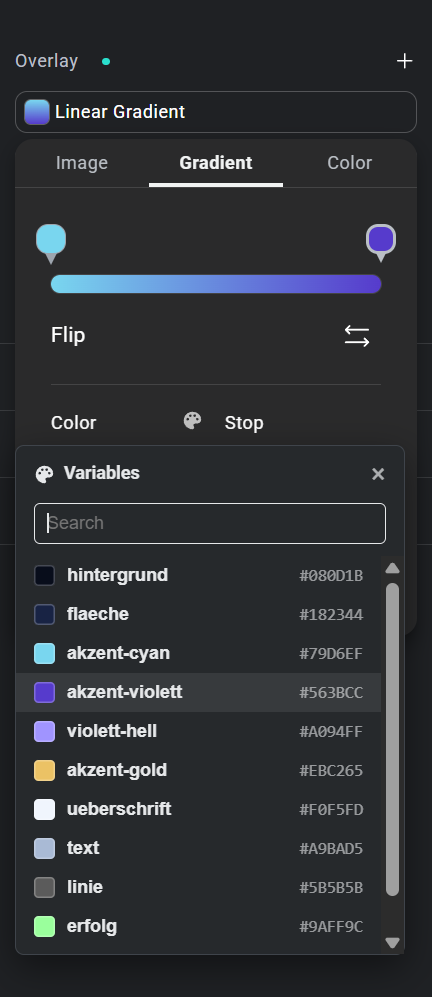
How it works
- Open a background overlay and switch to Gradient.
- Click a color stop marker on the gradient bar.
- Click the palette icon next to Color.
- Pick a variable from the list, or search for it.
The selected color stop gets the color of that variable.
Good to know
- The list shows the color variables of your active kit, in the same order as the Variables Manager.
- The color stop stores the color value. If you change a variable later, existing gradients keep their color.
- New variables show up after reloading the editor.
- NoviFix does not change Elementor. It only adds the button in the editor and loads nothing on your site's frontend.
- This is a temporary fix. Once Elementor supports variables in gradient controls, you can simply remove NoviFix.
Requirements
- WordPress 6.5 or newer
- PHP 7.4 or newer
- Elementor with Editor V4 (tested with Elementor 4.3)
Installation
- Download NoviFix at novissium.com/resources/novifix.
- In WordPress, go to Plugins → Add New Plugin → Upload Plugin.
- Upload the ZIP file and activate NoviFix.
License
GPL-2.0-or-later. See LICENSE.
NoviFix is not affiliated with or endorsed by Elementor.
Made by Novissium.