Can I Use? Shortcode WP Registry grade A. No security issues foundWP RegistryNo security issues foundOpen the reportA
A shortcode to display the "Can I Use?" widget data
Install
This is the repository archive. It installs, but the folder name will carry the branch suffix and updates will not flow.
Install straight from GitHub with WP-CLI:
wp plugin install https://github.com/norcross/caniuse-shortcode/archive/refs/heads/master.zipContributors: norcross
Website Link: https://github.com/norcross/caniuse-shortcode
Donate link: https://andrewnorcross.com/donate
Tags: HTML5, CSS3, web standards, browser support
Requires at least: 4.0
Tested up to: 4.7
Stable tag: 0.0.5
License: MIT
License URI: http://opensource.org/licenses/mit-license.php
Allows a user to display the "Can I Use?" data about a specific browser item
Description
Allows a user to display the "Can I Use?" data about a specific browser item. Use the provided shortcode along with the specific feature you want to display.
Inspiration and CSS from Andi Smith
Installation
This section describes how to install the plugin and get it working.
- Upload
caniuse-shortcodeto the/wp-content/plugins/directory. - Activate the plugin through the 'Plugins' menu in WordPress.
- Use the shortcode in a post with the feature
- Enjoy!
Frequently Asked Questions
What's this all about?
Chris Coyier mentioned it. I needed something to distract me for a few hours. So here we are.
How do I use the shortcode?
Place the following code in your post or page [caniuse feature="FEATURE-NAME-HERE"]
Can I customize it?
Yeah. There are filters and whatnot that I'll eventually get around to documenting.
Screenshots
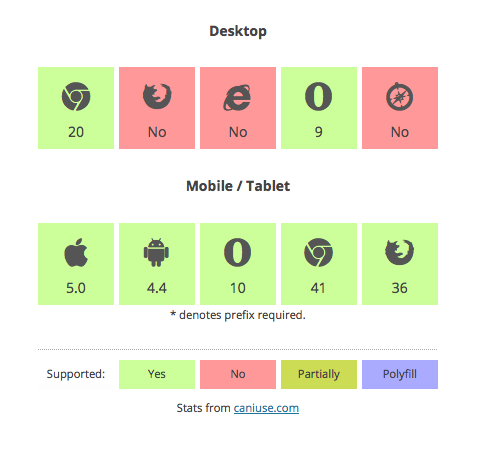
1. Example display of data
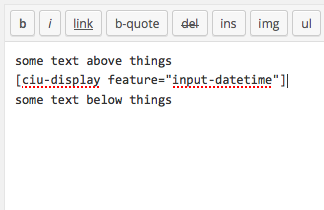
2. Example of shortcode
Changelog
0.0.5
- Refactored data array parsing to fix inconsistent return values.
- Set data source URL as a constant.
- Switched Opera Mobile to Opera Mini to match the caniuse site display.
0.0.4
- Including directory constant in file includes.
0.0.3
- Fixing link back to caniuse.com to include correct feature.
- A bunch of code cleanup.
0.0.2
- Fixed CSS bug with assigning icons to class.
0.0.1
- First release!
Upgrade Notice
Releases
5 releases.
These releases are tags only. The author does not attach a packaged zip, so there are no download counts to report.