Install
This is the repository archive. It installs, but the folder name will carry the branch suffix and updates will not flow.
Install straight from GitHub with WP-CLI:
wp plugin install https://github.com/noralam/paddle-for-woocommerce/archive/refs/heads/main.zipAccept payments for digital products with Paddle — the Merchant of Record built for software & SaaS.
Overview
Paddle for WooCommerce is a payment gateway plugin that connects your WooCommerce store to Paddle — the leading Merchant of Record platform for digital products, software, plugins, and SaaS subscriptions.
Paddle handles payments, taxes, and compliance on your behalf so you can sell globally without worrying about VAT, GST, or local tax regulations.
Why Paddle for Digital Products?
| Feature | Details |
|---|---|
| Merchant of Record | Paddle handles all sales tax, VAT & GST globally — you are not liable |
| Credit & Debit Cards | Visa, Mastercard, Amex, Discover |
| PayPal | Full PayPal wallet support |
| Apple Pay | One-tap checkout on Safari/iOS |
| Google Pay | One-tap checkout on Chrome/Android |
| 15+ Local Methods | iDEAL, Bancontact, and more |
| 30+ Currencies | Auto multi-currency with smart conversion |
| Overlay Checkout | No redirect — Paddle opens as an overlay on your store |
| Sandbox Testing | Full sandbox environment before going live |
Features
- Dual API Mode — supports both Paddle Classic (Vendor ID + API Key) and the newer Paddle Billing (API Key + Client Token)
- WooCommerce Blocks compatible — works with the modern block-based checkout
- Webhook-driven — real-time order status updates via Paddle webhooks
- Automatic signature verification — all webhooks are cryptographically verified
- Custom payment icons — upload your own accepted-methods badge
- Settings link on WordPress plugins page for quick access
- Sandbox / Live environment toggle — test safely before going live
Requirements
| Requirement | Minimum Version |
|---|---|
| WordPress | 5.8 |
| WooCommerce | 6.0 |
| PHP | 7.4 |
| A Paddle account | Sign up free |
Installation
Option A — Manual Upload (recommended)
-
Download the plugin as a
.zipfile from GitHub:
Code → Download ZIP -
In your WordPress admin, go to Plugins → Add New Plugin → Upload Plugin.
-
Click Choose File, select the downloaded
.zip, then click Install Now. -
Click Activate Plugin.
Option B — FTP / File Manager
-
Download and unzip the repository.
-
Upload the
paddle-for-woocommercefolder to:/wp-content/plugins/paddle-for-woocommerce/ -
In your WordPress admin, go to Plugins → Installed Plugins and click Activate under Paddle for WooCommerce.
Option C — WP-CLI
wp plugin install https://github.com/YOUR-USERNAME/paddle-for-woocommerce/archive/refs/heads/main.zip --activateReplace
YOUR-USERNAMEwith your actual GitHub username.
Configuration
After activating the plugin, follow these steps:
1. Open Gateway Settings
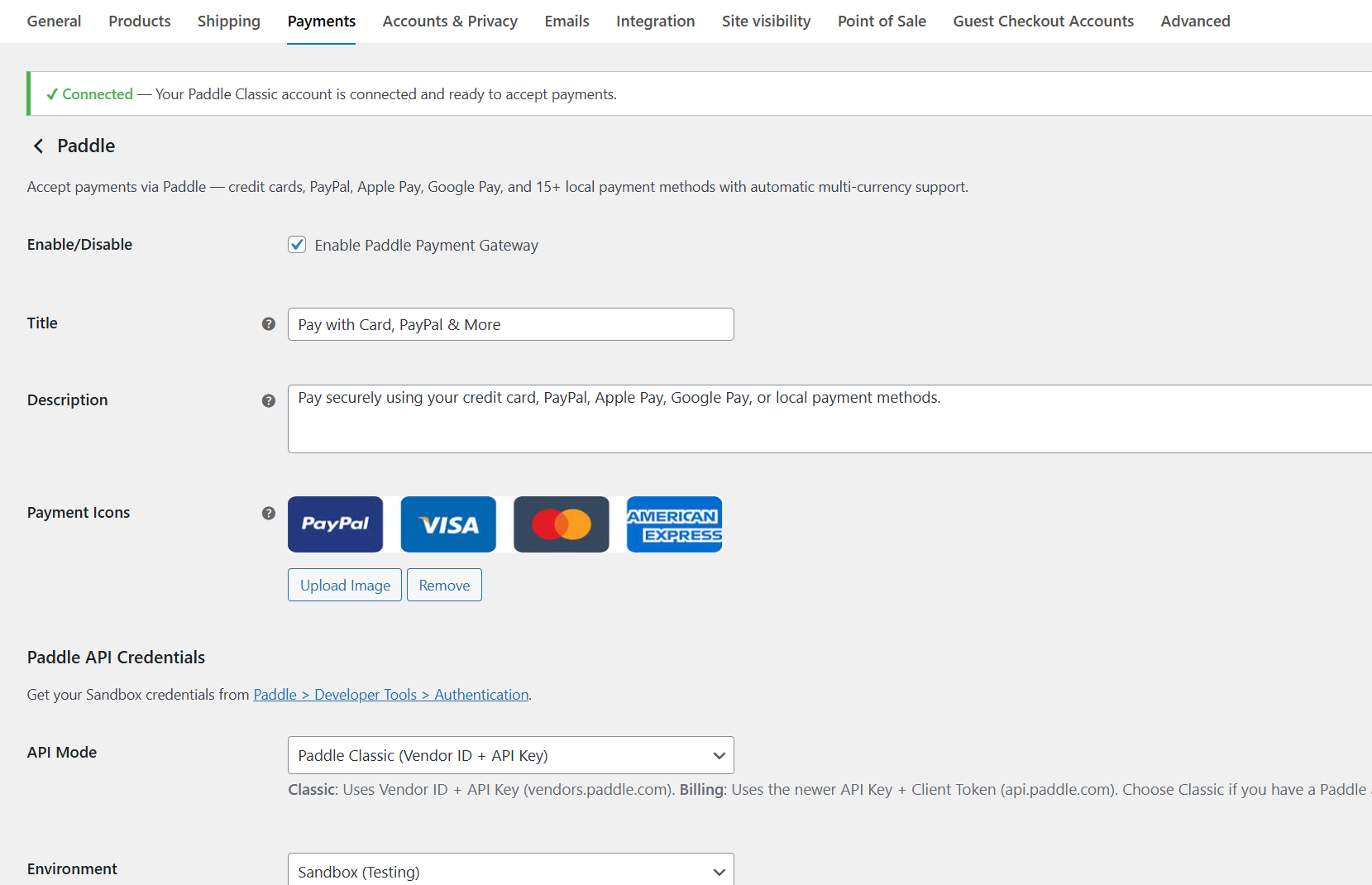
Go to WooCommerce → Settings → Payments → Paddle and click Manage.
2. Choose Your API Mode
| Mode | When to use |
|---|---|
| Classic | You have a Paddle account with a Vendor ID (vendors.paddle.com) |
| Billing | You have a newer Paddle account using API Key + Client Token (api.paddle.com) |
3. Set Environment
- Sandbox — for testing; use credentials from
sandbox-vendors.paddle.com - Live — for real payments; use credentials from
vendors.paddle.com
4. Enter API Credentials
Classic mode:
- Vendor ID → found at Paddle → Developer Tools → Authentication
- API Key → found at the same location
Billing mode:
- API Key → starts with
pdl_(live) ortest_(sandbox) - Client Token → starts with
live_ortest_
5. Add Webhook URL
In your Paddle dashboard, add the following webhook endpoint:
https://yourstore.com/wc-api/pfwc_webhookReplace
yourstore.comwith your actual domain. This URL is also shown on the settings page.
6. Save & Test
- Switch environment to Sandbox.
- Place a test order on your store.
- Complete payment using Paddle's test cards.
- Verify the order status changes to Processing or Completed in WooCommerce.
- Switch to Live when ready.
File Structure
paddle-for-woocommerce/
├── paddle-for-woocommerce.php   # Plugin bootstrap, AJAX hooks
├── includes/
│   ├── class-pfwc-api.php       # Paddle API client (Classic & Billing)
│   ├── class-pfwc-gateway.php   # WooCommerce payment gateway
│   ├── class-pfwc-webhook.php   # Webhook listener & processor
│   └── class-pfwc-blocks.php    # WooCommerce Blocks integration
└── assets/
    └── js/
        ├── pfwc-checkout.js         # Classic checkout JS
        └── pfwc-blocks-checkout.js  # Blocks checkout JS
How It Works
Customer clicks "Place Order"
        │
        ▼
Paddle overlay opens (no redirect)
        │
        ▼
Customer pays (card / PayPal / Apple Pay / etc.)
        │
        ├──► successCallback fires → WooCommerce order confirmed via AJAX
        │
        └──► Paddle webhook fires → Order status updated to Processing
                    │
                    ▼
            WooCommerce sends order confirmation email
Screenshots
Gateway Settings Page
Frequently Asked Questions
Does this plugin work for physical products?
Paddle is designed for digital products and software. It may not comply with Paddle's terms for physical goods.
Does Paddle handle VAT and sales tax?
Yes. As a Merchant of Record, Paddle automatically collects and remits sales tax, VAT, and GST for all transactions worldwide.
Can I test before going live?
Yes. Set the environment to Sandbox and use Paddle test cards.
Is this plugin free?
Yes, the plugin is free and open-source. Paddle charges a transaction fee on each sale.
Changelog
1.0.6
- Improved AJAX handling for order confirmation
- Classic public key auto-fetch and caching
- Admin JS to toggle Classic/Billing fields dynamically
1.0.0
- Initial release
Contributing
Pull requests are welcome. For major changes, please open an issue first to discuss what you would like to change.
- Fork the repository
- Create your feature branch:
git checkout -b feature/my-feature - Commit your changes:
git commit -m 'Add my feature' - Push to the branch:
git push origin feature/my-feature - Open a Pull Request
License
This plugin is licensed under the GPL-2.0+ license.
See LICENSE for details.
Author
Noor Alam
wpthemespace.com