Install
Upload it under Plugins → Add New Plugin → Upload Plugin, then activate.
Install straight from GitHub with WP-CLI:
wp plugin install https://github.com/nikolakakis/geotour-genoroots/releases/download/v1.0.0/geotour-genoroots.zipFamily trees for WordPress. Import GEDCOM files, let visitors explore family groups and an interactive tree, and give every person their own page.
Built for a Cretan village archive (kamilari.org.gr) and a regional site (geotour.gr), but nothing in it is tied to either: it runs on any WordPress site.
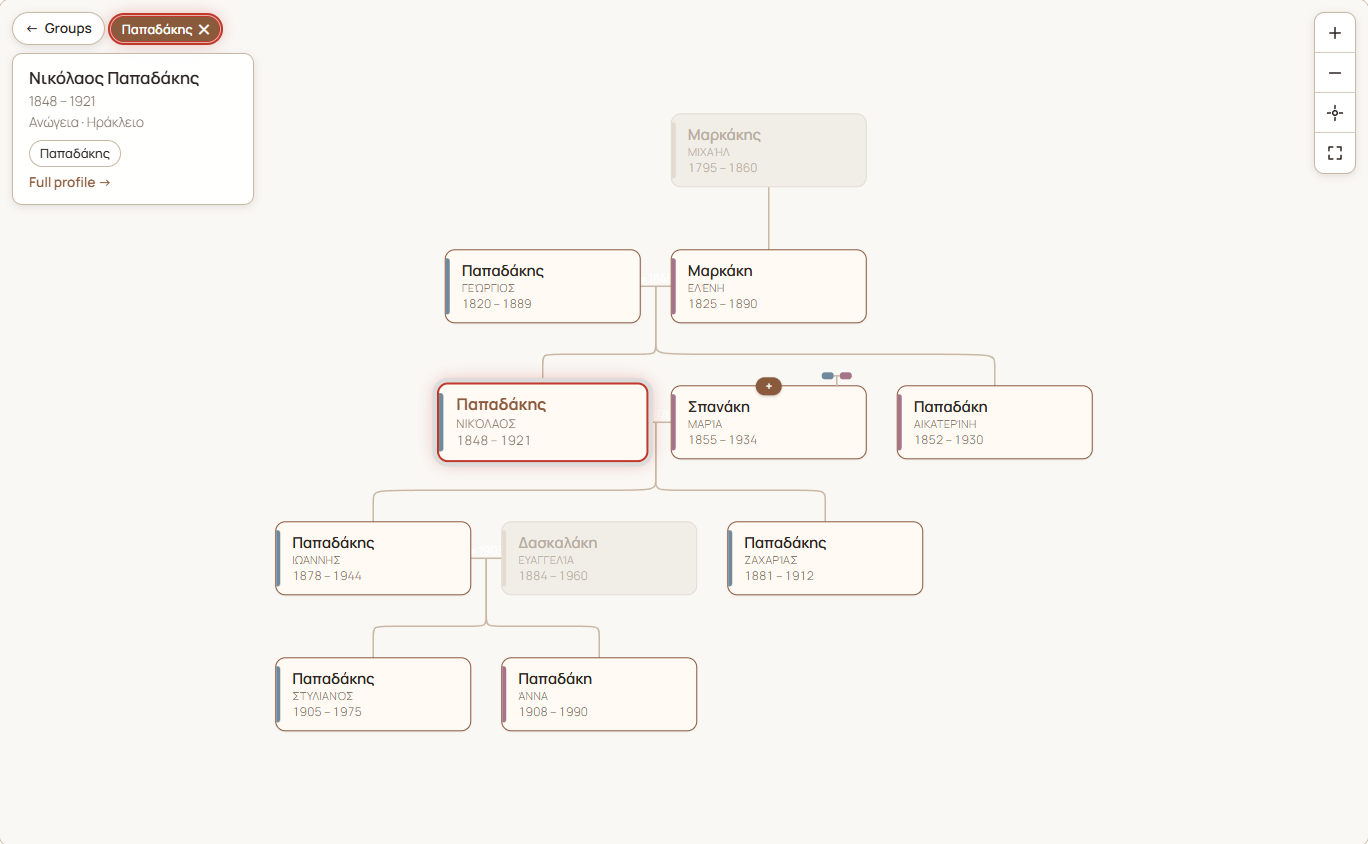
The tree for the invented sample family in tests/fixtures/sample-family.ged, on a plain Twenty Twenty-Five site.
- Groups explorer. Every family group is a bubble. Pick one and the groups that share members with it gather around it, overlaps drawn to scale. Pick a group or an overlap to list its members.
- Interactive tree. A focus-centred tree built on family-chart. It loads more as you click, and highlights the members of the chosen groups.
- Person pages with portrait, dates, places, notes, sources and links to relatives.
- GEDCOM 5.5 import and export, round-trip safe, with a few extension tags for groups, periods and certainty.
- Collections: several unrelated family networks on one site, each with its own explorer.
- Conversion from the "Genealogical Tree" plugin, keeping people's old numbers and URLs.
- WP-CLI for everything, with dry runs and rehearsals that roll back.
- Bilingual: English interface with a full Greek translation. Dates are shown in the page language.
- Optional Piwigo link: people are matched to photos in a Piwigo gallery by a number in the tag name.
Requirements
- WordPress 6.0 or newer
- PHP 8.2 or newer
- Advanced Custom Fields (the free version is enough; Pro works too)
Install
- Download
geotour-genoroots.zipfrom the latest release. - In WordPress: Plugins → Add New → Upload Plugin, choose the zip, then Activate.
- Install and activate Advanced Custom Fields if you haven't already.
The repository itself doesn't include the built JavaScript and CSS. To run it from a clone, see Development.
Quick start
- GenoRoots → Import GEDCOM: choose a
.gedfile and click Upload. "Only check the file" is ticked at first, so the first run only reports what would be created, without saving anything. Untick it and upload again to import. To try it out, usetests/fixtures/sample-family.ged, a small invented family. - Visit
/family-tree/on your site. That page shows the groups explorer, the tree and an A–Z list. - To put the explorer on a page of your own instead, add
[genoroots_app]to it. On themes with a sidebar, give that page a full-width layout.
The same import from the command line:
wp genoroots import tests/fixtures/sample-family.gedAddresses
| Page | Default address | Setting |
|---|---|---|
| Explorer and tree | /family-tree/ |
Family tree page |
| One person | /person/<name>/ |
Person pages |
| One group | /family-group/<group>/ |
Group pages |
| One collection | /collection/<collection>/ |
Collection pages |
Change the words under GenoRoots → Settings → Addresses. Changing a word moves those pages, and links to the old address stop working.
Sites that ran GenoRoots before 1.0 keep the words they had (/mele/,
/melos/, /oikogeneia/, /syllogi/). A theme can still override the
setting with the genoroots_slugs filter (see Hooks).
Shortcodes
| Shortcode | Shows |
|---|---|
[genoroots_app] |
The groups explorer and tree. Use it once per page. |
[genoroots_app collection="papadakis"] |
The same, for one collection only. |
[genoroots_tree person="123"] |
One embedded tree around a person (post ID). Optional: group="slug" highlights a group; up="2" and down="2" set how many generations are shown. |
[genoroots_family_link] |
On an article about a person: a "Family tree →" link to their page. Prints nothing when no person points to the article. |
People, families and groups
- People and families are post types. Edit them under GenoRoots. Parents, marriages and children are edited on the person's screen.
- Groups are a flat list (a taxonomy). A person can be in several groups, e.g. a woman in the group she was born into and in her husband's. "Groups" rather than "families" is deliberate: membership is sometimes uncertain.
- Each person has a permanent GenoRoots ID (
I384). It comes from the GEDCOM file or the old plugin. People added by hand get the next free number. Never renumber: the ID is how photos, bundles and re-imports find the person. - Related article: a person can point to one page on the site about
them, e.g. a biography. It shows as a button on the person page and as
"Read more →" in the tree. Any public content type can be chosen (filter:
genoroots_related_post_types).
Collections
A site with unrelated family networks puts each in a collection
(GenoRoots → Collections). Each collection has its own page with its own
groups explorer, search and A–Z list. /family-tree/ then lists the
collections. A person can be in more than one collection. With no
collections, /family-tree/ is a single shared explorer.
wp genoroots import papadakis.ged --collection=papadakis --collection-name="Papadakis family"IDs inside a collection are stored as papadakis:I1, so files that all
number from @I1@ never overwrite each other. Re-importing the same file
updates it.
GEDCOM import
What is read: NAME, SEX, BIRT/DEAT/BURI (DATE, PLAC),
NOTE and inline SOUR text (with CONT/CONC), and FAMC/FAMS. In
families: HUSB/WIFE/CHIL and MARR. Pointers to separate SOUR
records are not followed.
GenoRoots also reads its own extension tags (other programs ignore them):
| Tag | On | Sets |
|---|---|---|
_GROUP |
person (repeatable) | Group membership, by group name (or slug). A missing group is created with that name. |
_PERIOD |
person | Historical period |
_ARTICLE |
person | Related article, as a path on the importing site (people/nikolaos-papadakis) |
_STATUS |
family | Certainty: confirmed, probable or claimed |
Re-imports are safe. People and families are matched by ID and updated, never duplicated, and nothing is deleted. Notes, sources, burial, period, groups and article are only written when the file has them, so hand edits to other fields survive a re-import.
Add only (--add-only, or the checkbox on the import page) extends a
tree without changing it:
- People already on the site are only anchors. Nothing about them is rewritten.
- Families already on the site only gain new children, an empty spouse slot, or an empty marriage date or place.
- Everything else in the file is created.
The file check lists what each existing family will gain. It also warns when an ID in the file belongs to someone with a different name on the site. That is a numbering mistake that would attach people to the wrong person.
GEDCOM export
GenoRoots → Export GEDCOM, or:
wp genoroots export papadakis.ged --collection=papadakis
wp genoroots export spanakis.ged --collection=papadakis --group=spanakis- Everything the import reads is written back in the same tags. The export
also includes the Latin-script name as a second
NAME, and the portrait URL asOBJE/FILE. - Only published people are exported. A family is kept when at least two of its members are selected, and it lists only them.
- Re-importing an export into the same collection changes nothing.
- The file contains personal data, so the export page is for administrators only.
Languages
- The interface is in English, with a Greek translation in
languages/. The tree's labels come from the same catalogue. Add a language by translatinglanguages/geotour-genoroots-el.pointo a new.pofile and compiling it (wp i18n make-mo languages). - GEDCOM dates are shown in the page language: "23 AUG 1848" becomes "23 Αυγούστου 1848", "ABT 1820" becomes "περ. 1820". Free-text dates are shown as entered.
- Names, places, notes and group names are stored once and read through WordPress's standard functions, so a translation plugin that filters those can translate them.
- Name order on tree cards: surname first by default; switch with the
genoroots_name_orderfilter.
Piwigo photo archive (optional)
If your photos live in a Piwigo gallery, GenoRoots can link each person to their photos.
- Tag the photos with the person's name and GenoRoots ID number in
brackets, e.g. "Maria Papadaki [384]" for ID
I384. Keywords set in Lightroom or another photo tool work, through Piwigo's metadata sync. - Enter the gallery address under GenoRoots → Settings, then click
Preview and Sync now, or run
wp genoroots piwigo-sync. - Person pages and the tree then show "Photos (N) ↗".
GenoRoots only reads from Piwigo, and only when you run the sync. Piwigo's own tag numbers change when a gallery is rebuilt; the sync matches by the number in brackets, so running it again fixes the links.
Converting from Genealogical Tree
GenoRoots can take over from the Genealogical Tree plugin (free or Pro). The conversion reads the old plugin's data directly and leaves it untouched; both plugins can be active at the same time. People keep their old post number as their GenoRoots ID, and old URLs redirect once the old plugin is deactivated.
Step by step: docs/MIGRATING-FROM-GENEALOGICAL-TREE.md.
Moving data between sites
A bundle is one JSON file with people, families, fields, groups and collections, keyed by GenoRoots ID so post IDs can differ between sites.
# on the source site
wp genoroots export-bundle ~/bundle.json
# on the target site
wp genoroots preflight
wp genoroots import-bundle ~/bundle.json --dry-run
wp genoroots import-bundle ~/bundle.json
wp genoroots verify-bundle ~/bundle.json
Imports run in one database transaction: if anything fails, nothing is
saved. --rehearse does the whole import, checks it, then rolls it back.
--only-groups and --skip-groups limit an import to, or exclude, group
memberships. Bundles hold personal data, so delete them from servers when
you're done.
WP-CLI reference
| Command | Does |
|---|---|
wp genoroots import <file> |
Import a GEDCOM file. --collection, --collection-name, --add-only |
wp genoroots export <file> |
Export GEDCOM. --collection, --group |
wp genoroots preflight |
Check the site is ready: PHP, ACF, addresses, caches |
wp genoroots import-legacy |
Convert from Genealogical Tree. --dry-run, --rehearse, --skip-groups, --save-bundle=<file> |
wp genoroots export-bundle <file> |
Write a bundle |
wp genoroots import-bundle <file> |
Read a bundle. --dry-run, --rehearse, --skip-groups, --only-groups |
wp genoroots verify-bundle <file> |
Compare the site with a bundle, record by record |
wp genoroots piwigo-sync |
Link people to Piwigo tags. --piwigo=<address>, --dry-run |
wp help genoroots <command> shows every option.
REST API
Read-only, public, and limited to published records. Namespace
geotour-genoroots/v1:
| Route | Returns |
|---|---|
GET /focus?person=<id>&up=2&down=2 |
A person's neighbourhood for the tree |
GET /search?q=<text> |
People matching a name |
GET /groups |
All groups, their sizes and how many members each pair shares |
GET /members?groups=a,b |
Members of all the given groups (q, page) |
Every route except /focus accepts collection=<slug>.
Hooks
| Filter | Changes |
|---|---|
genoroots_slugs |
The address words. Runs after the Settings value. |
genoroots_name_order |
surname-first (default) or given-first |
genoroots_related_post_types |
Which content types a person's related article can be |
add_filter( 'genoroots_slugs', fn( $s ) => array_merge( $s, array(
    'people' => 'family-trees',
    'person' => 'person',
) ) );
Privacy
Genealogy is personal data, and much of it is about living people. GenoRoots shows every published person to everyone: the pages, the tree and the REST API all expose them. It has no automatic "living person" filter.
- Keep people who don't want to be public as drafts. A draft has no public page and is left out of the explorer, the tree, search and the relatives listed on other people's pages.
- GEDCOM exports and bundles contain everything, so only administrators can make them.
- The conversion from Genealogical Tree does not copy phone numbers, email addresses or postal addresses.
Development
npm install
npm run build      # build/: the JavaScript and CSS WordPress loads
npm run watch      # rebuild on save
npm run package # dist/geotour-genoroots/ and .zip: runtime files only- PHP:
geotour-genoroots.phpandincludes/. One class per file, loaded only when ACF is active. - Front end:
src/(Vite + Sass), built tobuild/. - Translations: edit
languages/*.po, then runwp i18n make-mo languages. - After changing a post type's or taxonomy's rewrite settings, bump
GENOROOTS_REWRITE_VERSIONso active sites re-flush their rewrite rules.
Issues and pull requests are welcome.
Roadmap
- Portraits on the tree cards and in the focus panel (person pages already show them).
- A photo strip on person pages, from the person's Piwigo tag.
- A draggable bottom sheet for the member panel on phones.
- "How are we related?" between two people.
License
GPL-2.0-or-later. Copyright © Manolis Nikolakakis.
The tree is drawn with family-chart by donatso (ISC license).
Releases
1 release. Each count is every asset in that release; expand a row for the breakdown.