Install
This is the repository archive. It installs, but the folder name will carry the branch suffix and updates will not flow.
Install straight from GitHub with WP-CLI:
wp plugin install https://github.com/nicksull/the-bonnie-situation/archive/refs/heads/main.zip
The Bonnie Situation
Save Contact Form 7 submissions to your database, then delete them on a schedule.
Privacy-first defaults, an audit log of every purge, and a warning when cleanup stops working.
Clean it up before Bonnie gets home.
WHY · FEATURES · PRIVACY · INSTALL · DEVELOPMENT

Why
Contact Form 7 doesn't store anything: once the email goes out, the submission is gone. The usual fix is a storage plugin that keeps every entry forever, IP address included, with no expiry. The moment your form collects a name and an email address, that's a growing pile of personal data you're responsible for.
Bonnie stores submissions and treats them as a liability:
- 🗑️ Data expires. Pick a retention window and a daily job permanently deletes anything older, with an audit log of every run.
- 🫥 Collect less. No IP address, user agent, referrer or spam unless you turn them on. CF7's own
do_not_storeandconsent_for:storageopt-outs are honoured. - 🚨 Failures are loud. If a purge errors, or stops running because WP-Cron isn't firing, you're told in Site Health and the dashboard. Data is never silently kept past its window.
[!NOTE] Bonnie provides controls that support GDPR, UK GDPR, the Australian Privacy Act and CCPA. Your lawful basis and configuration are still your responsibility. This isn't legal advice.
What it does
| Feature | ||
|---|---|---|
| 📥 | Capture | Every CF7 submission saved to its own table, after mail handling, so a storage error never blocks or delays the email |
| 🔎 | Browse | Search, sort and filter in a DataViews admin, with a detail view for each submission |
| ✂️ | Delete | Permanently delete one submission on demand |
| ⏳ | Retention | Delete everything older than N days, enforced daily by WP-Cron and logged |
| 🚨 | Health checks | A critical Site Health item and admin notice when a purge fails or none has succeeded for 48 hours. A missing cron event is recreated |
| 🧾 | Subject requests | Plugs into Tools → Export / Erase Personal Data, so a request by email includes captured submissions |
| 📦 | Import | One-click import from Flamingo and CFDB7, under your privacy settings and retention window. The source plugin doesn't need to be active |
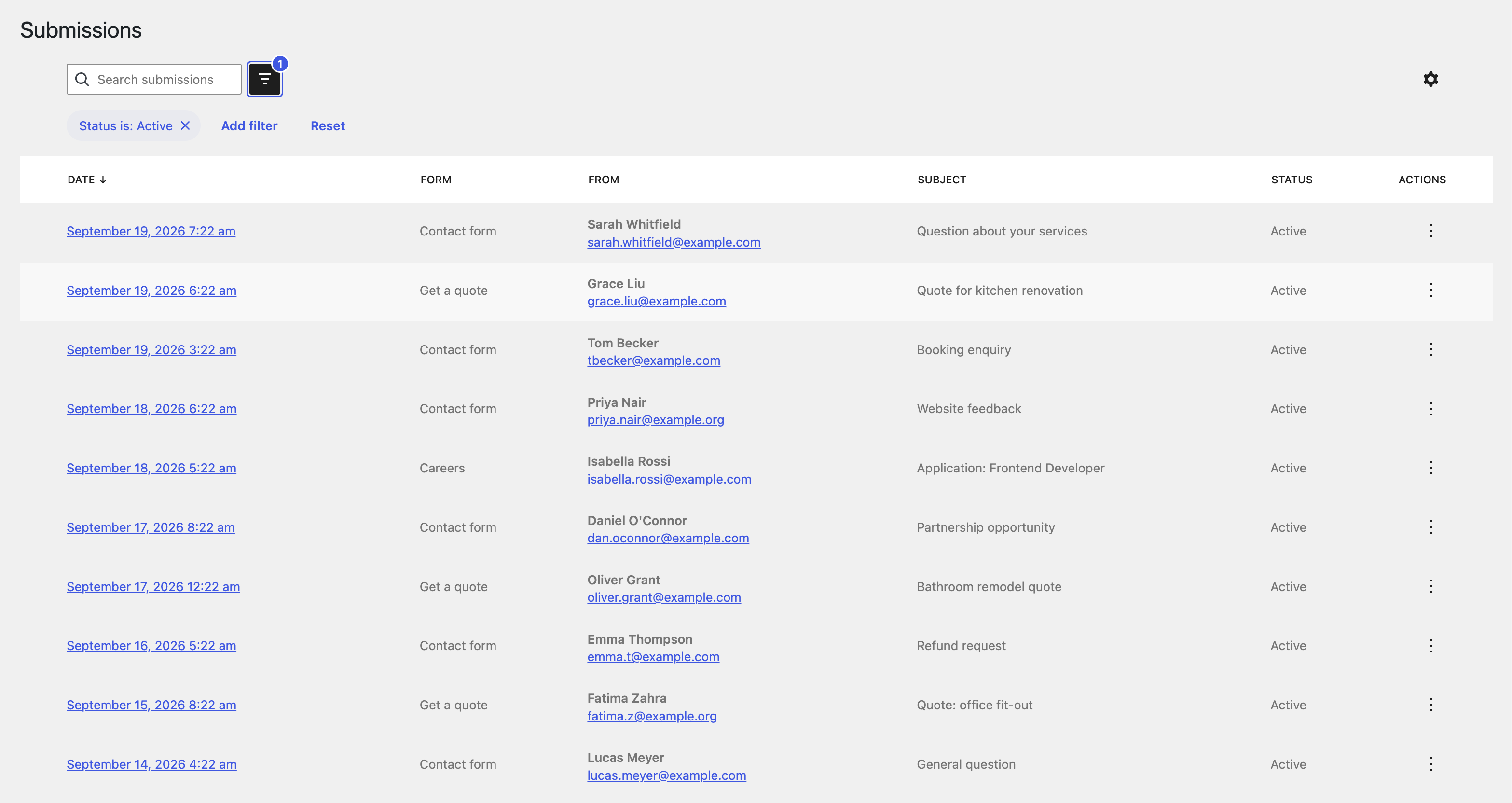 Submissions list with status views, search and filtering |
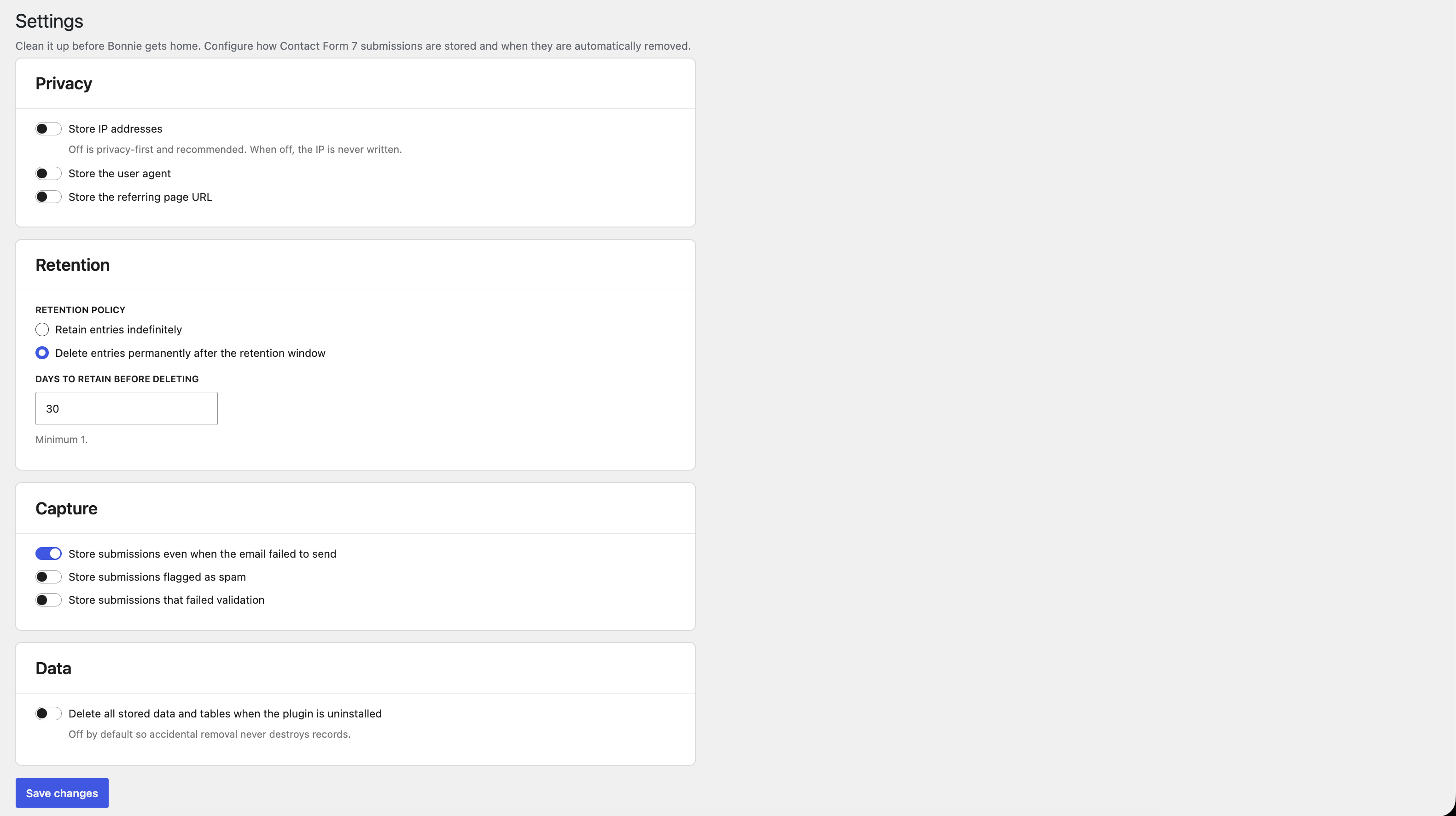 Privacy & Retention settings |
Private by default
| Default | ||
|---|---|---|
| IP address | not stored | Settings → Privacy |
| User agent, referrer | not stored | Settings → Privacy |
| Spam and validation failures | discarded | Settings → Privacy |
CF7 internal fields (_wpcf7*) |
never stored | |
do_not_store forms, unticked consent_for:storage |
never stored | |
do-not-store tags (quiz, CAPTCHA) |
never stored | |
| Retention | off until you choose a window (30 days suggested) | Settings → Retention |
| Data on uninstall | kept, unless you opt in to delete it | Settings |
[!TIP] Enquiry forms rarely need more than 30 to 90 days. Set the shortest window you can, and let Bonnie do the rest.
Install
| WordPress | 6.7 or later |
| PHP | 8.1 or later |
| Contact Form 7 | Required (declared with Requires Plugins) |
From WordPress.org (recommended): Plugins → Add New, search for The Bonnie Situation, then install and activate. Or download it from wordpress.org/plugins/the-bonnie-situation.
Then open Bonnie → Settings and choose your retention policy. Submissions are captured automatically from then on.
Install from source[!IMPORTANT] Retention runs on WP-Cron, which only fires when someone visits the site. On a quiet site, call
wp-cron.phpfrom a real system cron so purges happen on time. If nothing succeeds for 48 hours, Bonnie will flag it.
cd wp-content/plugins
git clone https://github.com/nicksull/the-bonnie-situation
cd the-bonnie-situation
npm ci && npm run build
build/ is committed, so the build step is only needed if you change src/.
Bonnie Pro
The free plugin is complete on its own. Bonnie Pro is a separate add-on, sold off WordPress.org, for agencies and sites with stricter requirements:
| 📤 CSV / JSON export | The current view or selected rows |
| 📇 Address book | Deduplicated contacts, linked to their submissions |
| ♻️ Trash workflow | Soft-delete with a restore window, plus a hard cap that force-deletes |
| 🧹 Bulk delete | Across selected submissions |
| 🎛️ Per-form overrides | Policy, window, IP rule and field mapping per form |
| 🎭 IP anonymisation | Store a masked address instead of the full IP |
| 🔐 Encryption at rest | Names, emails, subjects and fields encrypted, key in wp-config.php |
| ⌨️ WP-CLI | wp bonnie purge and wp bonnie import |
| 📣 Failure alerts | Email, Slack or webhook when cleanup fails, and when it recovers |
Development
| Command | What it does |
|---|---|
npm install |
Install the build and wp-env tooling |
npm run build |
Compile src/ to build/ (committed, so stage it with any src/ change) |
npm start |
Rebuild on change |
npx wp-env start |
Local WordPress at http://localhost:8888, with Contact Form 7. To test against Bonnie Pro, add it in a .wp-env.override.json |
npm run test:php:setup |
Install PHPUnit inside wp-env (once) |
npm run test:php |
Run the PHPUnit suite (retention, deletes, store) |
npm run plugin-zip |
Build the distributable zip, filtered by .distignore |
Layout
the-bonnie-situation.php   Plugin header and bootstrap
includes/                  Capture, store, retention, cron, health, privacy, import, REST
admin/                     Submissions and settings screens
src/                       React (DataViews) admin source → build/
tests/                     PHPUnit suite
readme.txt                 The WordPress.org listing
Licence
GPLv2 or later © 2026 Red Pocket