Install
This is the repository archive. It installs, but the folder name will carry the branch suffix and updates will not flow.
Install straight from GitHub with WP-CLI:
wp plugin install https://github.com/nickforddev/acf-swatch/archive/refs/heads/master.zipACF - Color Swatch field add-on
- Author: Nick Ford
- Tags: acf, acf add-on, color, color swatch, color swatches
- Requires at least: 4.0
- Tested up to: 5
License: GPLv2 or later
Description
This is a simple ACF Add-on field allowing the creation of color swatches that behave as radio buttons. This is particularly useful if you want to limit the color options available to the end users, instead of using a color picker field.
This is an add-on for the Advanced Custom Fields WordPress plugin and will not provide any functionality to WordPress unless Advanced Custom Fields is installed and activated.
The color swatch field is a radio button field, with a few modifications. The syntax for building the choices is the same as a radio button field, in that you may include a key : value pair, or just a single value, each option separated by a line break.
The field expects each line to be a color string, and can interpret all of the possible color formats.
For example, all of the following will produce a bright red swatch:
red#ff0000rgb(255,0,0)rgba(255,0,0, 1)hsl(0,100%,50%)hsla(0,100%,50%, 1)
Additionally, if you are using rgb/rgba or hsl/hsla, you may use only the values, if desired. For instance:
255,0,0, 1 // will be recognized as rgba0,100%,50% // will be recognized as hsl
This may be useful for defining CSS linear-gradients, or other situations where you may want to alter some of the values in the view.
Note that while the field can recognize these shortened syntaxes to display the color swatch in the Wordpress back end, it will still output only what you entered when using the_field() or get_field().
Screenshots
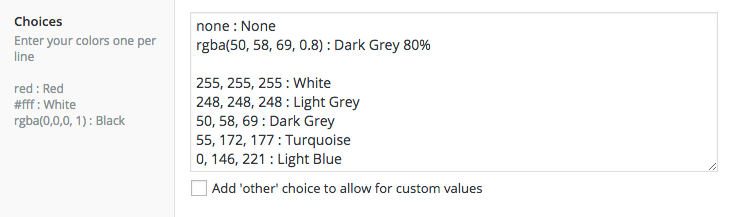

Installation
Wordpress Plugin Store
https://wordpress.org/plugins/acf-color-swatches
Composer
If using Composer (e.g. with Bedrock)
- Add repo to
composer.json:"repositories": [ { "type": "git", "url": "https://github.com/nickforddesign/acf-swatch" } ] - Install using composer
composer require nickford/acf-swatch
Manual
- Clone the repository to /wp-content/plugins/ in your Wordpress installation
- Activate in the Plugins manager.
Suggested Usage
Assuming you select a swatch with value "rgba(255,0,0, 1)":
As inline CSS:
<section style="background-color: <?php the_field('swatches')?>">Inside a `