Install
Upload it under Plugins → Add New Plugin → Upload Plugin, then activate.
Install straight from GitHub with WP-CLI:
wp plugin install https://github.com/ned-tom/discord-for-wordpress/releases/download/v0.01-alpha/discord-for-wordpress.zipNo built-in updater. New versions won't appear under Dashboard → Updates. Install new releases yourself, or let Git Updater track the repository.
Discord Integration for WordPress
Unofficial widget but whit respect for the discord guidelines
Support me

Usage
- Instal and activate plugin
- add shotcode in text.
Shortcodes
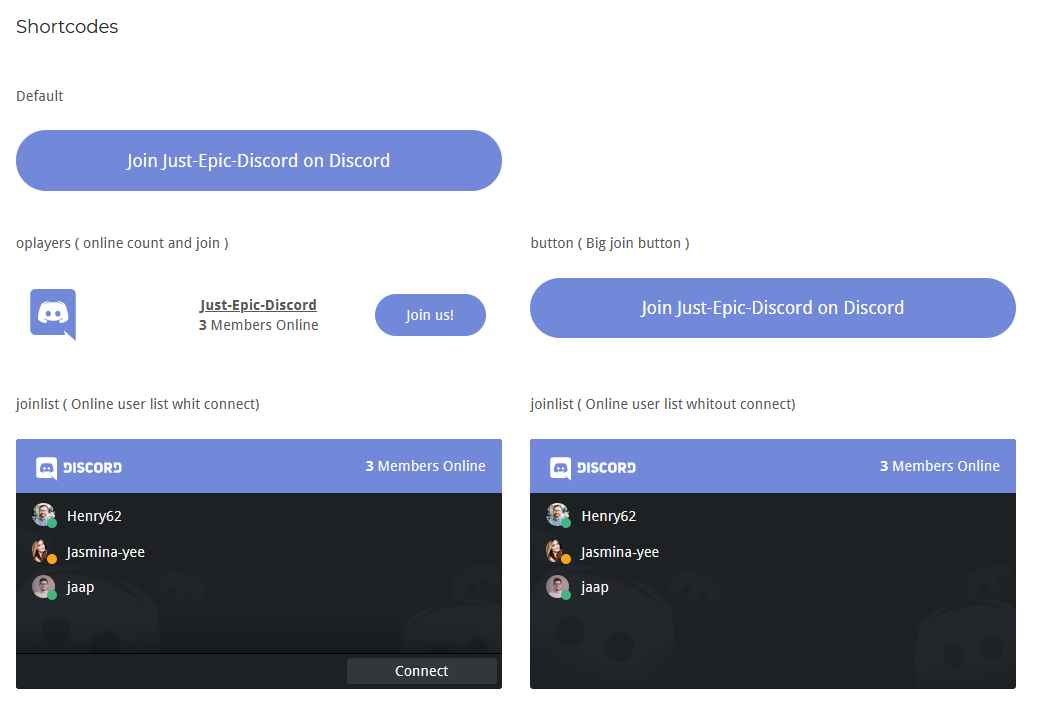
- Join button : [dfwp id="" type="button"]
- Online Players : [dfwp id="" type="oplayers"]
- Player list : [dfwp id="" type="list"]
- Player list whit join button : [dfwp id="" type="joinlist"]
Replace "<discord server id>" whit your server id
ToDo
- [x] implement short codes
- [x] Join button
- [x] Online Players
- [x] Player list
- [x] Player list whit join button
- [x] basic styling
- [x] lists
- [x] buttons
- [ ] Make plugin translatable
- [ ] clean up code
- [ ] add dark and light theme
- [ ] remove pre installed bugs
Thinking about
- [ ] color customization
- [ ] Wordpress blocks
- [ ] custom image in background list
- [ ] list customization
- [ ] branding
Development
Compile sass command
sass --watch dev/dfwp-style.scss:css/dfwp-style.cssinclude php libs
composer installSuggestions or Issues?
- Add a feature request on the GitHub issues page
- Notify me for bugs "Yes Please"
- something missing here ??, let me know.
Releases
1 release. Each count is every asset in that release; expand a row for the breakdown.
Tag
Published
Assets
Downloads