Install
This is the repository archive. It installs, but the folder name will carry the branch suffix and updates will not flow.
Install straight from GitHub with WP-CLI:
wp plugin install https://github.com/mzackarrya-stack/wp-quote-calculator/archive/refs/heads/main.zipA WordPress plugin that shows visitors an instant price from your price list, then sends you their request with the price recalculated on the server.
It is the kind of form a print shop, a packaging maker, a cleaning company or an agency puts on a page: pick a quantity, tick a few options, watch the total update, leave a name and an email. The form is the easy part. Most of this repository is about the two places where a tool like this quietly gets money wrong, and what it took to stop each one.
[quote_calculator] -> live price in the browser -> POST quantity + option ids
                                                -> PHP engine recalculates
                                                -> private post + email to you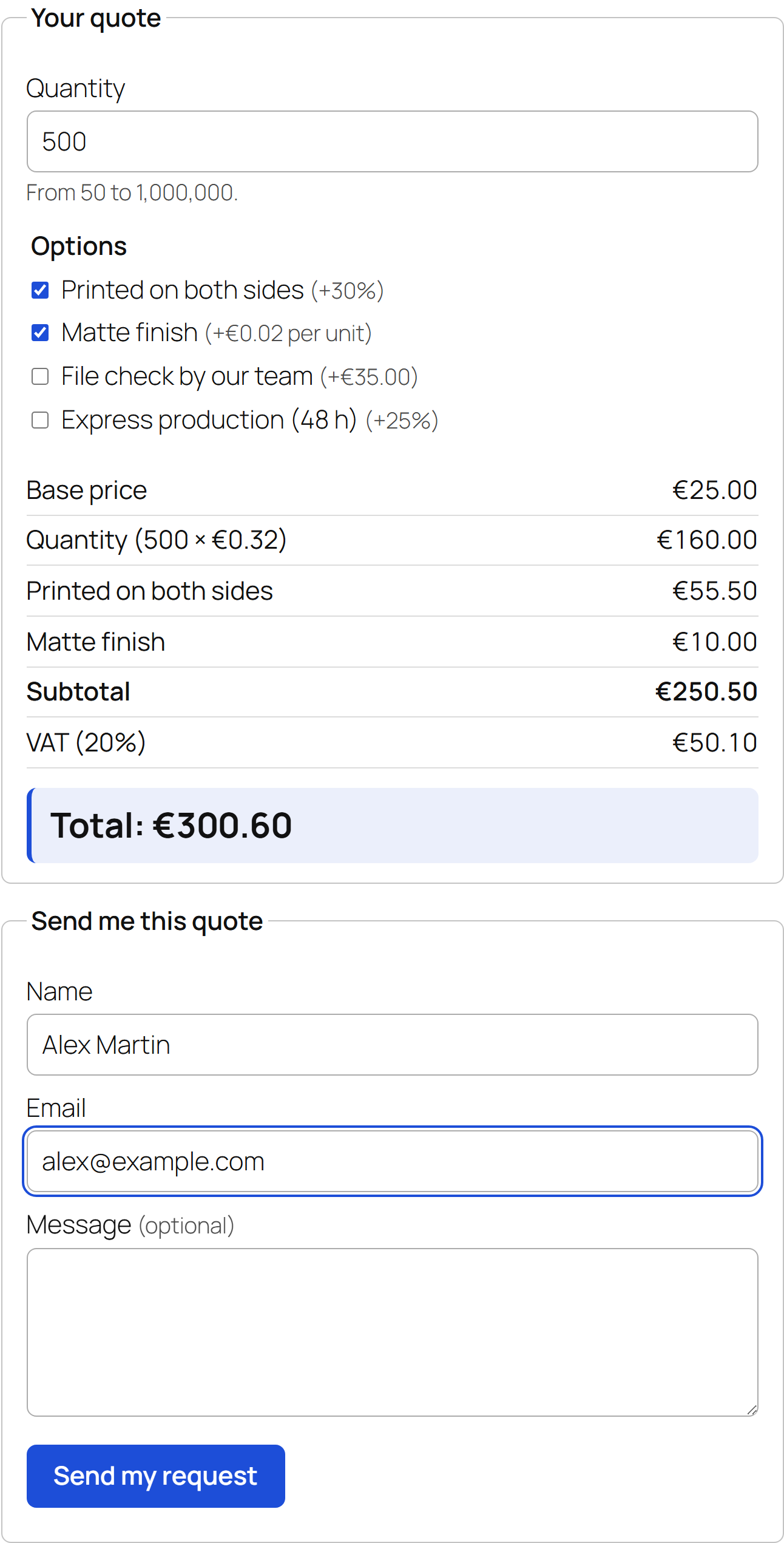
The default price list from config/default-pricing.json, on WordPress 7.1 with the
Twenty Twenty-Five theme. One accent colour (--wpqc-accent) drives the button, focus
ring, checkboxes and total; everything else comes from the theme.
Why the server recalculates the price
The browser computes the total on every keystroke, because a quote that needs a page reload is a quote nobody finishes. That number is for the visitor's eyes only.
Anything the browser sends can be edited before it leaves. A request for 5,000 units at a total of 4.00 takes ten seconds to forge in the developer tools. So the endpoint does not accept a total at all: it receives the quantity and the option ids, runs them through the PHP engine, and stores, emails and returns that figure. What lands in your inbox is what your price list says, whatever the page said.
Two consequences, both handled:
- You change prices while someone has the page open. Their request is priced with the new list, and the confirmation says so: "Confirmed total: €126.00. Prices were updated after this page was loaded, so this total differs from the one shown above."
- The browser and the server must never disagree by a cent. They are two
implementations of the same rules (
src/PricingEngine.phpandassets/js/pricing.js). The test suite prices 1,600 orders through both, tier boundaries included, and fails on any difference.
Money is integers
The second place it goes wrong is float arithmetic. 15,115 units at 0.155 is exactly
2,342.825. PHP's round() says 2,342.83; JavaScript's Math.round(x * 100) / 100 says
2,342.82. Two "obvious" implementations would show the visitor one price and email you
another, and nobody would notice until a customer did.
So neither side computes money with floats. Each amount in the price list is converted once to an integer: ticks of 1/10,000 for prices (0.155 stays exact), thousandths of a percent for rates (8.875 % is a real US sales tax). Each line is rounded half up to a whole cent, then lines are added as integers. The breakdown therefore always adds up to the total, to the cent; the tests check that on 500 random orders.
The limits exist for the same reason: 4 decimals for prices, 3 for percentages, 1,000,000 units, 100,000 per price, 20 options, tax up to 100 %. Within them every intermediate value stays below 2^53, the largest integer a browser handles exactly. The worst case, every limit maxed at once, is one of the configurations in the parity test.
How a price is built
base_price, once per order (a setup fee; leave it out for none)- quantity x the unit price of the tier the quantity falls into
- options:
fixed(once),per_unit(x quantity),percent(of 1 + 2) - if the subtotal is under
minimum_total, a line tops it up tax_rateon the result
Percentages apply to base + quantity only, never to each other, so the order in which boxes are ticked can never change the price.
Tiers are all-units: the whole order is priced at the tier the quantity falls into, which is how printed price lists work. It has a side effect worth knowing before you set your tiers: with the example below, 249 units cost 144.52 before tax and 250 cost 105.00.
Example price list
This is the default installed on activation (config/default-pricing.json):
{
    "currency": "EUR",
    "quantity_label": "Quantity",
    "base_price": 25,
    "minimum_total": 60,
    "tax_rate": 20,
    "tax_label": "VAT",
    "tiers": [
        { "min": 50, "max": 249, "unit_price": 0.48 },
        { "min": 250, "max": 999, "unit_price": 0.32 },
        { "min": 1000, "max": 4999, "unit_price": 0.21 },
        { "min": 5000, "max": null, "unit_price": 0.155 }
    ],
    "options": [
        { "id": "double-sided", "label": "Printed on both sides", "type": "percent", "amount": 30 },
        { "id": "matte", "label": "Matte finish", "type": "per_unit", "amount": 0.02 },
        { "id": "file-check", "label": "File check by our team", "type": "fixed", "amount": 35 },
        { "id": "express", "label": "Express production (48 h)", "type": "percent", "amount": 25 }
    ]
}
250 units, printed on both sides, express:
Base price                    25.00
Quantity (250 x 0.32)         80.00
Printed on both sides         31.50   30 % of 105.00
Express production (48 h)     26.25   25 % of 105.00, not of 136.50
Subtotal                     162.75
VAT (20%)                     32.55
Total                        195.30
50 units with no options come to 49.00, so a "Minimum order adjustment" of 11.00 brings them to 60.00 before VAT, 72.00 with it. Both examples, the all-units step above and the JSON block itself are checked by the test suite, so this README cannot drift from the code.
| Key | Required | Meaning |
|---|---|---|
currency |
yes | ISO 4217 code: EUR, USD, GBP... |
tiers |
yes | { min, max, unit_price }, contiguous with no gaps or overlaps; only the last max may be null |
options |
no | { id, label, type, amount }; type is fixed, per_unit or percent |
base_price |
no | Added once per order |
minimum_total |
no | Minimum before tax |
tax_rate, tax_label |
no | Percent and its name (VAT, Sales tax); no tax by default |
quantity_label |
no | Field label, e.g. Square metres; Quantity by default |
Unknown keys are refused rather than ignored: a typo such as "tax": 20 would otherwise
send every quote out without tax.
Use
- Copy the folder to
wp-content/plugins/and activate Quote Calculator. - Edit the price list under Settings > Quote Calculator. An invalid list is never
saved: every problem is listed at once (
tiers[1].min must be 100, right after the previous tier ends at 99...) and your edit stays in the editor instead of being replaced by the old version. - Put
[quote_calculator]on any page or post. - Requests appear under Quote requests in the admin menu and are emailed to the
address set in the settings (the site admin address by default), with
Reply-Toset to the visitor.
Requires WordPress 6.0+ and PHP 8.0+. No jQuery, no build step, no Composer. Prices in the
form are formatted for the site's locale with Intl.NumberFormat.
Security notes
- Settings are saved through
options.php, which checks the nonce andmanage_optionsbefore the sanitize callback runs. Labels are stripped of tags, and everything is escaped on output, including the validation messages, which can quote the submitted text back. - The REST nonce is checked explicitly. WordPress verifies
X-WP-Nonceonly when one is sent; a request without any nonce is simply treated as anonymous. For a public form that would make the check optional, so the endpoint makes it mandatory. - A nonce is not a secret for anonymous visitors. Every logged-out visitor gets the same one for 12 to 24 hours. It stops another site from submitting the form from your visitors' browsers; it does not stop bots. The honeypot and the rate limit do that. If your page cache keeps HTML longer than 12 hours, cached nonces expire and the form says it has expired: exclude the page from the cache or shorten its lifetime.
- Honeypot: an off-screen field (not
display:none, which some bots skip). When it is filled, the response is identical to a success, and nothing is stored or sent. - Rate limit: 5 requests per address per 10 minutes, counted in a transient keyed by a
salted hash, so the address itself is never stored. Only
REMOTE_ADDRis read, because forwarded headers are trivial to fake. Behind Cloudflare or another proxy every visitor shares the proxy's address: return the real one with thewpqc_client_ipfilter. The count is not atomic. It makes a spam script give up; it is not a denial-of-service defense. - Leads are personal data. Requests are private posts whose every capability maps to
manage_options: editors and authors cannot list them, and nobody can create one by hand. No IP address is kept. - Inline config is encoded with
JSON_HEX_TAGand its siblings, so a label containing</script>cannot close the script element. - Slashes:
wp_insert_post()and the meta API strip one level of slashes because WordPress expects slashed input. REST data is not slashed, so it goes throughwp_slash()first; otherwiseC:\print\jobsin a message would be stored asC:printjobs.
Tests
php tests/run.phpNo PHPUnit, no Composer, no WordPress: 61 tests on the pricing engine covering tier
boundaries, fixed, per-unit and percentage surcharges, the minimum order, tax, rounding,
every validation rule and the README examples. If Node.js is on the PATH, the same run
prices 1,600 orders with assets/js/pricing.js and compares them to the cent; without
Node that test is reported as skipped, not passed.
Checks throw instead of calling assert(): zend.assertions is off in the production
php.ini, which would turn every check into a silent pass.
The WordPress layer (settings page, shortcode, REST endpoint, admin screens) was exercised against stubbed WordPress functions and in a browser during development. There is no automated test for it in this repository.
Hooks
wpqc_request_created(action):$post_id, $quote, after a request is stored. Push the lead to a CRM from here.wpqc_client_ip(filter): the address used for rate limiting.wpqc_rate_limit,wpqc_rate_window(filters): requests allowed and window length in seconds. Return 0 fromwpqc_rate_limitto turn it off.
Not included
- A no-JavaScript fallback. Without JavaScript the form stays hidden and a one-line `