Simple Server Speed Test
A WordPress plugin to test server network performance including ping, download and upload speeds
Install
This is the repository archive. It installs, but the folder name will carry the branch suffix and updates will not flow.
Install straight from GitHub with WP-CLI:
wp plugin install https://github.com/myscode/simple-server-speed-test/archive/refs/heads/master.zipA WordPress plugin to test server network performance including ping, download and upload speeds.
🎯 Overview
This plugin provides a comprehensive server speed testing suite that measures:
- Ping Test - Network latency to Cloudflare
- Download Test - Download speed from
https://speed.cloudflare.com/__down - Upload Test - Upload speed to
https://speed.cloudflare.com/__up
Results are displayed in the WordPress admin interface, saved to the database, and can be used as hosting connection quality diagnostics.
📸 Screenshots
📷 Click to view screenshots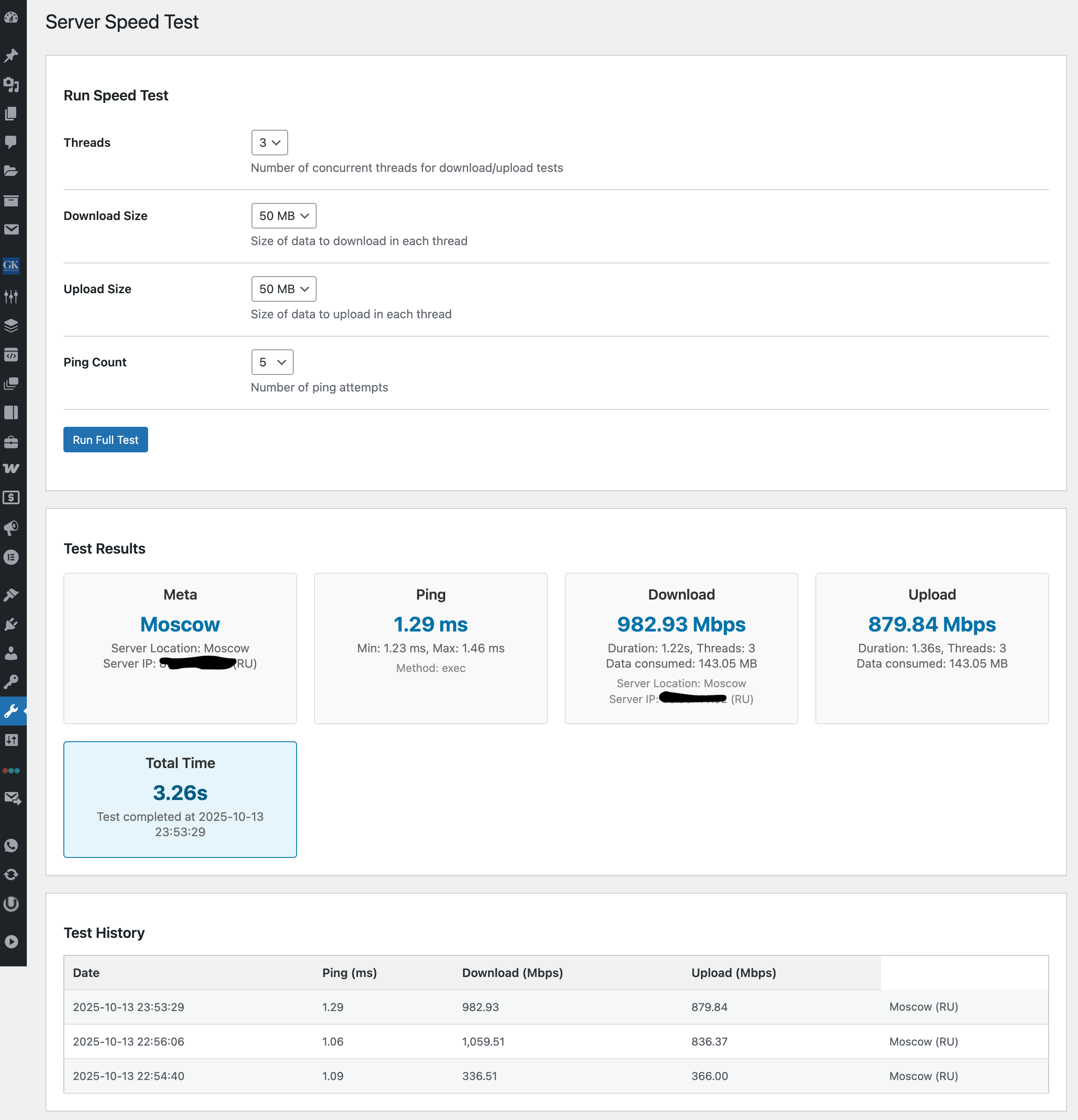
Screenshots captured from the WordPress Tools → Server Speed Test page.
(Screenshots captured from the WordPress Tools → Server Speed Test page.)
📏 Test Parameters
The plugin allows configuring separate payload sizes for download and upload tests:
- Download Size: 1 MB, 2 MB, 5 MB, 10 MB, 20 MB, 50 MB (default: 2 MB)
- Upload Size: 1 MB, 2 MB, 5 MB, 10 MB, 20 MB, 50 MB (default: 2 MB)
🚀 Features
- Ping Test: Uses cascading methods (ICMP, socket, fsockopen, cURL) with fallback
- Download Test: Measures speed from Cloudflare's global network
- Upload Test: Measures upload speed to Cloudflare
- Admin Interface: Clean, responsive UI in the WordPress Tools section
- History Tracking: Stores and displays previous test results
- Multi-threaded: Configurable concurrent connections (1/3/5 threads)
- Server Metadata: Extracts location and network information from speed.cloudflare.com/meta
- WP-CLI Support: Run tests and view history from command line
- Comprehensive Testing: Unit tests covering all core functionality
- Extensible Architecture: Provider pattern for metadata sources
⚙️ Technical Specifications
| Parameter | Value |
|---|---|
| Language | PHP ≥ 7.4 (compatible with 8.1+) |
| CMS | WordPress ≥ 6.0 |
| Architecture | PSR-4, SOLID |
| Patterns | Strategy, Factory, Repository, Template Method, Provider |
| Autoloading | Composer |
| Security | Nonce, manage_options, URL and data validation |
| Frontend | Wordpress built-in jQuery library |
| Data Source | https://speed.cloudflare.com |
| Metadata Source | https://speed.cloudflare.com/meta |
| Data Storage | Custom table wp_ssst_results |
| UI | "Server Speed Test" tab in Tools |
| Threading | 1 / Multi-thread (configurable in UI) |
| WP-CLI | Available commands for testing |
| License | MIT |
📊 Sample Test Result
{
  "ping": {
    "average_ms": 21.4,
    "min_ms": 20.7,
    "max_ms": 22.8,
    "method": "exec"
  },
  "download": {
    "avg_mbps": 134.6,
    "duration": 0.95,
    "threads": 3,
    "bytes": 2000000
  },
  "upload": {
    "avg_mbps": 76.3,
    "duration": 1.21,
    "threads": 3,
    "bytes": 2000000
  },
  "total_duration": 2.16,
  "timestamp": "2024-12-13 16:44:00",
  "meta": {
    "hostname": "speed.cloudflare.com",
    "clientIp": "195.26.223.11",
    "httpProtocol": "HTTP/1.1",
    "asn": 216071,
    "asOrganization": "Amsterdam, Netherlands",
    "colo": "AMS",
    "country": "NL",
    "city": "Amsterdam",
    "region": "North Holland",
    "postalCode": "1012",
    "latitude": "52.37403",
    "longitude": "4.88969"
  }
}
🛠️ Installation
- Download or clone this repository to your WordPress plugins directory
- Run
composer installin the plugin directory to install dependencies - Activate the plugin through the WordPress admin interface
- Navigate to Tools → Server Speed Test to run tests
🧪 Testing
This project uses PHPUnit for comprehensive unit testing. To run tests:
# Install dependencies (including PHPUnit)
composer install

# Run all tests
./vendor/bin/phpunit

# Run tests with code coverage
./vendor/bin/phpunit --coverage-html coverage
The test suite includes:
- Core component tests (ServerTestRunner, SpeedTestRunner, PingFactory)
- Model tests (TestResult, MetaData)
- Provider tests (CloudflareMetaProvider)
- Helper tests (Formatter)
- Strategy tests (all ping and speed test strategies)
- Integration tests for complete test flows
See tests/README.md for detailed information about testing.
🐚 WP-CLI Usage
The plugin includes WP-CLI commands for running tests from the command line:
# Run a full speed test with default settings
wp ssst run

# Run a test with custom parameters
wp ssst run --threads=5 --ping-count=5 --download-size=5000000 --upload-size=5000000

# View test history
wp ssst history --limit=20
🎨 Admin Interface
The plugin adds a "Server Speed Test" page under the WordPress Tools menu with:
- Test Controls: Configure threads, download size, upload size, and ping count
- Run Button: Execute the full speed test suite
- Results Display: Visual presentation of ping, download, and upload metrics
- Test History: Table of previous test results with location information
🔒 Security
- Capability check:
current_user_can('manage_options') - Nonce verification:
check_ajax_referer - URL whitelisting: Only allows
speed.cloudflare.com - Payload limits: Up to 50 MB
- cURL timeouts: 30 seconds
🧠 Architecture
simple-server-speed-test/
├── simple-server-speed-test.php           # Plugin entry point
├── composer.json
├── composer.lock
├── phpunit.xml.dist
├── uninstall.php                          # Uninstall hook
├── test-ping-detailed.php                 # Ping testing utilities
├── test-ping.php                          # Ping testing utilities
├── src/
│   ├── Commands/
│   │   └── SpeedTestCommand.php           # WP-CLI command implementation
│   ├── Contracts/
│   │   ├── MetaProviderInterface.php      # Metadata provider contract
│   │   ├── PingStrategyInterface.php      # Ping strategy contract
│   │   └── SpeedStrategyInterface.php     # Speed test strategy contract
│   ├── Core/
│   │   ├── MetaExtractor.php              # Metadata extraction orchestrator
│   │   ├── PingFactory.php                # Ping strategy factory
│   │   ├── PluginActivator.php            # Plugin activation/deactivation
│   │   ├── ResultRepository.php           # Database operations
│   │   ├── ServerTestRunner.php           # Main test orchestrator
│   │   ├── SpeedTestRunner.php            # Speed test orchestrator
│   │   ├── Models/
│   │   │   ├── MetaData.php               # Metadata DTO
│   │   │   └── TestResult.php             # Test result DTO
│   │   └── Providers/
│   │       └── CloudflareMetaProvider.php # Cloudflare metadata provider
│   ├── Helpers/
│   │   └── Formatter.php                  # Data formatting utilities
│   └── Strategies/
│       ├── CascadingPingStrategy.php      # Cascading ping implementation
│       ├── CurlMultiDownloadStrategy.php  # Multi-threaded download
│       ├── CurlMultiUploadStrategy.php    # Multi-threaded upload
│       └── HttpPingStrategy.php           # HTTP-based ping
├── admin/
│   ├── AdminPage.php                      # Admin UI controller
│   ├── AjaxHandler.php                    # AJAX request handler
│   └── assets/
│       ├── js/admin.js                    # Admin frontend logic
│       └── css/admin.css                  # Admin styling
├── tests/                                 # Unit tests
│   ├── README.md                          # Test documentation
│   └── Unit/                              # Unit test suites
│       ├── Core/                          # Core class tests
│       │   ├── Models/                    # Model tests
│       │   ├── Providers/                 # Provider tests
│       │   ├── PingFactoryTest.php
│       │   ├── ServerTestRunnerTest.php
│       │   ├── SpeedTestRunnerTest.php
│       │   └── ResultRepositoryTest.php
│       ├── Helpers/                       # Helper class tests
│       │   └── FormatterTest.php
│       └── Strategies/                    # Strategy tests
│           ├── CascadingPingStrategyTest.php
│           ├── CurlMultiDownloadStrategyTest.php
│           ├── CurlMultiUploadStrategyTest.php
│           └── HttpPingStrategyTest.php
└── README.md                              # This file
📚 Used Design Patterns (An attempt to describe and follow)
| Pattern | Application | Purpose |
|---|---|---|
| Strategy | Ping, Download, Upload strategies | Easily switch test algorithms |
| Factory | PingFactory | Manage ping implementation selection |
| Repository | ResultRepository | Isolate result storage logic |
| Template Method | ServerTestRunner | Define common test sequence: Ping → Down → Up |
| Provider | CloudflareMetaProvider | Flexible metadata source implementation |
| DTO | TestResult, MetaData | Standardized data representation |
| Open/Closed Principle (OCP) | All Strategy classes | Ability to add other providers |
| Dependency Injection | All core classes | Testability and flexibility |
| Interface Segregation | Contracts | Clear contract definitions |
📎 Additional Resources
For ping implementation inspiration, referenced geerlingguy/Ping - a PHP library for executing ping commands.
🧾 Implementation Checklist
- [x] Project structure (PSR-4, Composer)
- [x] Contracts and factories
- [x] Ping / Download / Upload implementations
- [x] Server metadata extraction from speed.cloudflare.com/meta
- [x] ServerTestRunner orchestrator
- [x] ResultRepository storage
- [x] Admin UI + JS
- [x] AJAX + Nonce + capability check
- [x] Documentation README.md
- [x] PHP 7.4+ support
- [x] WP-CLI command implementation
- [x] Comprehensive unit test coverage
- [x] Extensible metadata provider architecture
- [x] Data Transfer Objects for standardized data representation
Why Cloudflare
I chose Cloudflare as the backend provider for speed testing because it offers a simple, reliable, and globally distributed infrastructure — without the need to maintain any custom servers.
Key reasons:
- Seamless integration — The public endpoint at speed.cloudflare.com allows direct speed measurements using standard HTTP requests with no authentication, setup, or API keys required.
- Global Anycast routing — Requests are automatically routed to the nearest Cloudflare data center, eliminating the need to manually select a test server (as Speedtest requires unless using their PHP package).
- High network capacity — Cloudflare’s large, distributed network supports gigabit-level throughput without throttling or congestion.
- Real-world CDN performance — Tests naturally reflect how traffic behaves when served through a global CDN edge network.
- No maintenance overhead — No servers to host or monitor — endpoints are globally available and fully managed by Cloudflare.
📄 License
This project is licensed under the MIT License - see the LICENSE file for details.