AI Email Spam Shield
🛡️ Hybrid AI + rule-based spam detection for outgoing WordPress emails. Blocks spam before delivery using BERT, OpenAI, Claude, Gemini, Groq & more. Works with Contact Form 7, WPForms, Gravity Forms.
Install
Upload it under Plugins → Add New Plugin → Upload Plugin, then activate.
Install straight from GitHub with WP-CLI:
wp plugin install https://github.com/mymentech/ai-email-spam-shield/releases/download/v1.2.1/ai-email-spam-shield.zip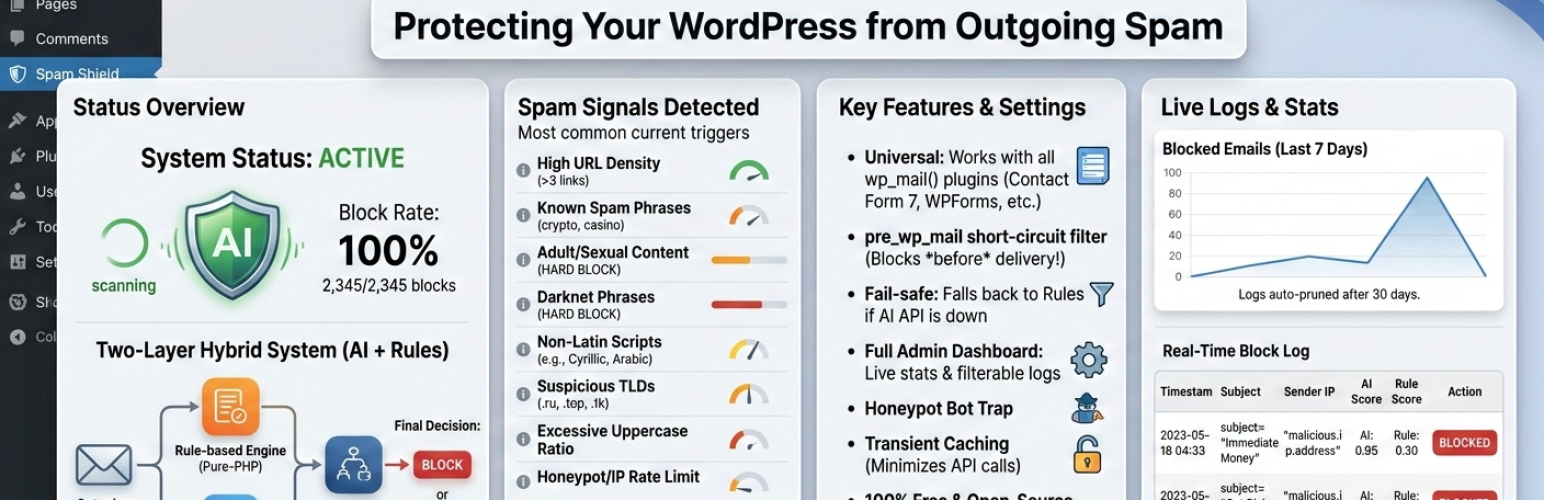
AI Email Spam Shield
Hybrid AI + rule-based spam detection for outgoing WordPress emails. Blocks spam before delivery — works with any form plugin.
How It Works
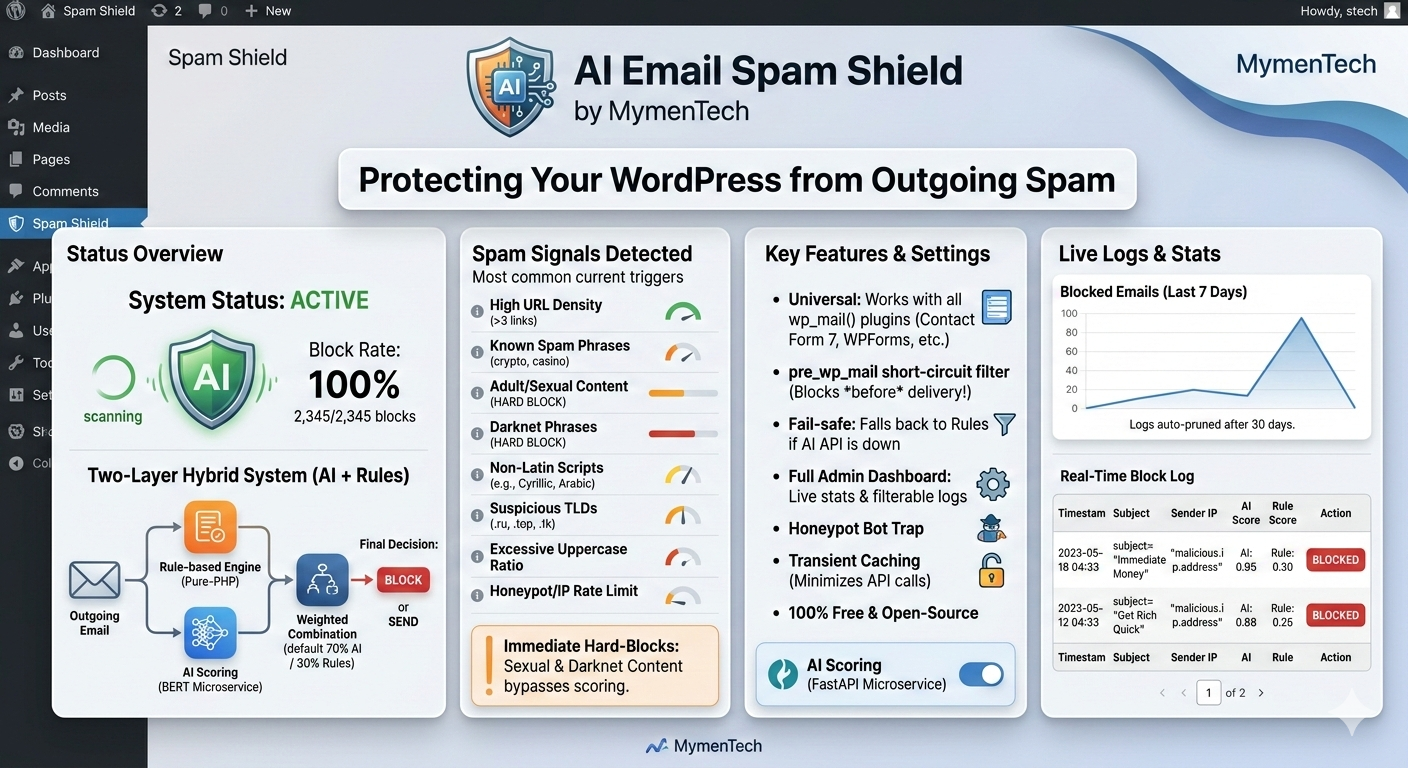
Every outgoing email passes through two scoring layers before delivery:
- Rule-based engine — instant, pure-PHP checks with no external dependency
- AI scoring — optional self-hosted BERT microservice or any supported cloud provider
The two scores are combined using configurable weights (default: 70% AI, 30% rules). If the final score meets or exceeds the spam threshold, the email is blocked before delivery.
Certain high-confidence signals — explicit sexual content, darknet phrases, or your own custom hard-block phrases — always block regardless of AI score.
Features
pre_wp_mailshort-circuit — blocks email before PHPMailer is invoked- Universal compatibility — Contact Form 7, WPForms, Gravity Forms, and any plugin using
wp_mail() - Fail-safe — AI unavailable? Falls back to rule-based scoring. Forms never break.
- Hard-block mode — bypasses AI weighting for zero-tolerance content
- Custom phrase management — add your own spam / hard-block phrases via the admin UI
- Transient caching — identical message hashes cached for 5 minutes to minimise API calls
- Admin dashboard — live charts, stats cards, paginated filterable logs, live test scanner
- Auto-prune — logs deleted after 30 days via WP-Cron
- 100% free and open-source — no paid APIs or subscriptions required
Spam Signals Detected
| Signal | Score |
|---|---|
| URL density (>3 links) | +0.25 |
| Spam phrases (crypto, casino, free money…) | +0.20 |
| Adult / sexual content (whole-word match) | +0.50 / hard-block |
| Darknet phrases (Tor, mirror links, markets…) | +0.30 / hard-block |
| Cyrillic / Russian script | +0.40 |
| Arabic, CJK, Hebrew, Devanagari, Thai | +0.30 |
| Suspicious TLDs (.ru, .top, .cc, .onion…) | +0.20 |
| Uppercase ratio >40% | +0.15 |
| Repeated special chars / letters (XXX, !!!!) | +0.10 |
| IP rate limit (>2 submissions / 2 min) | +0.30 |
| Custom spam phrases (configurable) | +0.20 |
| Custom hard-block phrases (configurable) | hard-block |
Supported AI Providers
| Provider | Notes |
|---|---|
| Self-Hosted (BERT) | Privacy-first — all processing on your server |
| OpenAI | GPT-4o-mini, GPT-4o, etc. |
| Anthropic Claude | claude-haiku-4-5, claude-sonnet, etc. |
| Google Gemini | gemini-1.5-flash (free tier available) |
| Groq | llama-3.1-8b-instant (very fast) |
| Cohere | command-r |
| DeepSeek | deepseek-chat (cost-effective) |
| Ollama | Any locally-pulled model |
| OpenAI-Compatible | LM Studio, Jan, LocalAI, etc. |
Installation
From WordPress Admin
- Upload the
ai-email-spam-shieldfolder to/wp-content/plugins/ - Activate through Plugins → Installed Plugins
- Go to AI Spam Shield → Settings, enable scanning, and save
The plugin works immediately in rule-only mode — no further setup required.
Self-Hosted BERT Microservice (optional)
# Clone the repo and start the spam-api service
cp spam-api/docker-compose-sample.yml docker-compose.yml
# Set AIESS_API_KEY in docker-compose.yml, then:
docker-compose up -d spam-api
Requires Docker and ~500 MB disk for the BERT model. Then enter the API URL (http://spam-api:8000/predict) and key in AI Spam Shield → Settings.
Custom Phrase Management
Go to AI Spam Shield → Phrases to add your own phrases:
- Spam phrases — boost the rule score (+0.20) when matched. Email is blocked only if the total score exceeds your threshold.
- Hard-block phrases — block immediately regardless of AI score or threshold. Use for zero-tolerance terms.
Screenshots
Requirements
- WordPress 6.0+
- PHP 8.0+
- Docker (optional, for self-hosted BERT microservice)
Privacy
This plugin logs email metadata (subject, sender address, IP address, spam scores, blocked status) to a local WordPress database table (wp_ai_spam_logs). Logs are automatically deleted after 30 days.
If a cloud AI provider is configured, email content is transmitted to that provider's API for spam scoring. Please review your chosen provider's privacy policy before use. For fully local processing, use the Self-Hosted provider with your own microservice.
Changelog
1.2.1
- Fixed fatal error:
Class "Parsedown" not foundwhen update checker parses GitHub release notes
1.2.0
- Added Custom Phrase Management — two-tier (spam / hard-block) phrase manager via new admin page
- Added Chart.js charts to dashboard: scanned vs blocked line chart + allowed/blocked doughnut
- Redesigned admin UI with modern color palette, card layout, and responsive grid
- Added
Logger::get_daily_stats()for per-day chart data
1.1.0.1
- Added plugin banner and screenshot assets
- Updated FAQ, Third Party Services, and Privacy sections
- Tested up to WordPress 6.9
1.1.0
- Added multi-provider AI support: OpenAI, Groq, DeepSeek, Anthropic Claude, Google Gemini, Cohere, Ollama, and OpenAI-compatible providers
- Added Provider_Factory for dynamic AI provider selection
- Updated admin Settings with provider selector and live health check
- Added dismissable privacy notice for cloud AI provider data transmission
1.0.2
- Added
.envfile support for API URL and key - Fixed Test Scanner UI incorrectly showing "API unavailable" on hard-block
- Added GitHub-based auto-updater
1.0.1
- Critical fix: switched to
pre_wp_mailshort-circuit — emails now reliably blocked before delivery - Added hard-block mode for sexual content and darknet phrases
- Added non-Latin script detection (Cyrillic, Arabic, CJK, Hebrew, Thai)
- Expanded suspicious TLDs
1.0.0
- Initial release
License
GPLv2 or later — by MymenTech
Releases
6 releases. Each count is every asset in that release; expand a row for the breakdown.