CMB2 Field Type: Select2 WP Registry grade A. No security issues foundWP RegistryNo security issues foundOpen the reportA
Select2 field type for Custom Metaboxes and Fields for WordPress
Install
This is the repository archive. It installs, but the folder name will carry the branch suffix and updates will not flow.
Install straight from GitHub with WP-CLI:
wp plugin install https://github.com/mustardbees/cmb-field-select2/archive/refs/heads/master.zipDescription
This plugin gives you two additional field types based on Select2:
- The
pw_selectfield acts much like the defaultselectfield. However, it adds typeahead-style search allowing you to quickly make a selection from a large list - The
pw_multiselectfield allows you to select multiple values with typeahead-style search. The values can be dragged and dropped to reorder
Installation
You can install this field type as you would a WordPress plugin:
- Download the plugin
- Place the plugin folder in your
/wp-content/plugins/directory - Activate the plugin in the Plugin dashboard
Alternatively, you can include this field type within your plugin/theme. The path to front end assets (JS/CSS) can be filtered using pw_cmb2_field_select2_asset_path. See an example where we load assets from the current active theme.
Usage
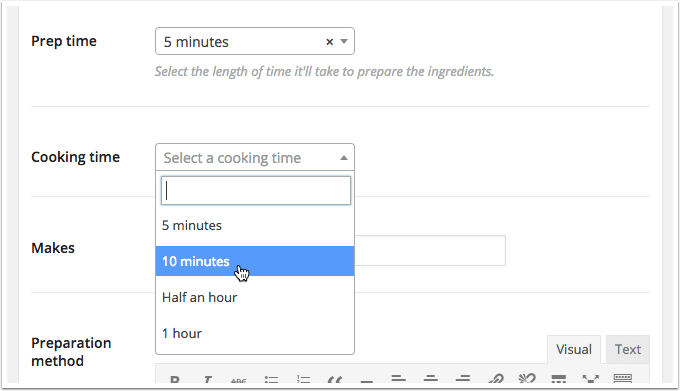
pw_select - Select box with with typeahead-style search. Example:
$cmb->add_field( array(
    'name'    => 'Cooking time',
    'id'      => $prefix . 'cooking_time',
    'desc'    => 'Cooking time',
    'type'    => 'pw_select',
    'options' => array(
        '5'  => '5 minutes',
        '10' => '10 minutes',
        '30' => 'Half an hour',
        '60' => '1 hour',
    ),
) );
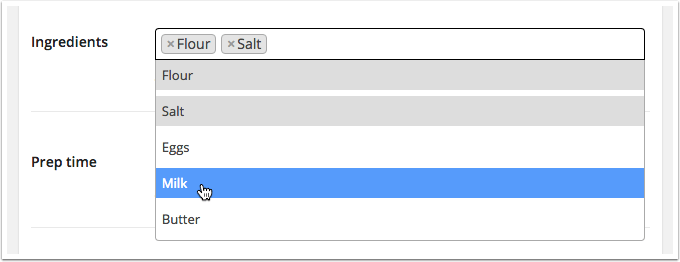
pw_multiselect - Multi-value select box with drag and drop reordering. Example:
$cmb->add_field( array(
    'name'    => 'Ingredients',
    'id'      => $prefix . 'ingredients',
    'desc'    => 'Select ingredients. Drag to reorder.',
    'type'    => 'pw_multiselect',
    'options' => array(
        'flour'  => 'Flour',
        'salt'   => 'Salt',
        'eggs'   => 'Eggs',
        'milk'   => 'Milk',
        'butter' => 'Butter',
    ),
) );
Placeholder
You can specify placeholder text through the attributes array. Example:
$cmb->add_field( array(
    'name'    => 'Ingredients',
    'id'      => $prefix . 'ingredients',
    'desc'    => 'Select this recipes ingredients.',
    'type'    => 'pw_multiselect',
    'options' => array(
        'flour'  => 'Flour',
        'salt'   => 'Salt',
        'eggs'   => 'Eggs',
        'milk'   => 'Milk',
        'butter' => 'Butter',
    ),
    'attributes' => array(
        'placeholder' => 'Select ingredients. Drag to reorder'
    ),
) );
Custom Select2 configuration and overriding default configuration options
You can define Select2 configuration options using HTML5 data-* attributes. It's worth reading up on the available options over on the Select2 website. Example:
$cmb->add_field( array(
    'name'    => 'Ingredients',
    'id'      => $prefix . 'ingredients',
    'desc'    => 'Select ingredients. Drag to reorder.',
    'type'    => 'pw_multiselect',
    'options' => array(
        'flour'  => 'Flour',
        'salt'   => 'Salt',
        'eggs'   => 'Eggs',
        'milk'   => 'Milk',
        'butter' => 'Butter',
    ),
    'attributes' => array(
        'data-maximum-selection-length' => '2',
    ),
) );
Helper functions
You may want to populate the options array dynamically. Common use cases include listing out posts and taxonomy terms. I've written a number of generic helper functions which can be used to return a CMB2 style array for both posts and terms.
Limitations/known issues
If you’d like to help out, pull requests are more than welcome!
- This field does not work well as a repeatable field within a repeatable group.
- Yoast SEO also loads Select2. Currently a version behind, there is an issue with the previous version of Select2 and it's ability to position the dropdown relative to the field.
Screenshots
Select box
Multi-value select box


Releases
14 releases.
These releases are tags only. The author does not attach a packaged zip, so there are no download counts to report.