Chatwoot Widget By Multilat
Chatwoot Live Chat Widget For WordPress With Defer Loading, Dark Mode, Locale, Custom Toggle Button, and Modern Admin UI
Install
This is the repository archive. It installs, but the folder name will carry the branch suffix and updates will not flow.
Install straight from GitHub with WP-CLI:
wp plugin install https://github.com/multilat/multilat-chatwoot-wordpress-plugin/archive/refs/heads/main.zipChatwoot Widget For WordPress — By Multilat
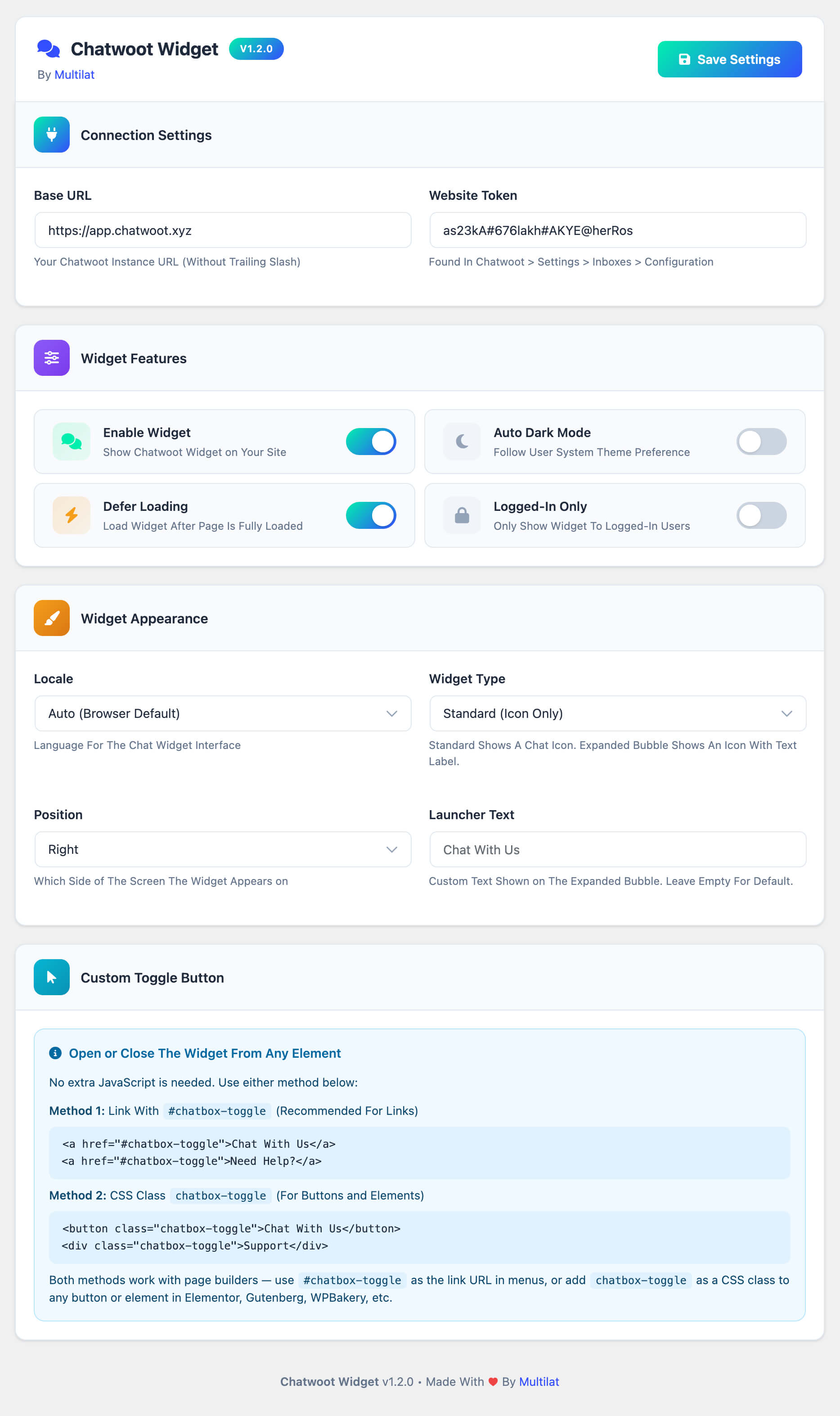
A lightweight WordPress plugin that adds the Chatwoot live chat widget to your site with deferred loading, dark mode, locale selection, custom toggle button support, and a modern admin interface.
Compatible With: WordPress 5.0+ and Chatwoot 4.x+
Features
Widget Controls
- Enable/Disable Widget: Master on/off switch
- Auto Dark Mode: Widget follows user system theme preference
- Defer Loading: Loads widget after page is fully loaded for better performance
- Logged-In Only: Restrict widget to authenticated WordPress users only
Widget Appearance
- Locale: Choose from 15 languages or auto-detect from browser
- Widget Type: Standard icon or expanded bubble with text label
- Position: Left or right side of the screen
- Launcher Text: Custom text for the expanded bubble
Custom Toggle Button
Open or close the chat widget from any element on your site — no JavaScript required:
- Link Method: Use
#chatbox-toggleas the URL (<a href="#chatbox-toggle">Chat With Us</a>) - Class Method: Add the
chatbox-toggleCSS class to any element - Works with all page builders (Elementor, Gutenberg, WPBakery, etc.)
Admin Interface
- Modern card-based settings page
- Visual feature toggles with color-coded icons
- Responsive layout for all screen sizes
- One-click save from the header
Requirements
- WordPress 5.0 or higher
- A Chatwoot instance (self-hosted or cloud)
- Website token from your Chatwoot inbox
Install
Option A: Upload ZIP
- Download
chatwoot-widget.zipfrom the latest release - Go to WordPress Admin > Plugins > Add New > Upload Plugin
- Upload the zip and click Install Now
- Click Activate
Option B: Manual Upload
- Download and extract the release zip
- Upload
chatwoot-widget.phpto yourwp-content/plugins/directory - Go to Plugins and activate Chatwoot Widget By Multilat
Option C: Git Clone
cd /path/to/wordpress/wp-content/plugins/
git clone https://github.com/multilat/multilat-chatwoot-wordpress-plugin.git
Configure
Go to Settings > Chatwoot Widget:
1. Connection Settings
- Base URL: Your Chatwoot instance URL
(e.g.,
https://chat.example.com) — without trailing slash - Website Token: Found in Chatwoot under Settings > Inboxes > Your Web Widget > Configuration
2. Widget Features
Toggle the features you need:
- Enable Widget: Turn the chat widget on or off
- Auto Dark Mode: Widget adapts to light/dark system preference
- Defer Loading: Loads the Chatwoot SDK after the page is fully loaded (recommended for performance)
- Logged-In Only: Only show the widget to logged-in WordPress users
3. Widget Appearance
- Locale: Set the widget language or leave as auto to detect from browser
- Widget Type: Choose between standard (icon only) or expanded bubble (icon + text)
- Position: Place the widget on the left or right side of the screen
- Launcher Text: Custom text displayed on the expanded bubble (e.g., "Chat With Us")
4. Custom Toggle Button (Optional)
Add a chat toggle to any page element:
<!-- Link Method -->
<a href="#chatbox-toggle">Chat With Us</a>

<!-- Class Method -->
<button class="chatbox-toggle">Need Help?</button>
Update
- Download the new release zip
- Go to Plugins > Add New > Upload Plugin
- Upload the zip and WordPress will prompt to replace the existing version
- Click Replace Current With Uploaded
Uninstall
- Go to WordPress Admin > Plugins
- Deactivate Chatwoot Widget By Multilat
- Click Delete to remove the plugin files
Plugin settings are stored in the wp_options table
under the key chatwoot_widget_settings and will be
removed when the plugin is deleted.
File Structure
multilat-chatwoot-wordpress-plugin/
├── chatwoot-widget.php    # Single-file plugin
├── LICENSE
└── README.md
License
This project is licensed under the GPL-2.0-or-later.
Developer
Multilat - Digital Services and Solutions
- Website: multilat.xyz
- Contact: multilat.xyz/contact
- Email: hello@multilat.xyz
Releases
1 release.
These releases are tags only. The author does not attach a packaged zip, so there are no download counts to report.