MUDRAVA Migration & Backup
Free WordPress migration, backup and restore. Portable archives, resumable exports, optional encryption. No account or paid size cap.
by MUDRAVA · github.com/mudrava/mudrava-migration-backup · website
Install
No release zip yet. The repository archive installs, but the folder name will carry the branch suffix and updates will not flow:
wp plugin install https://github.com/mudrava/mudrava-migration-backup/archive/refs/heads/main.zip
MUDRAVA Migration & Backup
Move a WordPress site to another host or domain. Keep a backup before a change.
Restore from your own portable .mudrava archive.
The complete manual workflow is free. No account. No paid archive size cap. Host resources and format limits still apply.
Download the plugin ZIP · Release notes · Report an issue · MUDRAVA
Release status: 1.0.0 review candidate. Submitted to WordPress.org on September 30, 2026. Automated scanning passed; manual review is pending. The download above is the installable plugin. GitHub's automatic “Source code” archives contain the development repository.
What you can do
| Feature | What it does |
|---|---|
| Export, import and restore | Move the database, media, themes, plugins and site files. |
| Streaming backups | Process files in chunks and database rows in batches. |
| Resumable jobs | Continue supported interrupted jobs from saved checkpoints. |
| Optional encryption | Protect an archive with a password and authenticated encryption. |
| Split archives and exclusions | Transfer a backup in parts and choose what to include. |
| Verification before restore | Check the archive and supported paths before replacing site data. |
| Destination restore point | Save the destination before overwriting and attempt recovery after an import error. |
| URL rewriting | Update site URLs, including recognized PHP serialized values. |
No telemetry or external migration service is used. WordPress handles its normal plugin update checks. You store and transfer your own archives.
Install and migrate
- Download the plugin ZIP.
- In WordPress, open Plugins → Add Plugin → Upload Plugin, upload the ZIP and activate it.
- Open MUDRAVA → Environment and review the host checks.
- On the source site, open Export, choose your options and select Create backup.
- Download the archive. Install the plugin on the destination and upload the archive under Import.
- Review the restore point information, restore, then inspect pages, media, accounts and integrations.
Requirements: standalone WordPress 6.0+, 64 bit PHP 7.4+ and zlib. Encrypted archives also require the backend recorded in the archive on the destination, either libsodium or the supported OpenSSL fallback.
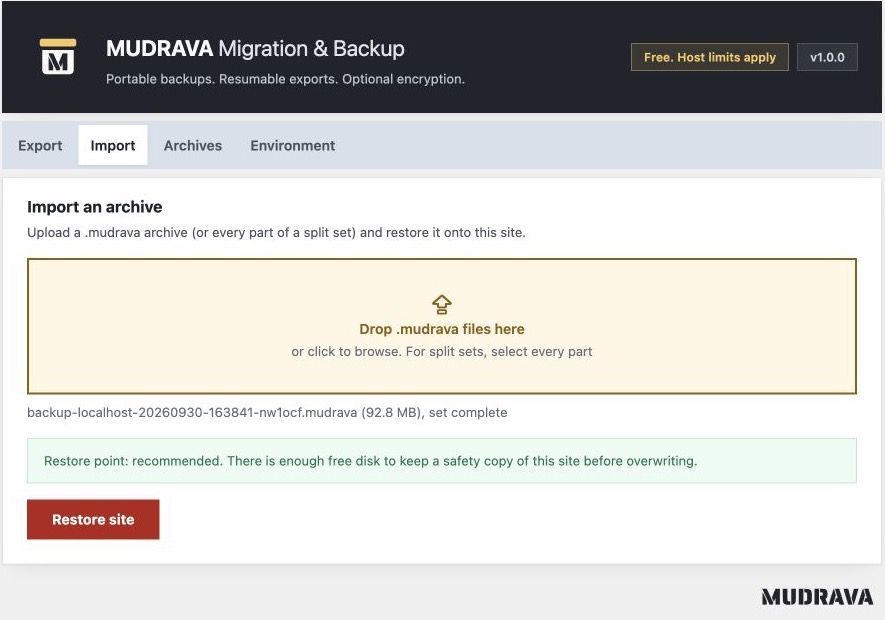
Export · Encryption and archive options · Environment checks · Completed restore
Tested, with clear limits
| Check | Recorded result |
|---|---|
| Automated suite | 577 tests and 2,612 assertions passed on September 30, 2026. |
| Code checks | PHPCS, PHPStan and distribution validation passed. |
| WordPress Plugin Check | No findings for the review candidate on the PHP 7.4 test site. |
| Large file round trip | A real 100 GiB file was exported and restored with matching independent hashes. |
| Plugin fixtures | Focused Elementor, Advanced Custom Fields and Polylang migration scenarios passed. |
See the 100 GiB report, compatibility scope and release validation. These results do not guarantee every host, plugin configuration or workload.
Pause orders, submissions, uploads and background writers during the final export. This release does not create a snapshot from one point in time of a changing site. Keep the import page open until restoration completes.
Multisite is not supported. Private archives need durable storage outside the web root. The Environment screen warns when temporary storage is being used. The earlier closed MUDRAVA plugin used a different format; its archives are not assumed compatible with this public release.
Help and documentation
- Compatibility, shared hosting and large sites
- Recovery guide and privacy
- Security policy for private vulnerability reports
- Issue templates for bugs and migration problems
Never attach a site backup, password, restore token or database dump to a public issue.
For developers
composer install
npm ci
composer check
composer dist
composer dist produces the installable ZIP in dist/.
For a Docker lab and browser tests, see development and
testing. CI workflows currently run manually.
Read the architecture, archive format, contribution guide and release process.
License
GPL 2.0 or later. Published by MUDRAVA.