Install
Upload it under Plugins → Add New Plugin → Upload Plugin, then activate.
Install straight from GitHub with WP-CLI:
wp plugin install https://github.com/mohdneotech/nh-games/releases/download/v1.0.1/nh-games-1.0.1.zipNH Games — Steam & PlayStation Shelf for WordPress
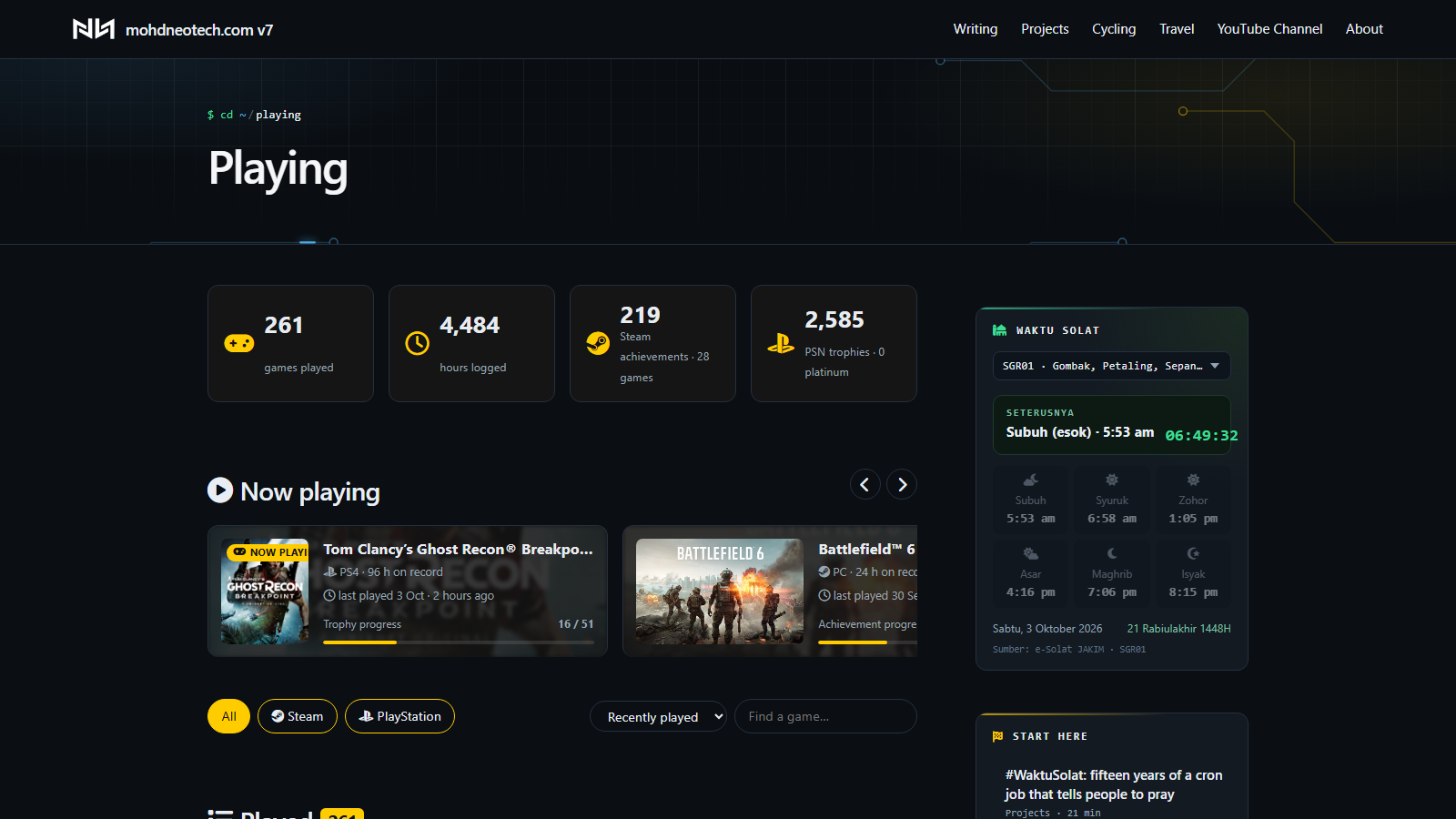
Show every game you've played on Steam and/or PlayStation on your WordPress site — playtime, last played, achievements & trophies, a live Now playing badge, a sidebar widget and a full, paginated games page.
Only use one platform? Turn on just that one. You only enter details for the platforms you enable.
Features
- Steam via the official Steam Web API — every played game, total playtime, last played, achievement progress, and a red Live badge while you're in-game.
- PlayStation (PS4 / PS5, plus PS3 & Vita through trophies) — playtime, sessions, first/last played, trophy breakdown (platinum / gold / silver / bronze). PS4 and PS5 versions of the same game are merged.
- Now playing — anything played in the last 48 hours (configurable), or games you pin by hand.
[nh_games]page — stats strip, horizontal "Now playing" rail, platform filter, sort (recent / most played / completion / A–Z), search, and pagination.[nh_now_playing]widget — also available as a classic widget under Appearance → Widgets.- A page per game at
/played/<game>/with cover, stats, progress bar, store link and room for your own review and star rating. - Auto-sync every 3 hours. Hide a game by setting it to Draft — syncing never republishes it.
- Accent colour + dark/light scheme setting, and optional widget CSS classes so it blends into your theme's sidebar.
Install
- Download the latest release zip from Releases (or clone this repo into
wp-content/plugins/nh-games). - Plugins → Add New → Upload Plugin, activate.
- Go to Settings → NH Games, tick the platforms you use, and fill in their details.
- Create a page (e.g. Playing) containing
[nh_games], and set its URL in the settings. - Add
[nh_now_playing](Shortcode block) or the NH Games — Now playing widget to your sidebar.
Steam setup
- Get a free Web API key at https://steamcommunity.com/dev/apikey (any domain name works).
- Paste the key and your profile — a profile URL, your custom name from
steamcommunity.com/id/<name>, or your 17-digit SteamID64. - In Steam: Edit Profile → Privacy Settings → set My profile and Game details to Public. Untick "Always keep my total playtime private".
PlayStation setup
Sony doesn't offer a public API, so this uses the same PSN mobile endpoints as psn-api and psnawp.
- Sign in at https://www.playstation.com.
- In the same browser, open https://ca.account.sony.com/api/v1/ssocookie and copy the
npssovalue. - Paste it into NPSSO token and save.
The NPSSO is exchanged for a refresh token immediately and never stored. The login lasts about two months and renews itself; when it lapses, wp-admin shows a notice and you paste a fresh NPSSO. Treat the NPSSO like a password — anyone holding it can act as you on PSN.
⚠️ PSN support relies on an unofficial API. It may break if Sony changes it, and it's used at your own risk.
Shortcodes
| Shortcode | What it does |
|---|---|
[nh_games] |
The full games page |
[nh_now_playing count="3"] |
Sidebar widget |
[nh_game_more] |
"More I've played on …" strip — for a custom single-nh_game template |
[nh_game_crumbs class="…"] |
Terminal-style breadcrumb for a custom single-game template |
Block themes
Game pages use your theme's normal single-post template. For a cleaner layout, create a template named single-nh_game in the Site Editor (or templates/single-nh_game.html in your theme) and drop in Post Content plus [nh_game_more].
Hooks
nhg_cpt_slug— change the/played/base (flush permalinks after).nhg_load_fontawesome— returnfalseto stop the plugin loading Font Awesome (it already skips this if your theme loads it).
Requirements
WordPress 6.2+, PHP 8.0+. Outbound HTTPS from your server to api.steampowered.com, store.steampowered.com, ca.account.sony.com and m.np.playstation.com.
Credits
Built by Mohd Nordin Hussain for mohdneotech.com/playing. PSN endpoint research thanks to the psn-api, psn-php and psnawp projects.
Not affiliated with Valve or Sony Interactive Entertainment. Steam and PlayStation are trademarks of their respective owners.
License
GPL-2.0-or-later
Releases
2 releases. Each count is every asset in that release; expand a row for the breakdown.