MPRO Text Canvas WP Registry grade A. No security issues foundWP RegistryNo security issues foundOpen the reportA
Interactive Elementor text canvas for editing, styling, moving, resizing, and exporting text as PNG or JPG — part of the MPRO WordPress plugin suite.
Install
Upload it under Plugins → Add New Plugin → Upload Plugin, then activate.
Install straight from GitHub with WP-CLI:
wp plugin install https://github.com/moghadam-pro/text-canvas-wp-plugin/releases/download/v1.1.0/mpro-text-canvas.zipAn interactive, exportable text-composition canvas for Elementor — part of the MPRO plugin suite for WordPress.
Overview
MPRO Text Canvas adds a responsive text-design workspace to Elementor. Visitors can click or tap text directly on the canvas to edit it, drag layers to reposition them, resize text with a handle or a two-finger pinch gesture, choose fonts and colors, and download the finished composition as an image.
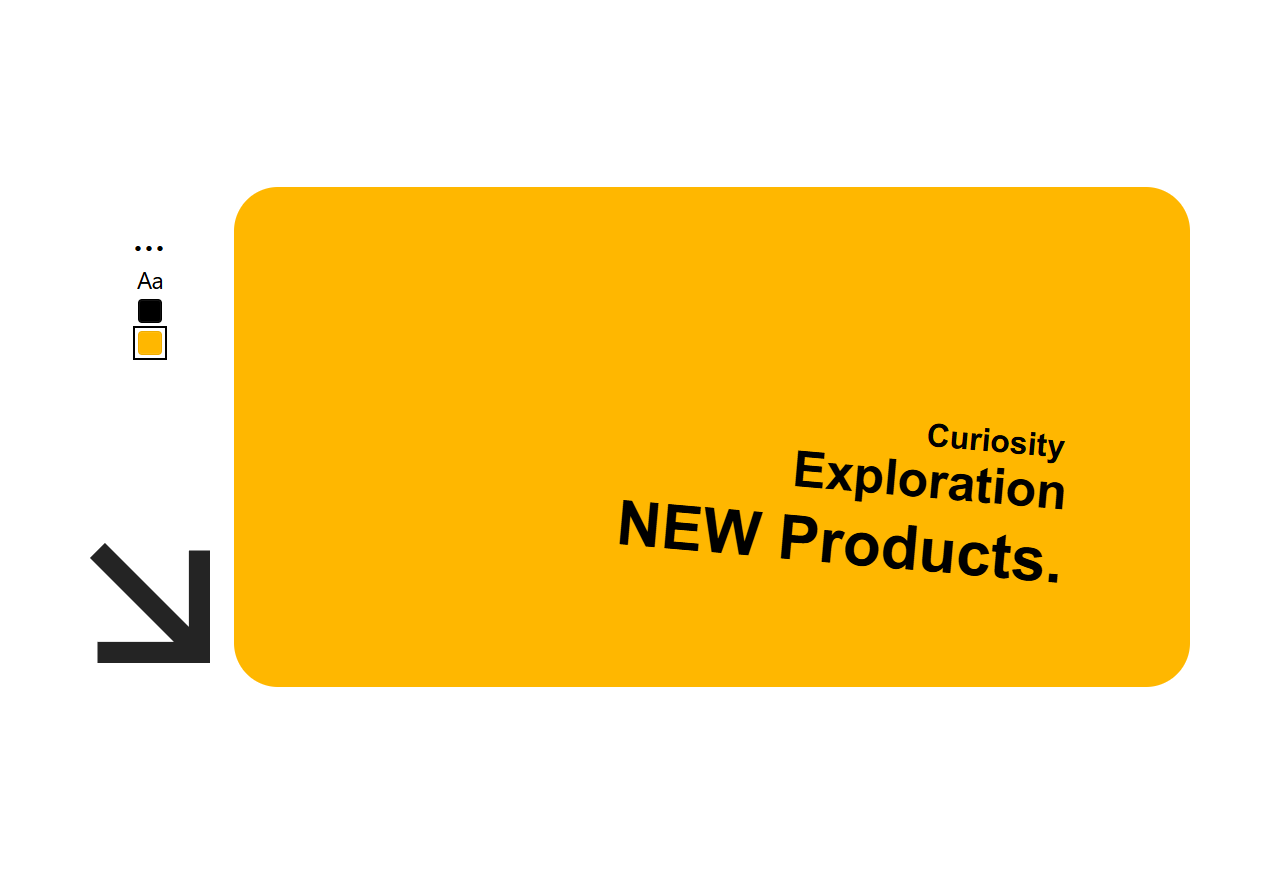
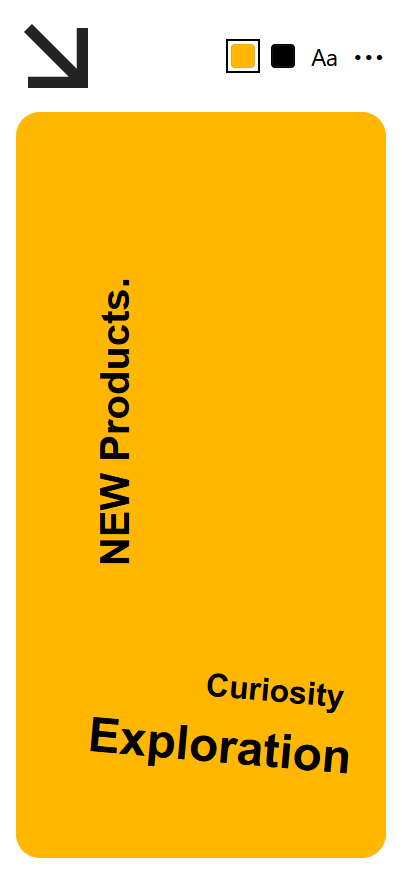
The widget follows the supplied desktop and mobile layouts:
- It always fills the width of the Elementor container that contains it.
- The default canvas height is 500 px on desktop/tablet and 746 px on mobile.
- Desktop uses a compact control column and right canvas.
- Mobile places the canvas first, followed by the compact toolbar.
- Export dimensions are exactly the rendered canvas dimensions.
- Exported images are always rectangular; the visual corner radius is intentionally excluded.
Preview
Desktop
Mobile
Main Features
Visitor-facing canvas
- Inline editing — click or tap a text layer to enter editing mode.
- Exit editing naturally — click or tap anywhere outside the active layer.
- Drag positioning — move each text layer freely inside the canvas.
- Pinch and rotate — use two fingers on touch devices to resize and rotate text.
- Visible resize handle — mouse and keyboard users can resize the selected layer.
- Visible rotation handle — mouse and keyboard users can freely rotate the selected layer.
- Up to three text layers — the Add Text action disables automatically at the limit.
- Layer deletion — use the selected-layer delete control or the Delete/Backspace key.
- Plain-text paste — pasted formatting is stripped to keep output predictable.
- RTL/LTR friendly — editable text uses automatic text direction detection.
- Responsive starting positions — separate desktop, tablet, and mobile defaults.
Toolbar
- Background color swatch opens a color-picker modal.
- Text color swatch changes the selected layer color.
- Aa font control opens the configured font library.
- A three-dot menu contains Reset, Add Text, both exports, and a link to the full online tool.
- Reset restores all text layers, colors, font choices, sizes, rotations, and positions to widget defaults.
- Add Text creates another editable layer using the default text and style.
- Export Transparent / Export PNG downloads a transparent PNG.
- Export With BG / Export JPG downloads a JPG with the current canvas background.
Image export
- Uses the browser Canvas API; no server processing is required.
- Waits for configured fonts to finish loading before rendering.
- Preserves text alignment, line height, wrapping, weight, style, direction, color, and letter spacing.
- Uses the exact current CSS pixel dimensions of the yellow frame.
- Transparent export contains no background pixels.
- Background export fills the complete rectangle, including the four corners.
- Border radius is never baked into either export.
- Files are saved locally with timestamped names.
WordPress administration
Available under MPRO → Text Canvas:
- Default text
- Default background color
- Default text color
- Default font stack
- Google Fonts management
- Uploaded font management
Font management
Google Fonts
- Add any Google Fonts family by name.
- A built-in suggestion list includes commonly used Latin, Arabic, and Persian families.
- Select one or more weights, for example
400;700. - Fonts use
display=swap. - Google Fonts are registered as a widget stylesheet dependency and are loaded only when the Text Canvas stylesheet is used.
Uploaded fonts
- Upload through the standard WordPress Media Library.
- Supported formats: WOFF2, WOFF, TTF, and OTF.
- Configure family name, weight, style, and format per file.
- Generated
@font-facedeclarations usefont-display: swap.
Site color integration
- Visitor color pickers accept unrestricted colors and do not inherit WordPress or Elementor palettes.
Installation
From the release ZIP
- Download
mpro-text-canvas.zipfrom the repository's Releases page. - Open WordPress Admin → Plugins → Add New → Upload Plugin.
- Choose the ZIP file and click Install Now.
- Activate MPRO Text Canvas.
- Confirm that Elementor is installed and active.
From source
cd wp-content/plugins/
git clone https://github.com/moghadam-pro/text-canvas-wp-plugin.git mpro-text-canvas
Then activate the plugin from Plugins → Installed Plugins.
Initial Setup
- Go to MPRO → Text Canvas.
- Set the global default text and colors.
- Add any Google Fonts or uploaded font files needed on the site.
- Save changes.
- Edit a page with Elementor.
- Find MPRO Text Canvas in the MPRO widget category.
- Drag the widget into any container.
Elementor Controls
Content
| Control | Purpose |
|---|---|
| Default text | Text used by the initial layer and every newly added layer |
| Reset label | Label shown on the reset action |
| Add Text label | Label shown on the add-layer action |
| Transparent export labels | Separate desktop and mobile labels |
| Background export labels | Separate desktop and mobile labels |
Canvas
| Control | Responsive | Default |
|---|---|---|
| Background color | No | Admin default (#ffb700) |
| Height | Yes | 500 px desktop/tablet, 746 px mobile |
| Corner radius | Yes | 44 px desktop, 24 px mobile |
| Inner padding | Yes | 32 px desktop, 20 px mobile |
Default text style
| Control | Responsive | Default |
|---|---|---|
| Text color | No | Admin default |
| Font family | No | Admin default font stack |
| Font weight | No | 700 |
| Font size | Yes | 24 px |
| Line height | Yes | 1.45 em |
| Alignment | No | Right |
| Initial horizontal position | Yes | 68% desktop, 52% mobile |
| Initial vertical position | Yes | 84% desktop, 80% mobile |
| Initial text width | Yes | 59% desktop, 78% mobile |
Toolbar and layout
| Control | Responsive | Default |
|---|---|---|
| Desktop toolbar width | Yes | 120 px |
| Layout gap | Yes | 24 px desktop, 16 px mobile |
| Button background | No | #f5f4ef |
| Button text color | No | Black |
| Button radius | Yes | 4 px |
Visitor Interaction Guide
| Action | Mouse / keyboard | Touch |
|---|---|---|
| Select and edit text | Click a layer | Tap a layer |
| Finish editing | Click outside | Tap outside |
| Move text | Drag layer | Drag layer |
| Resize text | Drag resize handle; arrow keys on focused handle | Two-finger pinch or drag handle |
| Rotate text | Drag rotation handle; arrow keys on focused handle | Two-finger twist |
| Delete text | Delete button or Delete/Backspace | Delete button |
| Change font | Select layer, then click Aa | Select layer, then tap Aa |
| Change text color | Select layer, then click text swatch | Select layer, then tap text swatch |
Export Behavior
Transparent PNG
Desktop label: EXPORT TRANSPARENT
Mobile label: EXPORT PNG
The PNG contains only the text layers. Empty canvas pixels remain transparent.
JPG with background
Desktop label: EXPORT WITH BG
Mobile label: EXPORT JPG
The JPG contains the current background color across the complete rectangular image.
Dimensions
The plugin reads the live frame dimensions immediately before export. Examples using the default design:
- Desktop:
956 × 500 pxwhen placed in the supplied1100 pxcomposition. - Mobile:
370 × 746 pxin a370 pxwide container.
A different Elementor container width produces a correspondingly different export width. The configured frame height remains in effect.
File Structure
mpro-text-canvas/
├── mpro-text-canvas.php
├── uninstall.php
├── README.md
├── readme.txt
├── CHANGELOG.md
├── RELEASE-NOTES.md
├── LICENSE
├── includes/
│   ├── class-mpro-tc-admin.php
│   ├── class-mpro-tc-elementor-widget.php
│   └── class-mpro-tc-fonts.php
├── assets/
│   ├── css/
│   │   ├── admin.css
│   │   └── frontend.css
│   └── js/
│       ├── admin.js
│       └── frontend.js
├── docs/
│   ├── desktop-preview.png
│   └── mobile-preview.png
├── scripts/
│   └── build-release.sh
├── tests/
│   ├── browser-fixture.html
│   ├── run-browser-smoke.sh
│   └── run_browser_smoke.py
└── .github/workflows/
    ├── ci.yml
    └── release.yml
Technical Architecture
PHP
- Registers the shared MPRO admin menu and plugin settings.
- Registers frontend assets without globally enqueueing the widget bundle.
- Registers the Elementor widget through
elementor/widgets/register. - Keeps visitor color controls independent from WordPress and Elementor palettes.
- Registers Google Fonts as optional stylesheet dependencies.
- Generates safe
@font-facedeclarations for uploaded files.
JavaScript
The frontend is written in dependency-free vanilla JavaScript.
Each widget instance owns:
- Its own frame and layer state
- Pointer tracking and gesture state
- Selection and editing state
- Modal state
- Export rendering
Multiple Text Canvas widgets can therefore exist on the same page without sharing layer state.
CSS
- CSS Grid reproduces the desktop and mobile compositions.
- Elementor selectors and CSS custom properties handle visual overrides.
- The frame is always
width: 100%of its available grid column. - Touch interaction uses Pointer Events and
touch-actionrules.
Development
Static checks
find . -name '*.php' -not -path './vendor/*' -print0 | xargs -0 -n1 php -l
node --check assets/js/frontend.js
node --check assets/js/admin.js
Browser smoke test
The browser test verifies:
- Widget initialization
- Desktop and mobile frame dimensions
- Tap-to-edit and tap-outside behavior
- Drag movement
- Two-pointer pinch resizing
- Three-layer limit
- Reset behavior
- Font and color modals
- PNG and JPG generation
- Exact export dimensions
- Transparent PNG corners
- Full rectangular JPG background with no exported radius
Run:
./tests/run-browser-smoke.shThe test requires Python 3, Chromium, Xvfb, requests, and websocket-client.
Build the installable ZIP
./scripts/build-release.shOutput:
dist/mpro-text-canvas.zipAutomated Release
The workflow in .github/workflows/release.yml watches .release-trigger.
To publish a new version:
- Update the plugin version and changelog.
- Put the tag name in
.release-trigger, for examplev1.1.0. - Commit and push the trigger file.
- GitHub Actions runs syntax checks, builds the ZIP, creates the tag/release if needed, and uploads the package.
Requirements
| Dependency | Minimum |
|---|---|
| WordPress | 5.8 |
| PHP | 7.4 |
| Elementor | 3.0 recommended |
| Browser | Modern browser with Pointer Events, Canvas, and download support |
Elementor is required for rendering the widget. The administration page remains accessible when Elementor is inactive, and WordPress displays an activation notice.
Privacy and External Requests
- The canvas and exports are processed entirely in the visitor's browser.
- No composition text or image is sent to the WordPress server by the plugin.
- No analytics or tracking are included.
- Google Fonts requests occur only after an administrator explicitly adds a Google Fonts family.
- Uploaded fonts are served from the site's own Media Library.
Known Scope of v1.1.0
- Text layers are intentionally limited to three.
- The exporter supports text and solid background colors; image backgrounds are not part of v1.1.0.
- User compositions are not persisted between page visits.
- Export resolution follows CSS pixels rather than applying an automatic high-density multiplier.
MPRO Suite
MPRO Text Canvas is designed to coexist with the other MPRO WordPress plugins. The suite shares one MPRO top-level admin menu and gives every plugin its own submenu.
| Plugin | Purpose |
|---|---|
| Text Canvas | Interactive text composition and image export |
| Text Scramble | Character decode animation for text, links, and buttons |
| Portfolio | Custom portfolio content management and presentation |
Changelog
See CHANGELOG.md.
Author
Sayid Moghadam / Moghadam.pro
https://moghadam.pro/mpro-plugins
License
MPRO Text Canvas is licensed under the GNU General Public License v2.0 or later. See LICENSE.
Releases
2 releases. Each count is every asset in that release; expand a row for the breakdown.