Gravity Forms Data Attributes WP Registry grade A. No security issues foundWP RegistryNo security issues foundOpen the reportA
Add custom data attributes to your Gravity Forms field markup
Install
This is the repository archive. It installs, but the folder name will carry the branch suffix and updates will not flow.
Install straight from GitHub with WP-CLI:
wp plugin install https://github.com/mmirus/gravity-forms-data-attributes/archive/refs/heads/master.zipOn Packagist as mmirus/gravity-forms-data-attributes:
composer require mmirus/gravity-forms-data-attributesThis plugin allows you to add custom data attributes to Gravity Forms fields.
It should work with:
- all of the Standard field types
- any of the Advanced field types that only have one input field (e.g., Email but not Address)
- the List advanced field type, including with multiple columns (thanks @reddo!).
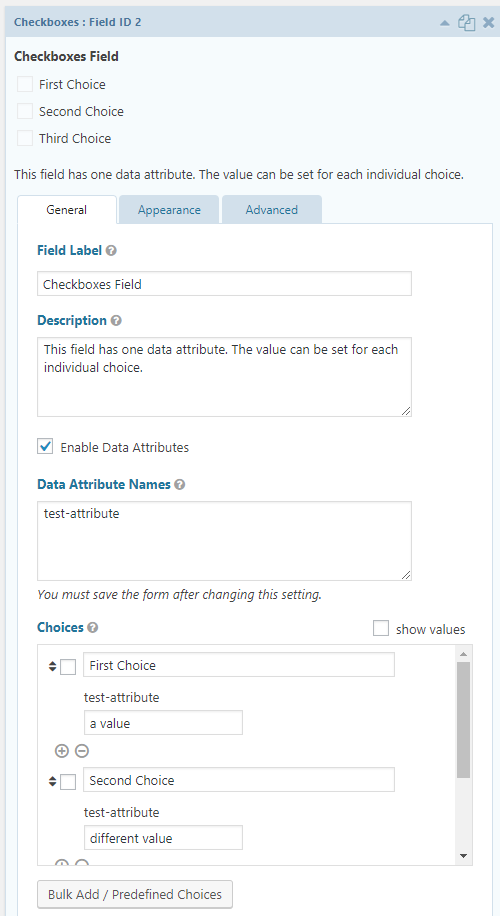
For fields with choices, such as checkboxes, you can assign separate values for each data attribute for each choice (the UI for this is ugly right now 🤷).
Usage
For each field you want to enable data attributes for:
- On the field's General settings tab, check the Enable Data Attributes box.
- In the Data Attribute Names field that appears, enter one data attribute name (e.g.,
my-attribute) per line.- Do not prefix your attribute name with
data-. The plugin will do that for you,
- Do not prefix your attribute name with
- Save your form.
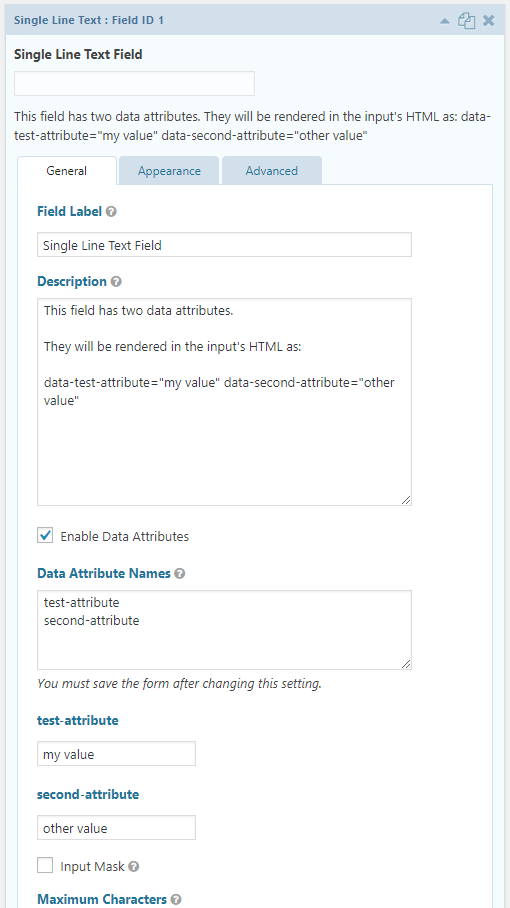
- Reopen the field settings. You will now see additional setting fields where you can enter the value of each data attribute you added.
- For fields with choices, such as checkboxes, the data attribute value settings appear next to each choice's name and value fields.
- For other fields, the data attribute value settings will appear underneath the Data Attribute Names field.
Installation
There are three options for installing this plugin:
- With composer from Packagist:
composer require mmirus/gravity-forms-data-attributes - With GitHub Updater
- By downloading the latest release ZIP from this repository and installing it like any normal WordPress plugin
Contributing
To work on this project (for yourself or to contribute a PR):
- Clone this repo
- Run
composer install - Run
yarnornpm install
And you should be good to go.
Pre-commit linting is enforced (see .eslintrc.js and .stylelintrc.js for scripts and styles; PHP uses PSR-2).
Screenshots
Settings for a field without choices
Settings for a field with choices (checkboxes)
Releases
7 releases.
These releases are tags only. The author does not attach a packaged zip, so there are no download counts to report.