Install
This is the repository archive. It installs, but the folder name will carry the branch suffix and updates will not flow.
Install straight from GitHub with WP-CLI:
wp plugin install https://github.com/mklasen/claudes-todo-list-wordpress-plugin/archive/refs/heads/master.zipTodo List Front Page WordPress Plugin
Note: This repo is a WordPress Plugin entirely created by Claude Code, as an experiment. It took 45 minutes from installing Claude Code to this result. You can find the used prompts in USED_PROMPTS.md
Screenshot of front page on clean WordPress install:
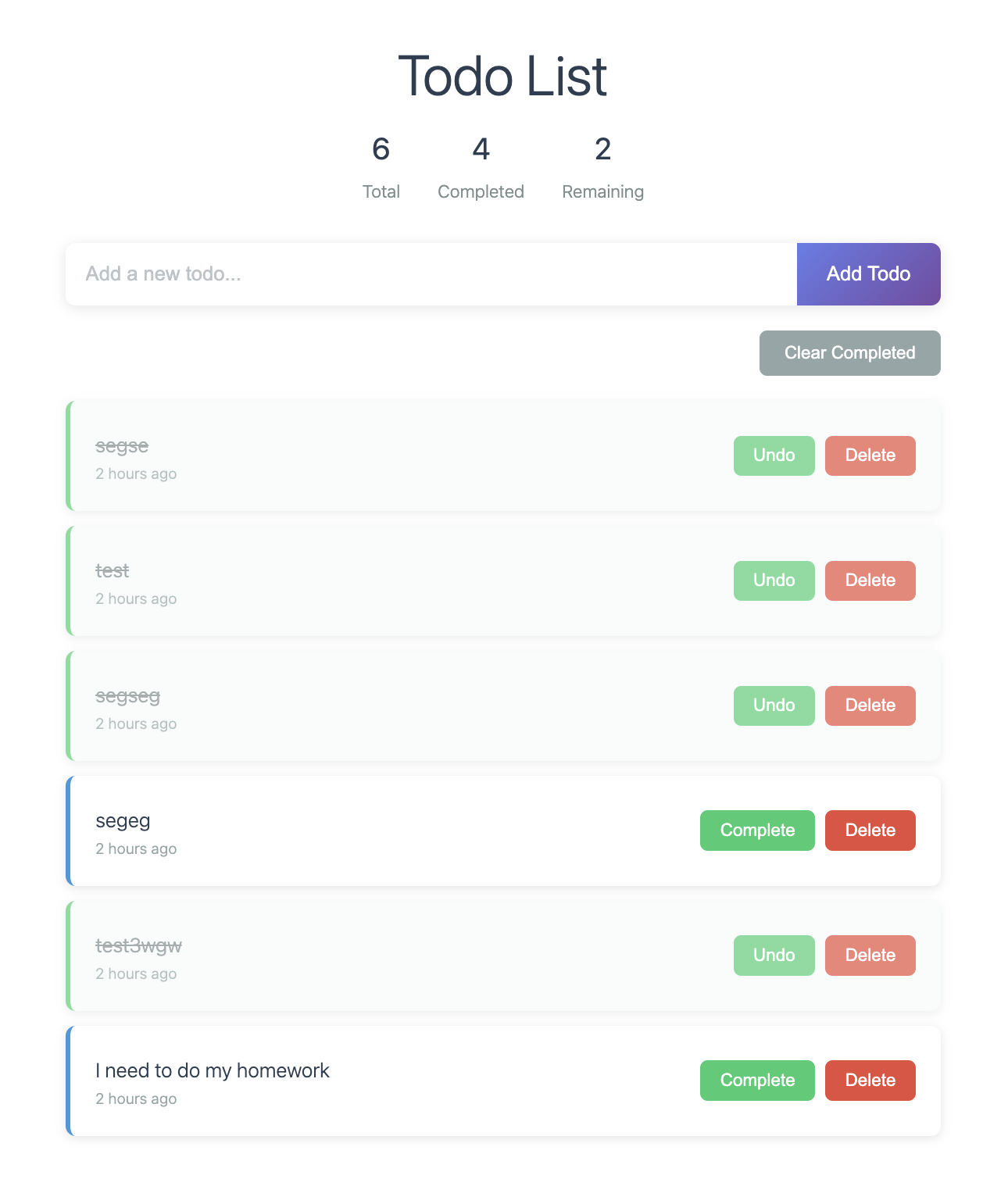
A modern, enterprise-grade WordPress plugin that replaces the front page content with a fully functional todo list application. Built with modern PHP architecture, REST API endpoints, and responsive design.
Author: Marinus Klasen
Version: 1.0.0
License: GPL v2 or later
WordPress: 5.0+ | PHP: 7.4+ | Tested up to: 6.4
Features
Core Functionality
- ✅ Add Todos: Create new todo items with a simple form
- ✅ Mark Complete: Toggle todo items between completed and pending states
- ✅ Delete Todos: Remove individual todo items
- ✅ Clear Completed: Bulk remove all completed todos
- ✅ Statistics: Display total, completed, and remaining todo counts
- ✅ Timestamps: Shows when each todo was created
- ✅ Empty State: User-friendly message when no todos exist
Technical Features
- ✅ Modern Architecture: PSR-4 autoloading with Composer
- ✅ Object-Oriented: Properly structured classes with single responsibility
- ✅ AJAX Powered: Seamless user experience without page reloads
- ✅ Secure: Nonce verification and proper input sanitization
- ✅ Responsive Design: Mobile-friendly interface
- ✅ WordPress Integration: Follows WordPress coding standards and hooks
- ✅ Internationalization Ready: Text domain setup for translations
- ✅ Database Optimized: Uses WordPress options API for data storage
User Experience
- ✅ Real-time Updates: Stats update automatically after each action
- ✅ Confirmation Dialogs: Prevents accidental deletions
- ✅ Visual Feedback: Hover effects and transitions
- ✅ Keyboard Friendly: Form submission with Enter key
- ✅ Error Handling: User-friendly error messages
- ✅ Loading States: Proper feedback during AJAX operations
Code Preferences Applied
PHP Coding Standards
- ✅ snake_case: All method and variable names use snake_case instead of camelCase
- ✅ Same-line Braces: Opening braces on same line as declaration
- ✅ No Closures: Avoided anonymous functions to prevent serialization errors
- ✅ Proper Class Structure: Clean class organization with clear separation of concerns
Architecture Principles
- ✅ Dependency Injection: Plugin URL passed to Frontend class
- ✅ Singleton Pattern: Single instance management for Plugin class
- ✅ Method Isolation: Each method has a single, clear responsibility
- ✅ Error Handling: Try-catch blocks and proper error responses
- ✅ Security First: Input validation and nonce verification
File Structure
todo-list-frontpage/
├── composer.json                    # Composer configuration with PSR-4 autoloading
├── todo-list-frontpage.php         # Main plugin bootstrap file
├── README.md                       # This documentation file
├── src/                            # PHP source files (PSR-4 namespace)
│   ├── Plugin.php                  # Main plugin initialization class
│   ├── Frontend.php                # Frontend content replacement
│   ├── Rest_Controller.php         # REST API endpoint handlers
│   ├── Todo_Manager.php            # Business logic layer
│   ├── Todo_Repository.php         # Data access layer
│   └── Database.php                # Database table management
├── assets/                         # Frontend assets
│   ├── todo-list.js                # JavaScript functionality
│   └── todo-list.css               # Styling and responsive design
└── vendor/                         # Composer autoloader (generated)
    └── autoload.php
Installation
- Upload the plugin folder to
/wp-content/plugins/ - Run
composer install --no-devin the plugin directory - Activate the plugin through the WordPress admin
- Visit your front page to see the todo list
Usage
Adding Todos
- Enter text in the input field
- Click "Add Todo" or press Enter
- Todo appears in the list with timestamp
Managing Todos
- Click "Complete" to mark a todo as done
- Click "Undo" to mark a completed todo as pending
- Click "Delete" to remove a todo (with confirmation)
- Use "Clear Completed" to remove all finished todos
Statistics
- View total number of todos
- See completed count
- Track remaining tasks
Technical Implementation
Data Storage
- Custom Database Table: Uses dedicated
wp_todo_itemstable for optimal performance - Auto-incrementing IDs: Primary key with bigint(20) for scalability
- Indexed Fields: Optimized queries with indexes on
completedandcreated_atcolumns - Data Migration: Automatically migrates existing data from options table on activation
- Table Structure:
CREATE TABLE wp_todo_items (
    id bigint(20) unsigned NOT NULL AUTO_INCREMENT,
    text text NOT NULL,
    completed tinyint(1) NOT NULL DEFAULT 0,
    created_at datetime NOT NULL DEFAULT CURRENT_TIMESTAMP,
    updated_at datetime NOT NULL DEFAULT CURRENT_TIMESTAMP ON UPDATE CURRENT_TIMESTAMP,
    PRIMARY KEY (id),
    KEY idx_completed (completed),
    KEY idx_created_at (created_at)
)
Security Measures
- WordPress nonce verification for all AJAX requests
- Input sanitization using
sanitize_text_field() - Proper escaping in output with
esc_html()andesc_attr() - User capability checks (can be extended)
Performance Optimizations
- Assets Optimization: Only loaded on front page
- Database Efficiency: Custom table with proper indexes for fast queries
- Repository Pattern: Clean separation between data access and business logic
- Prepared Statements: All database queries use prepared statements for security
- Error Logging: Comprehensive error handling with detailed logging
- Minimal JavaScript: Organized code structure with efficient DOM manipulation
- CSS Optimization: Fast rendering with modern CSS practices
Browser Support
- Modern browsers (Chrome, Firefox, Safari, Edge)
- Internet Explorer 11+ (with degraded animations)
- Mobile browsers (iOS Safari, Chrome Mobile)
Customization
Styling
Edit assets/todo-list.css to modify appearance:
- Colors and themes
- Typography
- Spacing and layout
- Responsive breakpoints
Functionality
Extend the plugin by:
- Adding new todo properties (priority, categories, etc.)
- Implementing user-specific todos
- Adding export/import functionality
- Creating admin interface
Development Notes
Code Style Preferences
- snake_case for all PHP methods and variables
- Same-line braces for all control structures and functions
- No anonymous functions to avoid serialization issues
- Explicit typing where beneficial for code clarity
WordPress Hooks Used
plugins_loaded- Plugin initializationwp_enqueue_scripts- Asset loadingthe_content- Content replacementrest_api_init- REST API endpoint registration
REST API Endpoints
The plugin provides a complete REST API for todo management:
Base URL: /wp-json/todo-list/v1/
- GET /todos - Get all todos (with optional search parameter)
- POST /todos - Create a new todo
- GET /todos/{id} - Get a specific todo
- PUT /todos/{id} - Update a todo
- DELETE /todos/{id} - Delete a todo
- PUT /todos/{id}/toggle - Toggle todo completion status
- DELETE /todos/completed - Clear all completed todos
- GET /todos/stats - Get todo statistics
Example API Usage:
// Get all todos
fetch('/wp-json/todo-list/v1/todos')
  .then(response => response.json())
  .then(data => console.log(data));

// Create a new todo
fetch('/wp-json/todo-list/v1/todos', {
  method: 'POST',
  headers: {
    'Content-Type': 'application/json',
    'X-WP-Nonce': wpApiSettings.nonce
  },
  body: JSON.stringify({ text: 'New todo item' })
});
Database Architecture
- Repository Pattern: Clean separation between data access and business logic
- Database Class: Handles table creation, versioning, and schema management
- Todo_Repository: Encapsulates all database operations with proper error handling
- Todo_Manager: Business logic layer that coordinates between repository and frontend
- Automatic Migration: Seamlessly migrates data from options table to custom table
Future Enhancements
- User authentication integration
- Todo categories and tags
- Due dates and reminders
- Drag and drop reordering
- Bulk operations
- Data export/import
- Advanced search and filtering
- Database table optimization tools
- Real-time updates with WebSockets
- Mobile app integration via REST API
Troubleshooting
Common Issues
- Plugin not activating: Check PHP version (7.4+ required)
- Todos not saving: Verify database permissions
- AJAX errors: Check WordPress debug logs
- Styling issues: Clear any caching plugins
Debug Mode
Enable WordPress debug mode in wp-config.php:
define('WP_DEBUG', true);
define('WP_DEBUG_LOG', true);
License
This plugin is licensed under the GPL v2 or later.
Copyright (C) 2024 Marinus Klasen

This program is free software; you can redistribute it and/or modify
it under the terms of the GNU General Public License as published by
the Free Software Foundation; either version 2 of the License, or
(at your option) any later version.

This program is distributed in the hope that it will be useful,
but WITHOUT ANY WARRANTY; without even the implied warranty of
MERCHANTABILITY or FITNESS FOR A PARTICULAR PURPOSE. See the
GNU General Public License for more details.
Support & Contributing
- Author: Marinus Klasen
- Email: hello@mklasen.com
- Website: mklasen.com
- Issues: GitHub Issues (when available)
- Documentation: This README file
Getting Help
- Check the troubleshooting section above
- Enable WordPress debug mode for detailed error logs
- Verify all requirements are met (PHP 7.4+, WordPress 5.0+)
- Contact support via email with detailed error information
Contributing
Contributions are welcome! Please follow WordPress coding standards and include:
- Proper PHPDoc comments
- Unit tests for new features
- Updated documentation
- Backwards compatibility considerations
Acknowledgments
- Built with modern WordPress development practices
- Follows PSR-4 autoloading standards
- Implements WordPress REST API best practices
- Responsive design with modern CSS Grid/Flexbox
- Comprehensive error handling and logging
- Internationalization ready (i18n)