FileFolio – File Browser, Photo Gallery & Embeds for Google Drive
FileFolio (formerly Embed Drive): show Google Drive folders, photo galleries, file previews, search and ZIP downloads on WordPress with a block or shortcode. Read-only, open source, no upsells.
Install
Upload it under Plugins → Add New Plugin → Upload Plugin, then activate.
Install straight from GitHub with WP-CLI:
wp plugin install https://github.com/mk-manishkandel/filefolio/releases/download/v0.6.0/filefolio.zip
FileFolio
File browser, photo gallery and embeds for Google Drive, on WordPress. Formerly Embed Drive.
Show Google Drive folders and files on your WordPress site. Open source, with no licence keys, upsells or tracking.
Download the latest release (filefolio.zip). After you install it, updates appear on your Plugins screen like any other plugin.
The plugin has been submitted to the WordPress.org plugin directory and is waiting for review. Once it's approved, you'll also be able to install it from Plugins > Add New.
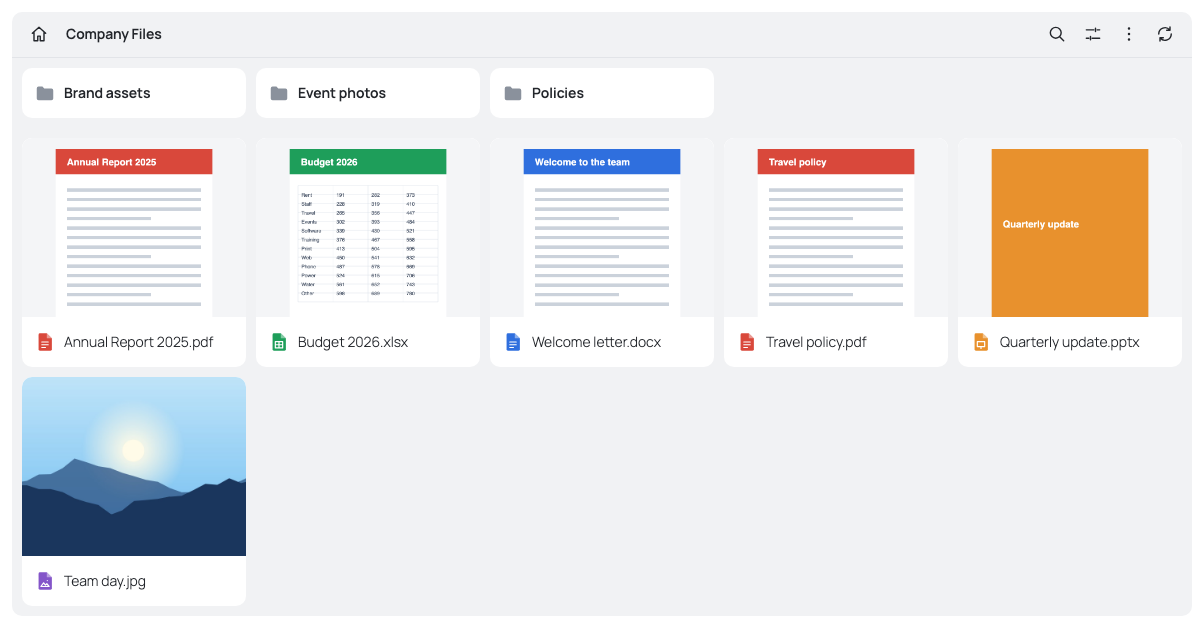
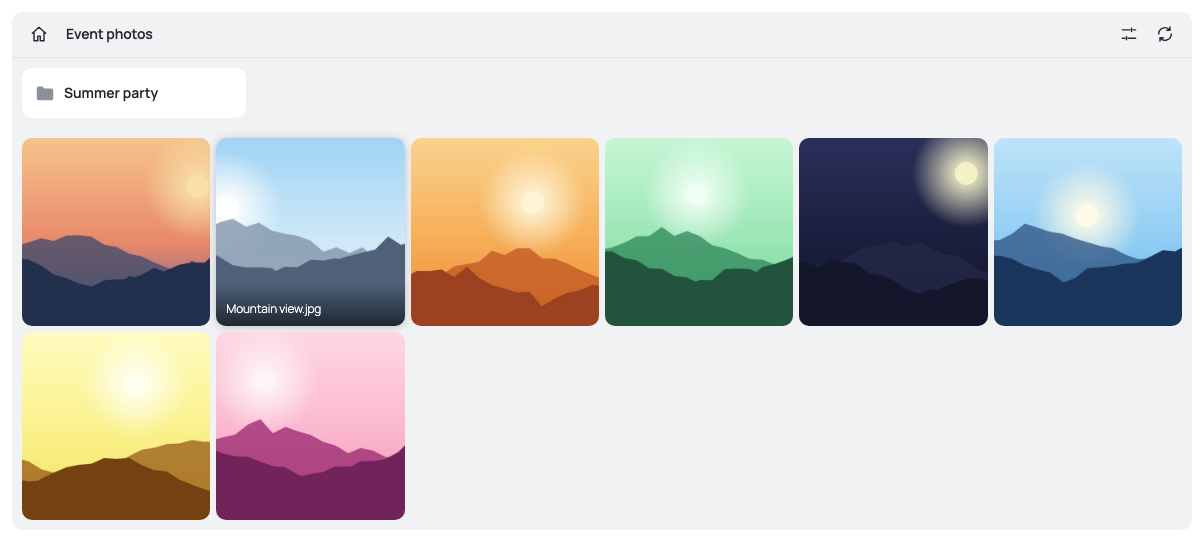
Features
- File browser with list and grid views, breadcrumbs and sorting
- Photo gallery, with subfolders as albums and a full-screen viewer
- Previews for images, PDFs, Word and Excel files, audio, video, text and Google Docs
- Search across a folder and its subfolders
- Single-file embeds, download buttons and links
- Single-file and streaming ZIP downloads
- Multiple Google accounts
- Activity log, which works with WordPress's personal data export and erase tools
- Email alerts if an account stops working or requests to Google keep failing, and a connection status on the settings screen
- Gutenberg block and shortcode builder
Quick start
- Upload
filefolio.zipunder Plugins > Add New > Upload Plugin, then activate it. - Create your Google app and sign in under FileFolio > Accounts & Settings. See Connecting to Google.
- Add the FileFolio block to a page, or create a shortcode under FileFolio > Shortcode Builder.
Requires WordPress 6.0+ and PHP 8.0+.
Upgrading from Embed Drive
Copies installed from GitHub before 0.6.0 can't find updates any more, because the project moved here from EmbedDriveToWordpress. Install 0.6.0 by hand once: upload filefolio.zip, activate it, then deactivate and delete the old Embed Drive copy. Settings, Google sign-ins and the activity log move across on their own, and old [embed_drive] shortcodes, blocks, filters and constants keep working. Clear any page cache afterwards.
Connecting to Google
Each site owner connects with their own Google app. Google requires an app for any Drive sign-in. Using your own means your sign-in and tokens go only between your site and Google, and no one has to host anything. It's free and takes about 10 minutes, once per site.
- In the Google Cloud console, create a project.
- Enable the Google Drive API.
- Open the OAuth consent screen (Google Auth Platform) and fill in the app name and your email. Choose External, or Internal if your Google Workspace organisation will be the only one using it.
- Under Data Access, add the
https://www.googleapis.com/auth/drive.readonlyscope. For an External app, publish it under Audience: in Testing mode your sign-in expires after 7 days. - Under Clients, create a Web application client. Add the redirect URI shown on the plugin's settings screen.
- Paste the client ID and secret into FileFolio > Accounts & Settings, save, and click Sign in with Google.
An External app shows "Google hasn't verified this app" at sign-in. That's expected for your own app: choose Advanced, then continue to your app. Google allows up to 100 people to do this per app, which is plenty for one site's owner.
Someone hosting sites for others can run the optional sign-in relay instead, enabled with FILEFOLIO_RELAY_URL in wp-config.php.
Shortcode
[filefolio mode="files" folder="FOLDER_ID"]
[filefolio mode="gallery" folder="FOLDER_ID"]
[filefolio mode="search" folder="FOLDER_ID"]
[filefolio mode="embed" file="FILE_ID"]
[filefolio mode="button" file="FILE_ID" label="Get the guide"]
[filefolio mode="link" file="FILE_ID"]| Attribute | Values | Default | Applies to |
|---|---|---|---|
mode |
files, gallery, search, embed, button, link |
files |
All |
folder |
Drive folder ID, or root for My Drive |
files, gallery, search |
|
file |
Drive file ID | embed, button, link |
|
account |
Account ID, for multi-account sites | First account | All |
view |
grid, list |
grid |
files |
sort |
name, modified, size |
name |
files, gallery |
order |
asc, desc |
asc |
files, gallery |
download |
yes, no |
yes (no for embed) |
files, gallery, search, embed |
zip |
yes, no |
yes |
files |
search |
yes, no |
yes |
files |
preview |
yes, no |
yes |
files, search |
min_height |
pixels | the plugin setting | files, gallery |
label |
Text | File name | button, link |
height |
Pixels, for documents | 600 |
embed |
download="no" removes downloads and ZIPs, but previewable files can still be viewed and so saved by a determined visitor.
Security model
- Read-only. The plugin requests
drive.readonly, so it can't change or delete anything in your Drive. Files are proxied through your site, so they don't need public sharing. - Modules are public. Anyone who can see the page can see its module's files. There are no per-role or password rules, so don't point a module at a private folder.
- A gallery is confined to photos. Its visitor link can list and fetch only JPEG, PNG, GIF, WebP and AVIF pictures in its folder and subfolders, never documents or other files beside them.
- Each module is confined to its folder. The page holds a signed token naming the folder and options. Every request checks the signature and walks up Drive's parent chain to confirm the item is inside that folder.
- Editors and above only. A module in a post by a lower role won't display, as it could otherwise publish any file in the Drive. Change this with the
filefolio_embed_capabilityandfilefolio_author_may_embedfilters. - Credentials are encrypted in the database with keys derived from your WordPress salts. Rotating the salts means signing in again. Define
FILEFOLIO_KEYinwp-config.phpto avoid that. - Safe inline types only. HTML, SVG and anything else outside a short allowlist is sent as a download, never rendered on your site's origin.
- Visitor links don't expire, so cached pages keep working. Accounts & Settings > Reset visitor links cancels them all if one leaks or after you remove a module.
- Document previews stay sandboxed. Word, Excel and PDF files are drawn in a frame with no access to your site, and the viewer refuses to run outside it.
- Updates are signed. A site installed from this repository installs an update only if it comes from its releases and carries a signature from the maintainer's private key, which is never stored on GitHub. Installing a ZIP by hand skips this check, so only use ZIPs from the releases page. The WordPress.org copy has no updater of its own and gets its updates from WordPress.org.
- Checked every week. A scheduled GitHub workflow looks up the bundled preview libraries in GitHub's security advisories and runs the full tests on the latest WordPress, so the maintainer hears about new flaws or breakage.
What this can't protect against: a stolen WordPress admin or Editor login, another vulnerable plugin or theme, or a module pointed at a folder that shouldn't be public. Use two-factor sign-in for those accounts.
Found a vulnerability? Please report it privately through GitHub security advisories.
Development
There's no build step. Run the tests with Node 24.18+, unzip and python3; no PHP install is needed, as they run real WordPress in WP Playground against a mock Google server:
tests/run.sh             # PHP 8.0, latest WordPress
tests/run.sh 8.4         # A specific PHP version
node bin/check-libs.mjs  # Look up the bundled libraries in GitHub's security advisories
bin/build-zip.sh builds the plugin, and bin/build-zip.sh --wordpress-org builds the WordPress.org copy, which leaves out the GitHub updater as WordPress.org requires. Check that copy with the Plugin Check plugin before submitting it.
Releasing an update
- Update the version in
filefolio.php(the header andFILEFOLIO_VERSION) andreadme.txt(Stable tagand the changelog). - Commit, then tag and push:
git tag v1.2.3 && git push origin main v1.2.3 - GitHub Actions runs the tests, checks that the versions match the tag, builds
filefolio.zipandfilefolio-wordpress-org.zip, and creates a draft release, which sites can't see yet. - Sign and publish it on your own computer, with the private key:
node bin/sign-release.mjs 1.2.3 ~/filefolio-signing.pem
Installed sites normally see the update within a day, or straight away with Check again under Dashboard > Updates. If the signing key is ever replaced, sites must install the next version by hand, because they only trust the key they already have.
Independence
FileFolio is an independent project, written from scratch. It isn't affiliated with Google or any commercial Google Drive plugin. Google Drive is a trademark of Google LLC.
Licence
Releases
17 releases. Each count is every asset in that release; expand a row for the breakdown.
v0.6.0
latest
Nov 15, 2026 2d ago
filefolio.zip
+2 assets
6
Nov 9, 2026 8d ago
embed-drive.zip
+2 assets
10
Nov 9, 2026 8d ago
embed-drive.zip
+2 assets
8
Nov 9, 2026 8d ago
embed-drive.zip
+2 assets
8
Nov 9, 2026 8d ago
embed-drive.zip
+2 assets
8
Nov 1, 2026 16d ago
embed-drive.zip
+1 asset
6
Nov 1, 2026 16d ago
embed-drive.zip
+1 asset
6
Nov 1, 2026 16d ago
embed-drive.zip
+1 asset
6
Nov 1, 2026 16d ago
embed-drive.zip
+1 asset
6
Nov 1, 2026 16d ago
embed-drive.zip
+1 asset
7
Nov 1, 2026 16d ago
embed-drive.zip
+1 asset
7
Active-site estimate ≈10 comes from the v0.3.2 cohort. Method.