Install
Upload it under Plugins → Add New Plugin → Upload Plugin, then activate.
Install straight from GitHub with WP-CLI:
wp plugin install https://github.com/mjonssonme/transcribus-viewer-for-wordpress/releases/download/v2.1.0/transcribus-viewer-for-wordpress-2.1.0.zipUploads Transkribus exports (ZIP) and displays them in an interactive, line-by-line viewer.
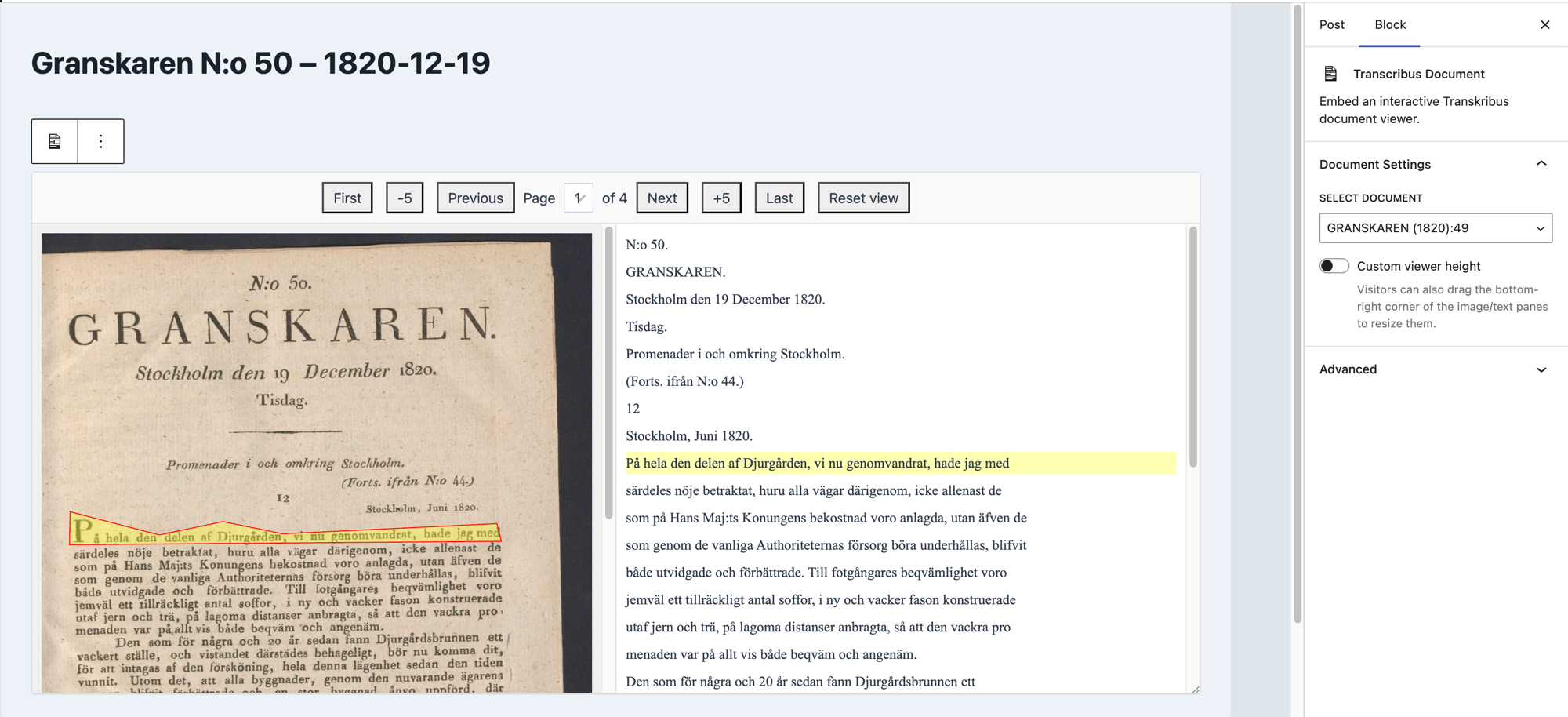
This plugin provides a full-featured system for importing Transkribus documents into WordPress and embedding them anywhere via a custom "Transcribus Document" Gutenberg block - just upload the export ZIP through the async background uploader, then drop the block into any post or page. The viewer displays the document's description followed by the interactive image and text panes, kept in sync as you navigate, zoom, pan, or resize.
Download the latest release (.zip)
This is what you get
Installation
- Download the latest release and upload the zip via Plugins > Add New > Upload Plugin (or unzip it into
/wp-content/plugins/directly). - Install the 'Action Scheduler' library in
/includes/lib/. - Activate the plugin through the 'Plugins' menu in WordPress.
- Navigate to "Transkribus Docs" > "User Guide" for next steps.
Building from source instead? Clone the repo, run npm install and npm run build to build the Gutenberg block assets, then follow the same steps above.
See readme.txt for the full changelog and WordPress.org-style plugin metadata.
Releases
1 release. Each count is every asset in that release; expand a row for the breakdown.