Replace Quick Mail Sender WP Registry grade A. No security issues foundWP RegistryNo security issues foundOpen the reportA
WordPress Plugin to replace user sender name and address in Quick Mail plugin.
Install
This is the repository archive. It installs, but the folder name will carry the branch suffix and updates will not flow.
Install straight from GitHub with WP-CLI:
wp plugin install https://github.com/mitchelldmiller/replace-quick-mail-sender/archive/refs/heads/master.zipReplace user sender name, email address, reply to address in Quick Mail plugin.
Description
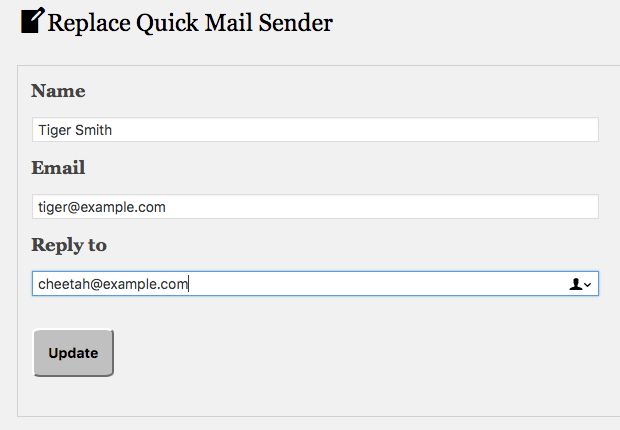
Implements filter for current user to replace their sending name, email address, reply to address.
Requires Quick Mail plugin 3.5.0 or later.
Features
- Includes
replace_quick_mail_senderfilter, and form to change sending name and addresses with it.
Learn More
Installation
-
Download the latest release and unpack in your
/wp-content/plugins/directory. -
Verify that Quick Mail plugin is activated.
-
Activate the plugin through the WordPress 'Plugins' menu.
Frequently Asked Questions
Who can use this plugin?
- User must be able to publish posts. Site must have Quick Mail plugin active.
How to Disable Filter
- Delete name or email, to temporarily disable filter.
Saves Credentials
-
Does not delete user info when plugin is uninstalled.
-
Delete plugin from Dashboard to delete user options.
Limitations
-
Check
Fromname in Quick Mail, because other mail plugins can override sender credentials. -
Replacement name must be 1-80 characters.
-
Replacement email address is verified if
Verify recipient email domainsis enabled.
Translators and Programmers
- A .pot file is included for translators.
License
This plugin is free for personal or commercial use.
Releases
3 releases.
These releases are tags only. The author does not attach a packaged zip, so there are no download counts to report.