Email via Emailjs Blocks WP Registry grade A. No security issues foundWP RegistryNo security issues foundOpen the reportA
Email via Emailjs Blocks - Send emails from WordPress without a mail server through emailjs.com API. Just add your free API keys and have your contact form ready in no time.
Install
Upload it under Plugins → Add New Plugin → Upload Plugin, then activate.
Install straight from GitHub with WP-CLI:
wp plugin install https://github.com/milanchymcak/wordpress-email-via-emailjs-blocks/releases/download/stable/email-via-emailjs-blocks.zipNow available on the WordPress Plugins Repository!
https://wordpress.org/plugins/email-via-emailjs-blocks/
Email via Emailjs Blocks - Emailjs API
Email via Emailjs Blocks - Send emails from WordPress without a mail server through emailjs.com API. Just add your free API keys and have your contact form ready in no time.
Download
Prerequisite
First, you need to have an active EmailJS account. Register for free
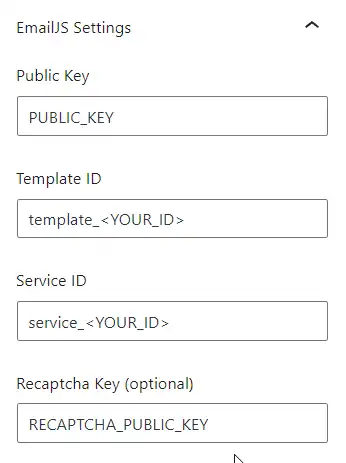
- Emailjs.com Public API Key Get it here
- Emailjs.com Template ID Get it here
- Emailjs.com Service ID Get it here
Recaptcha
The WordPress Emailjs Plugin is also coming with Recaptcha support, to get it working, you have to get Recaptcha keys.
- Register at Google.com for free
- Enter Recaptcha private key in the emailjs template interface (Step 2. in #Prerequisite)
- Store public key for the Contact Form Plugin
Installation
- Enter site editor or post editor and simply add a block called "Contact Form - Emailjs"
- Enter the required API keys from the previous steps
Releases
3 releases. Each count is every asset in that release; expand a row for the breakdown.
Active-site estimate ≈10 comes from the median of recent superseded releases. Method.