Install
Upload it under Plugins → Add New Plugin → Upload Plugin, then activate.
Install straight from GitHub with WP-CLI:
wp plugin install https://github.com/mikezielonkadotcom/wp-category-customization/releases/download/v1.5.1/wp-term-custom-heading.zipOverride category archive page titles (h1) with custom text — like Genesis archive headlines, but for any theme.
Description
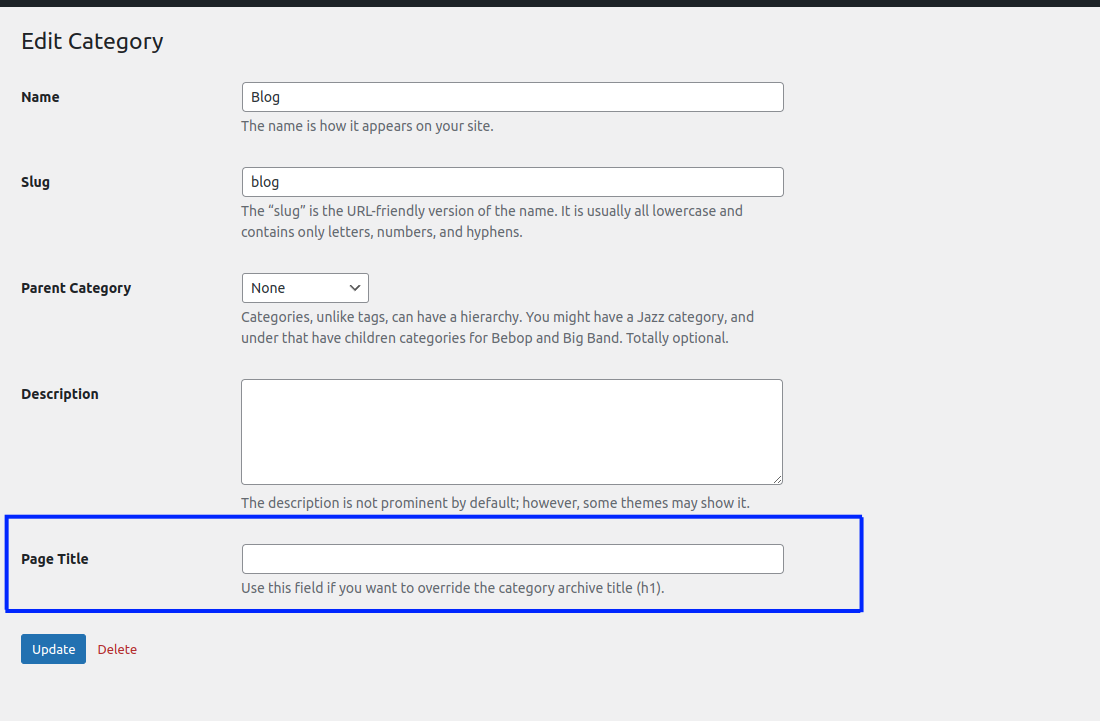
This plugin adds a Page Title field to the WordPress category add/edit screens. When set, it replaces the default archive title on category pages.
Works with any theme that uses the get_the_archive_title filter (most modern themes do).
Installation
- Download the latest release.
- In WordPress admin, go to Plugins → Add New → Upload Plugin and upload the ZIP.
- Activate the plugin.
Or clone this repo into wp-content/plugins/:
cd wp-content/plugins
git clone https://github.com/mikezielonkadotcom/wp-category-customization.git
Usage
- Go to Posts → Categories.
- Add or edit a category.
- Enter your custom title in the Page Title field.
- The category archive page will display your custom title instead of the default.
Auto-Updates
This plugin checks GitHub for new releases automatically. When a new version is tagged, WordPress will show the update in the dashboard — no manual downloads needed.
Requirements
- WordPress 5.5+
- PHP 7.4+
FAQ
Which themes are supported?
Any theme that uses the get_the_archive_title hook to display category titles on archive pages.
What taxonomies are supported?
The default WordPress category taxonomy.
Changelog
1.4.0
- Security: Add nonce verification and capability checks on save.
- Security: Fix XSS — escape output on edit form.
- Fix: Use
sanitize_text_field()instead ofesc_attr()for input sanitization. - Fix: Register archive title override as filter instead of action.
- Update: Bump minimum WordPress requirement to 5.5.
1.3.1
- Test release workflow.
1.3.0
- Add automatic update checking from GitHub.
- Fix double
https://in author and plugin URIs.
1.2
- Fix typo.
1.1
- Fixes and improvements.
1.0
- First release.
License
GPL-2.0+ — see LICENSE.
Releases
6 releases. Each count is every asset in that release; expand a row for the breakdown.