Install
This is the repository archive. It installs, but the folder name will carry the branch suffix and updates will not flow.
Install straight from GitHub with WP-CLI:
wp plugin install https://github.com/merlinstacks/personaliseit/archive/refs/heads/main.zip
OverCustomise
A visual product customiser and print-production workflow for WooCommerce.
OverCustomise connects the customer-facing design experience to the production floor. Store teams create reusable designs, print areas, layers, colours, fonts, and artwork choices. Customers personalise a product in a live canvas editor. The finished configuration then follows the product through cart, checkout, order management, and asynchronous print-file generation.
Built for real product-personalisation workflows, it supports individual product variations, multiple print areas, variable data, protected customer artwork, signed webhooks, and output pipelines for engraving, UV printing, embroidery artwork, and sublimation.
[!IMPORTANT] OverCustomise is under active development. Test it on a staging site and validate generated artwork against your own production process before using it for live orders.
Visual tour
The following promotional mockups are based on the current plugin structure and controls. They illustrate representative workflows rather than a specific live store; storefront styling inherits the active WordPress theme.
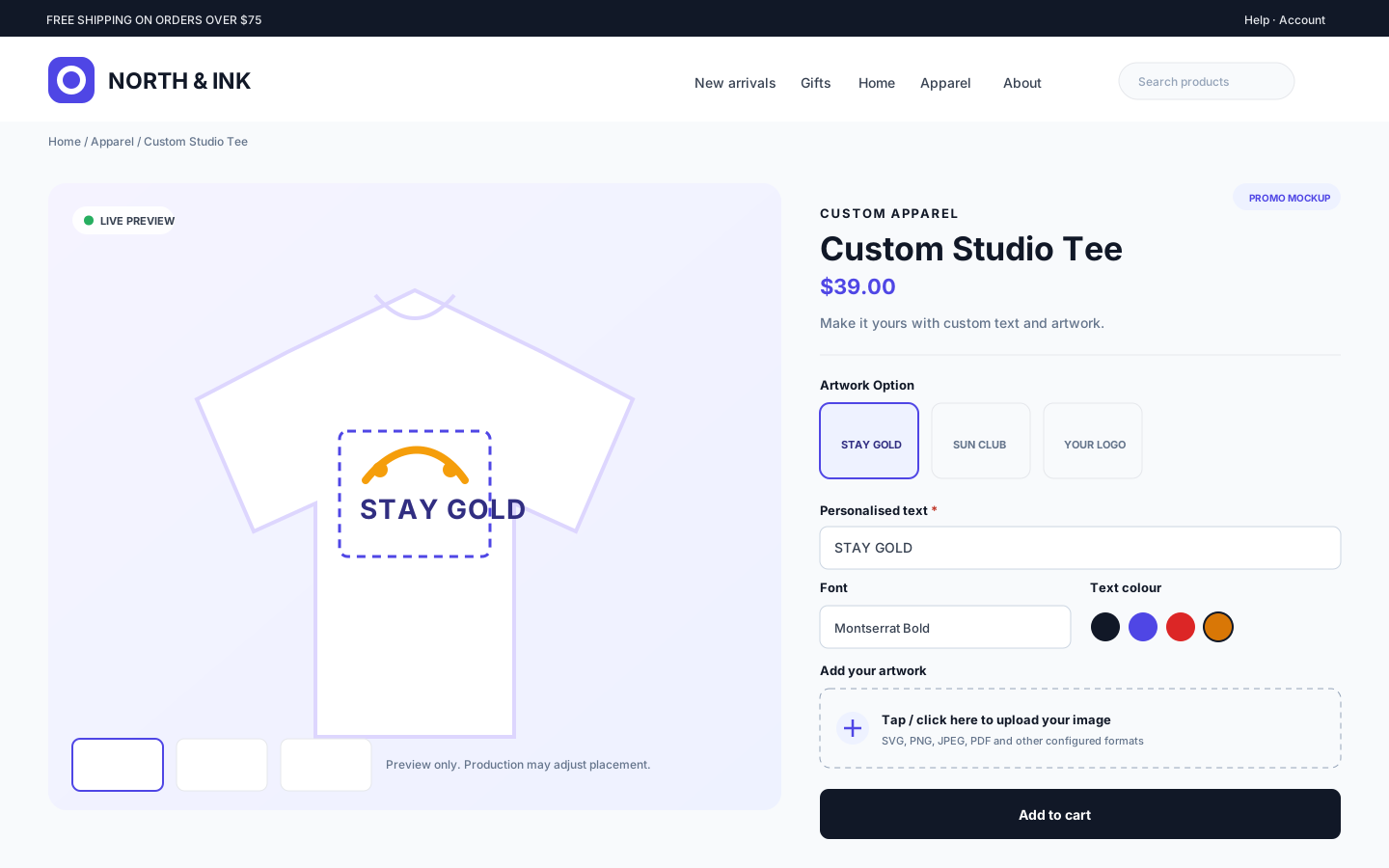
Personalise products in the storefront
Customers work inside the normal WooCommerce product page, using only the controls enabled for that design. The product gallery provides the live preview, with an additional preview-confirmation step on mobile.
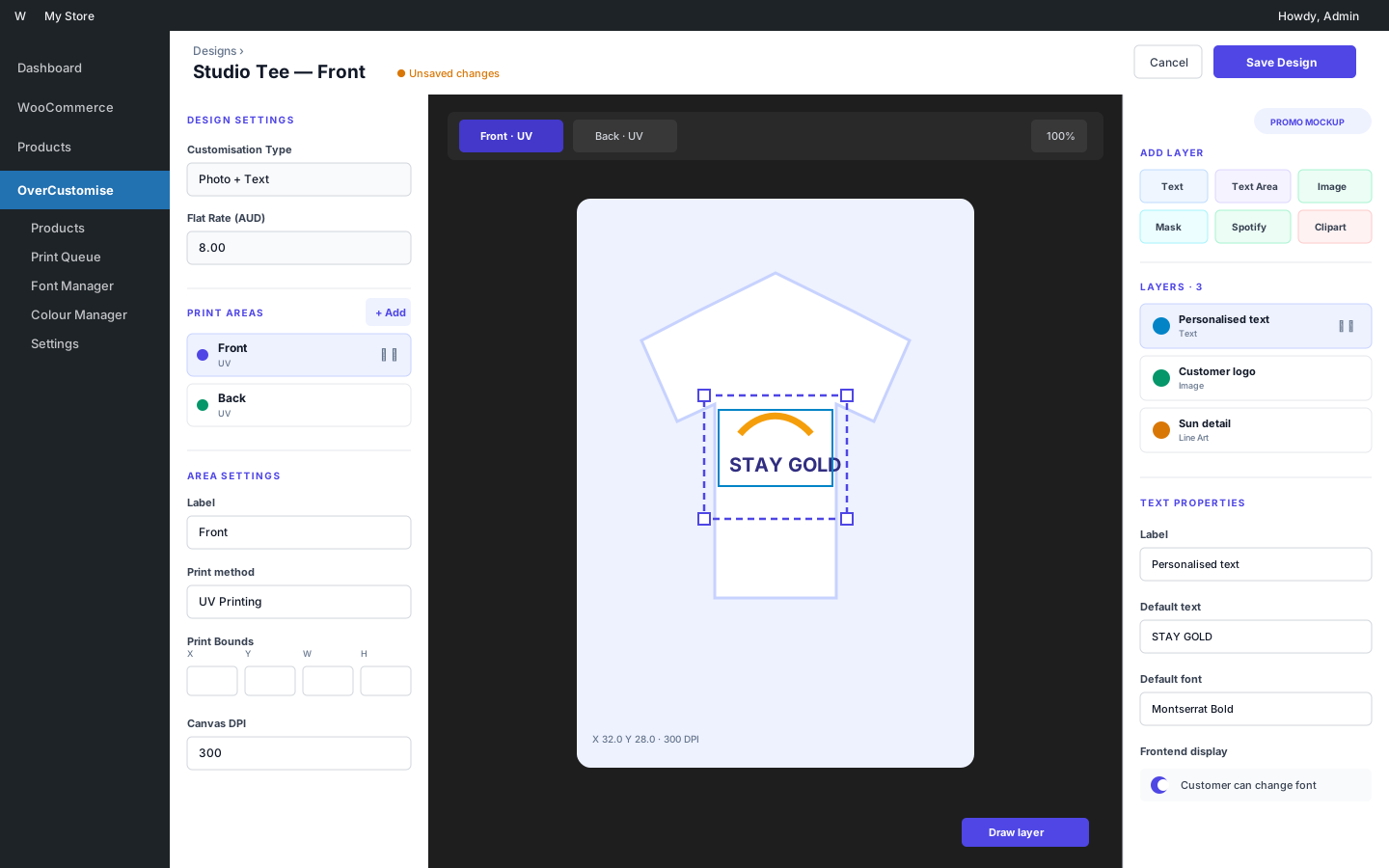
Build reusable designs visually
Store teams configure print areas and layers through a compact three-column editor inside WordPress admin.
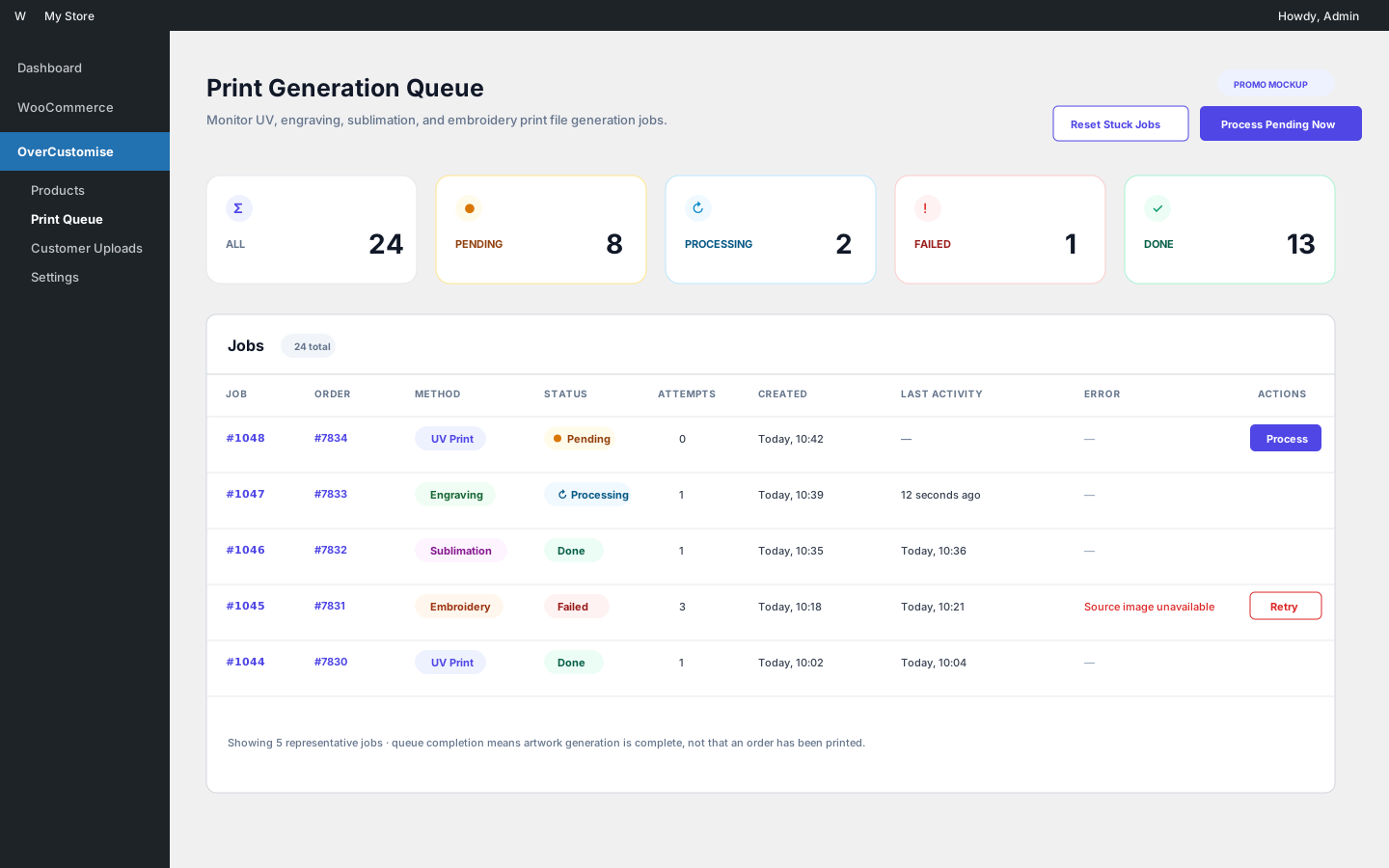
Monitor production artwork
The print queue surfaces pending, processing, completed, and failed generation jobs with manual recovery actions.
Why OverCustomise?
- One workflow from browser to production: customer inputs are preserved through WooCommerce and transformed into production artwork.
- Visual, reusable design system: define print areas, variants, editable layers, fonts, colours, clipart, mockups, and image filters once, then assign them to products or variations.
- Built for varied products: collect text, multiline text, images, clipping-mask artwork, line art, clipart, and Spotify-related input across multiple print areas.
- Production-aware output: generate files for engraving, UV printing, embroidery (EPS artwork), and sublimation with configurable bleed, crop marks, and DPI metadata.
- Operational tooling: monitor and retry queued print jobs, regenerate artwork, clean up expired files, import variable data from CSV, and notify external systems with signed webhooks.
- Modern WooCommerce integration: supports High-Performance Order Storage and Cart/Checkout Blocks.
How it works
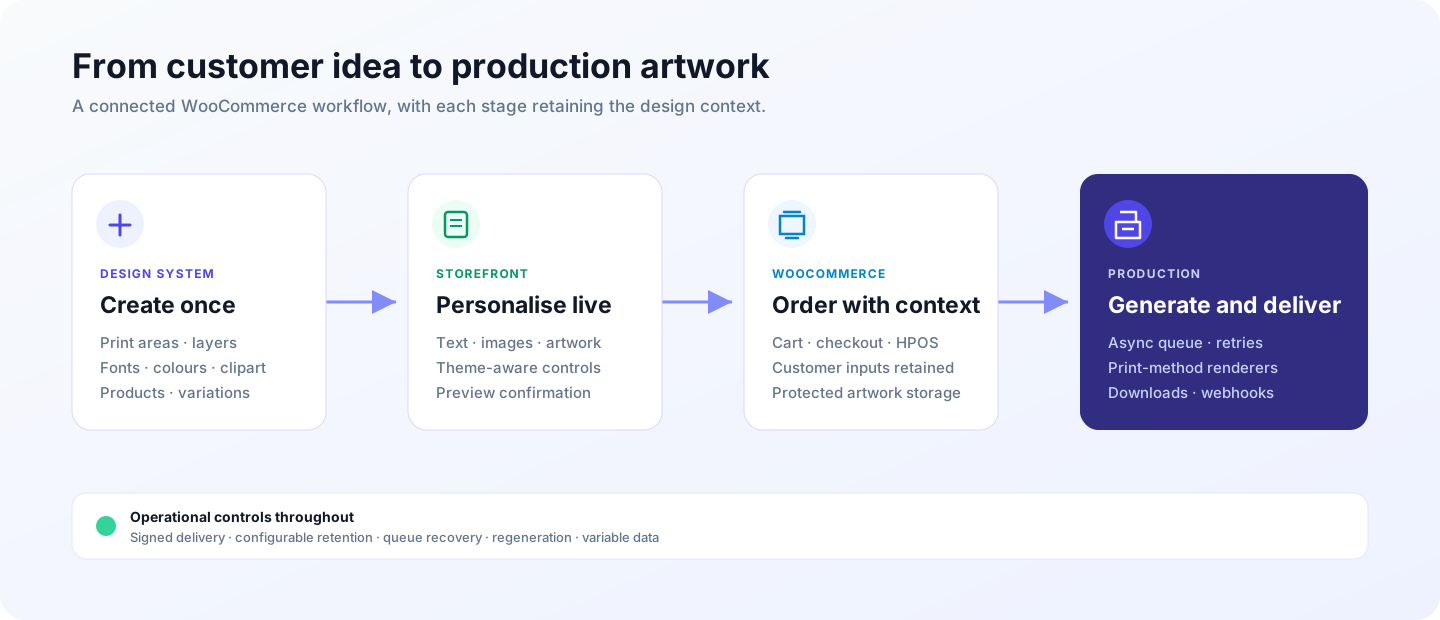
Feature overview
Storefront customiser
- Live canvas rendering powered by Fabric.js
- Text, textarea, image, clipping mask, line art, clipart, and Spotify-related layers
- Design variants and multiple print areas
- Product gallery, cart, checkout, and order previews
- Customer uploads including SVG, PDF, EPS, PNG, JPEG, WebP, HEIC, and HEIF where the server supports the required conversions
- Optional image-to-image filters through OpenRouter, Google Gemini, or OpenAI
Design and catalogue management
- Reusable designs assignable to products and individual variations
- Font, colour, clipart, mockup, and image-filter libraries
- Layer-level defaults, constraints, linked inputs, and customer-edit controls
- CSV-driven variable-data printing
Production workflow
- Asynchronous print queue with retry and recovery controls
- Engraving, UV, embroidery artwork, and sublimation renderers
- PDF generation through TCPDF
- Configurable bleed, crop marks, and DPI metadata
- Protected storage for customer artwork, previews, variable data, and generated files
- Configurable retention and cleanup
- Signed webhooks for customisation and print-job events
Requirements
| Dependency | Requirement |
|---|---|
| WordPress | 6.8 or newer |
| PHP | 8.2 or newer |
| WooCommerce | Active installation |
| PHP extensions | BCMath, cURL, DOM, Fileinfo, GD, mbstring, OpenSSL, XMLReader, and zlib |
| Scheduling | Working WP-Cron or a real cron runner |
Optional capabilities:
- Imagick/ImageMagick for higher-quality conversion, image effects, and HEIC/HEIF support when the necessary codec is installed.
- Ghostscript for outlining embedded PDF fonts.
- OpenRouter, Google Gemini, or OpenAI API access for AI image filters. Provider usage may incur charges, and submitted images are handled according to the selected provider's policies.
Installation
CI builds an installable overcustomise.zip artifact with production Composer
dependencies and compiled frontend assets. Use that artifact for WordPress
installations rather than GitHub's automatically generated source archive.
To install from source:
-
Clone or download this repository into
wp-content/plugins/. -
Install PHP runtime dependencies:
composer install --no-dev --optimize-autoloader -
Install and compile frontend assets:
npm ci npm run build -
Activate WooCommerce, then activate OverCustomise in WordPress.
-
Open OverCustomise → Settings and verify the server status before configuring products.
The plugin directory must include Composer's vendor/ directory and the compiled files under assets/build/ when deployed.
Quick start
- Configure upload limits, retention, bleed, crop marks, and print methods under OverCustomise → Settings.
- Add the fonts, colours, clipart, and mockups that customers can use.
- Create a design, define one or more print areas, and add editable layers.
- Assign the design to a WooCommerce product or variation.
- Open the product as a customer, complete a personalisation, and place a staging order.
- Confirm the preview, order data, queued job, and generated production file before going live.
Development
The CI workflow checks PHP syntax on PHP 8.2 and 8.4, runs the complete PHP quality suite on PHP 8.4, and uses Node.js 22 for frontend checks.
# Install dependencies
composer install
npm ci

# Watch frontend assets
npm run start

# Create a production build
npm run build
Quality checks
# JavaScript and stylesheet linting
npm run lint

# JavaScript unit tests and bundle budgets
npm run test:js
npm run test:performance

# PHP syntax, unit tests, coding standards, and static analysis
composer quality
Integration and browser tests
PHP integration tests need a complete WordPress/WooCommerce test environment:
WP_TESTS_DIR=/path/to/wp-tests vendor/bin/phpunit --testsuite IntegrationPlaywright tests need a prepared WooCommerce site and customisable test product:
npx playwright install --with-deps chromium
E2E_BASE_URL=https://example.test npm run test:e2e
Optional E2E settings include E2E_PRODUCT_PATH, E2E_CART_PATH, E2E_PRODUCT_NAME, E2E_TEXT_VALUE, and E2E_VARIANT_LABEL.
Data, privacy, and uninstalling
OverCustomise stores customer artwork, generated previews, variable-data files, and production output. Access controls and retention settings are included, but site operators remain responsible for server configuration, backups, privacy notices, and compliance with applicable law.
[!CAUTION] Uninstalling the plugin permanently removes its custom database tables, settings, taxonomy data, and plugin-managed upload files. Back up anything you need before uninstalling.
Contributing and support
Contributions are welcome. Start with CONTRIBUTING.md, use the issue forms for reproducible bugs and focused feature proposals, and read SUPPORT.md before asking for help.
Please follow the Code of Conduct in all project spaces.
License
OverCustomise is free software licensed under the GNU General Public License v2.0 or later.
WordPress, WooCommerce, OpenRouter, Google Gemini, OpenAI, Spotify, Fabric.js, and TCPDF are trademarks or projects of their respective owners. Their mention does not imply endorsement.