Image Crop Positioner WP Registry grade B. Medium-severity findings · 1 findingWP RegistryMedium-severity findings · 1 findingOpen the reportB
Face recognition and hotspot selection for cropping images in WordPress.
★ 8stars
80release downloads
51kcomposer installs
v1.0.3latest · 10mo ago
Install
Upload it under Plugins → Add New Plugin → Upload Plugin, then activate.
Install straight from GitHub with WP-CLI:
wp plugin install https://github.com/mentosmenno2/image-crop-positioner/releases/download/v1.0.3/image-crop-positioner-v1.0.3.zipOn Packagist as mentosmenno2/image-crop-positioner:
composer require mentosmenno2/image-crop-positionerNo built-in updater. New versions won't appear under Dashboard → Updates. Install new releases yourself, or let Git Updater track the repository.
Image Crop Positioner WordPress plugin
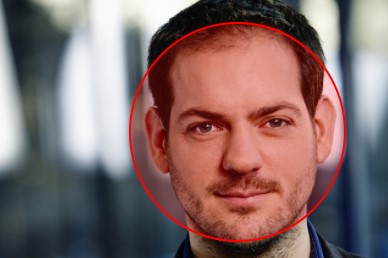
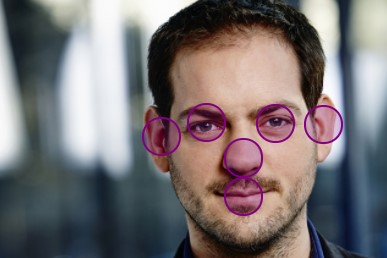
This plugin allows you to better crop your images, based on face detection or hotspot selection.
Menu
- Requirements
- Installation instructions
- Faces detection
- Hotspot selection
- Migrators
- WP-CLI Commands
- Developing
- Automated testing
- Known issues
Do you like this plugin?
That's amazing to hear 😄! I attempt to keep it up to date as best as I can. However, it's a spare-time project that I mostly work on in the evening hours. Would you like to support me, feel free to give a small donation so I can buy some snacks to eat while I'm typing new code.

Example images
Faces detection
Hotspots selection
Releases
21 releases. Each count is every asset in that release; expand a row for the breakdown.
Tag
Published
Assets
Downloads