Install
This is the repository archive. It installs, but the folder name will carry the branch suffix and updates will not flow.
Install straight from GitHub with WP-CLI:
wp plugin install https://github.com/memberfixstudio-ind/command-deck/archive/refs/heads/main.zipNo built-in updater. New versions won't appear under Dashboard → Updates. Install new releases yourself, or let Git Updater track the repository.
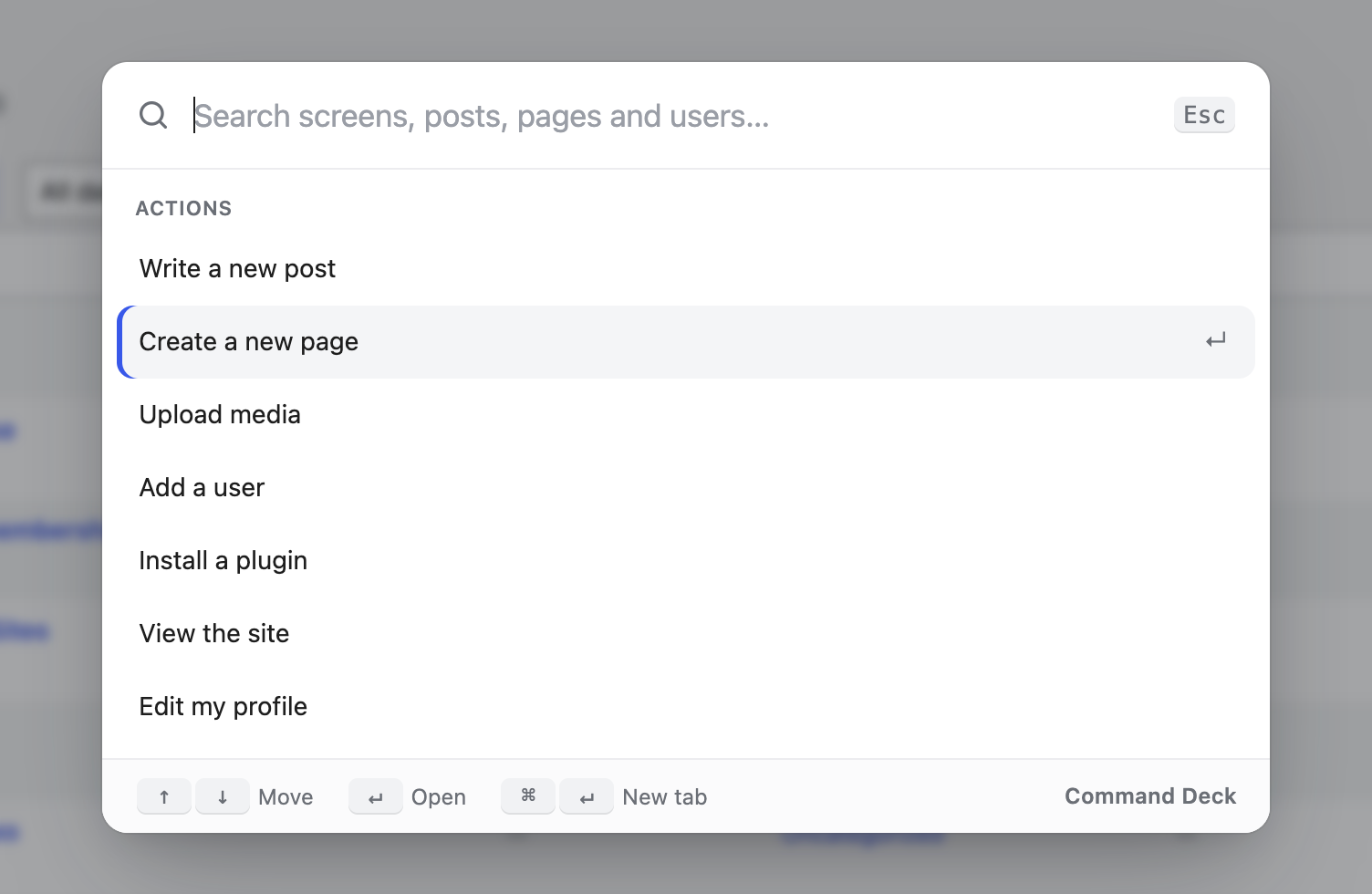
Press ⌘K (or Ctrl+K) anywhere in wp-admin and go straight to what you want.
WordPress admin menus get long fast. Command Deck puts one search box on top of all of it: every admin screen, your posts and pages, your users and common actions, all reachable without touching the sidebar.
Why it's nice to use
- Nothing to set up. Activate it and press ⌘K. There's no settings page.
- Forgiving search. Type
plug addand you get Plugins › Add New. Letters only have to appear in order, so typos in the middle still find things. - Finds your content too. After two letters it also searches posts, pages and users, and opens the editor for the one you pick.
- Remembers where you go. Your last five picks show at the top when the box opens.
- Keyboard first, mouse friendly. Use ↑ ↓ to move, ↵ to open and ⌘↵ to open in a new tab. There's also a Search button in the admin bar.
- Respects permissions. People only see screens and actions their role can use. Search goes through the normal REST API, so private content stays private.
- Fits your admin. It picks up your admin colour scheme and works on phones.
- Gets out of the editor's way. In the block editor, ⌘K is left to WordPress (links and its own command menu). The admin bar button still opens Command Deck.
Install
- Download this repository as a ZIP (Code → Download ZIP).
- In WordPress go to Plugins → Add New → Upload Plugin and upload the ZIP.
- Activate it and press ⌘K / Ctrl+K.
Requires WordPress 6.3+ and PHP 7.4+. No build step. It's plain PHP, CSS and JavaScript.
For developers
Add your own actions with a filter:
add_filter( 'command_deck_actions', function ( $actions ) {
    $actions[] = array(
        'title' => 'Clear the page cache',
        'url'   => admin_url( 'admin.php?page=my-cache&flush=1' ),
        'group' => 'Actions',
        'keys'  => 'purge flush', // extra words that should match
    );
    return $actions;
} );
Files
command-deck.php          Menu collection, actions, admin bar button
assets/command-deck.js    The palette (no framework, uses wp.apiFetch for search)
assets/command-deck.css   Styles
License
GPL-2.0-or-later. Built by Rohan Salave.