Install
This is the repository archive. It installs, but the folder name will carry the branch suffix and updates will not flow.
Install straight from GitHub with WP-CLI:
wp plugin install https://github.com/mecachisenros/woocommerce_civicrm/archive/refs/heads/master.zipNo built-in updater. New versions won't appear under Dashboard → Updates. Install new releases yourself, or let Git Updater track the repository.
WooCommerce CiviCRM Integration
Installation
Step 1: Install Wordpress plugin
Install this Wordpress plugin as usual. More information about installing plugins in Wordpress - https://codex.wordpress.org/Managing_Plugins#Installing_Plugins
Configuration
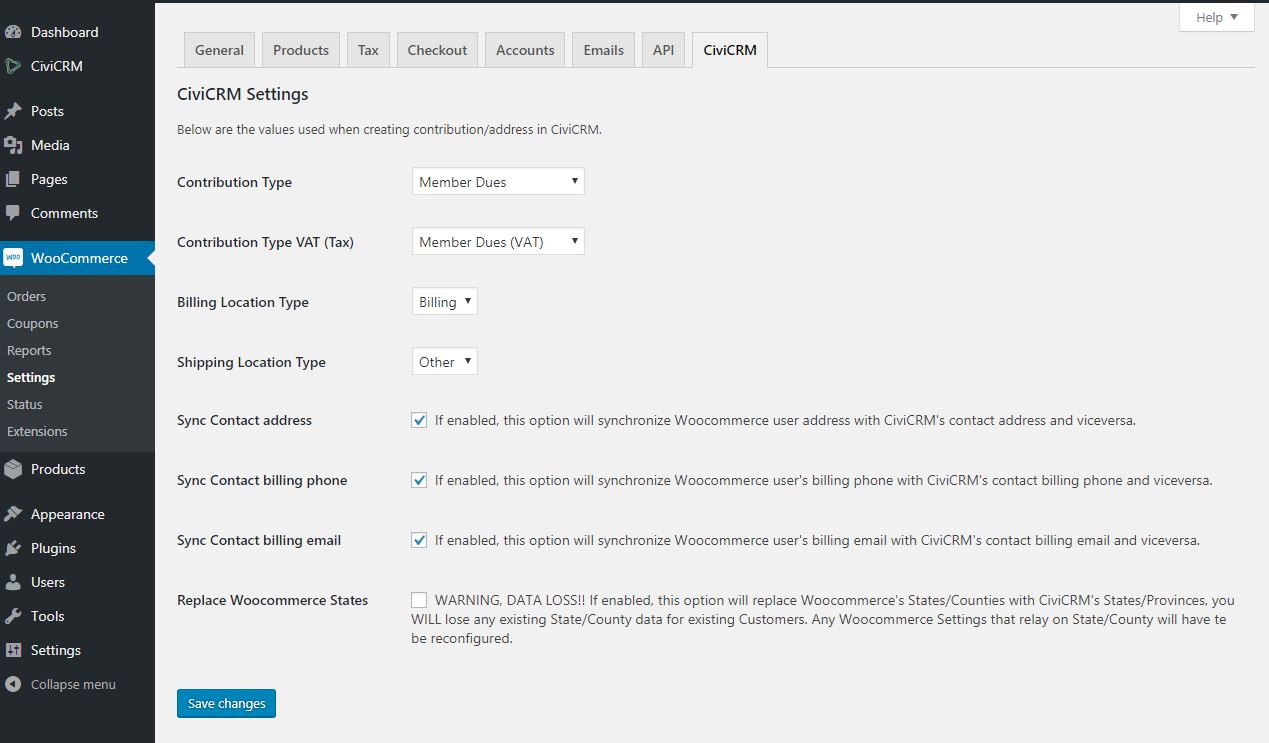
Configure the integration settings in Woocommerce Menu >> Settings >> CiviCRM (Tab) Direct URL: https://example.com/wp-admin/admin.php?page=wc-settings&tab=woocommerce_civicrm
Functionality
- Woocommerce orders are created as contributions in CiviCRM, each product in the order is a line item in the Contribution.
- Sales TAX/VAt & Shipping cost are configurable/mappable as CiviCRM Financial Types.
- A global campaign can be defined for each contribution, but campaigns can be customized per order.
- Logged in users are recognised and the contribution is created against the related contact record.
- If not logged in, the plugin tries to find the contact record in CiviCRM using Dedupe rules and the contribution is created against the found contact record.
- If the contact does not exist, a new contact record is created in CiviCRM and the contribution is created against the newly created contact record.
- Related contact record link is added to the Woocommerce order as notes.
- Option to sync CiviCRM and Woocommerce address, billing phone, and billing email. If a user edits his/hers address, billing phone, or billing email through the Woocommerce Account >> Edit Address page, CiviCRM profile, or through CiviCRM's backoffice, the data will be updated in both CiviCRM and Woocommerce.
- Option to replace Woocommerce's States/Counties list with CiviCRM's State/Province list. (WARNING!!! Enabling this option in an exiting Woocommerce instance will cause State/County data loss for exiting Customers and Woocommerce settings that relay on those.)
- Basic Membership implementation: select the Membership type in CiviCRM Settings panel in the Product screen, if set, a membership will be created at checkout.
Developers
There are a few hooks available
woocommerce_civicrm_contribution_create_paramsfilterwoocommerce_civicrm_contribution_update_paramsfilterwoocommerce_civicrm_financial_types_paramsfilterwoocommerce_civicrm_campaigns_paramsfilterwoocommerce_civicrm_admin_settings_fieldsfilterwoocommerce_civicrm_address_mapfilterwoocommerce_civicrm_mapped_location_typesfilterwoocommerce_civicrm_utm_cookie_expirefilterwoocommerce_civicrm_wc_address_updateactionwoocommerce_civicrm_civi_address_updatedactionwoocommerce_civicrm_wc_phone_updatedactionwoocommerce_civicrm_civi_phone_updatedactionwoocommerce_civicrm_wc_email_updatedactionwoocommerce_civicrm_civi_email_updatedaction