ACF WP-Objects WP Registry grade C-. High-severity findings · 1 findingWP RegistryHigh-severity findings · 1 findingOpen the reportC-
Map ACF Fields to WordPress objects
Install
Upload it under Plugins → Add New Plugin → Upload Plugin, then activate.
Install straight from GitHub with WP-CLI:
wp plugin install https://github.com/mcguffin/acf-wp-objects/releases/download/0.8.12/acf-wp-objects.zipOn Packagist as mcguffin/acf-wp-objects:
composer require mcguffin/acf-wp-objectsFilling some gaps between WordPress and ACF.
Features
Integrate WordPress Objects objects into ACF.
- Edit WP-Post properties with ACF fields:
- Settings: blogname
- Settings: blogdescription
- Post: post_title
- Post: post_excerpt
- Post: post_content
- Post: post_thumbnail
- Post: attachments
- Term: term_name
- Term: term_description
- Theme-Mod: custom_logo
- New Field types:
- Post Type
- Taxonomy
- Image Size
- Includer (include all fields from a different field group)
- User Role
- Sweet Spot (use with media)
- Plugin Template Select (Selector for template file from plugin)
- New Location Rules:
- Post Type / Taxonomy is public / builtin / show_ui / show_in_menu / show_in_nav_menus
- Post type supports
- Editor is Classic / Block editor
- WP Options page is General / Writing / Reading / Discussion / Media / Permalinks
- Plugin Template Settings
- Everywhere
- Choice fields: get choices from a repeater, e.g. from an ACF options page
- Multisite:
- Add a network admin page with
acf_add_options_(sub_)page(). Add"network" => true,to the page args (ACF Pro only – both plugins must be network-enabled)
- Add a network admin page with
- Styling:
- More compact styles in block editor sidebar
- Add classes
no-headandno-sortto repeaters - Add classes
seamlessandno-labelto fields - Add class
button-groupto checkboxes (make them look like button groups)
- Page Layouts: Generic flexible content field providing a location rule for field groups. Init
acf_add_page_layout('foobar'), render withacf_page_layouts('foobar') - JSON-Paths: Save Field group JSON in custom places (like plugins)
- Localization: Localize ACF Field labels through po-files
- ACF Options Page: Optionally for Reset, Export and Import in the Backend and from WPCLI.
- Tab Field Open a tab by URL. Just append
#Tab Label
Installation
Production (using Github Updater – recommended for Multisite)
- Head over to releases
- Download 'acf-wp-objects.zip'
- Upload and activate it like any other WordPress plugin
- AutoUpdate will run as long as the plugin is active
Development
- cd into your plugin directory
- $
git clone git@github.com:mcguffin/acf-wp-objects.git - $
cd acf-wp-objects - $
npm install - $
npm run dev
JSON-Paths
Consider the follwing Scenario: You are using local json field groups in your theme. You want to override them in a child theme. Or alternatively, you have a plugin with an ACF dependency, incorporating field groups as local json.
This will load and save ACF JSON from the subdirectory path/to/json-files inside the theme and child theme directory but only if the field group key is group_my_fieldgroup_key.
acf_register_local_json(
    'path/to/json-files', // e.g. 'acf-json' in a theme
    function( $field_group ) {
        // callback
        // return true, if the field group JSON
        // should be saved at the given location
        return $field_group['key'] === 'group_my_fieldgroup_key';
    },
    [ // parent paths to check
        get_template_directory(),
        get_stylesheet_directory(),
    ]
);
Sweet Spot Field
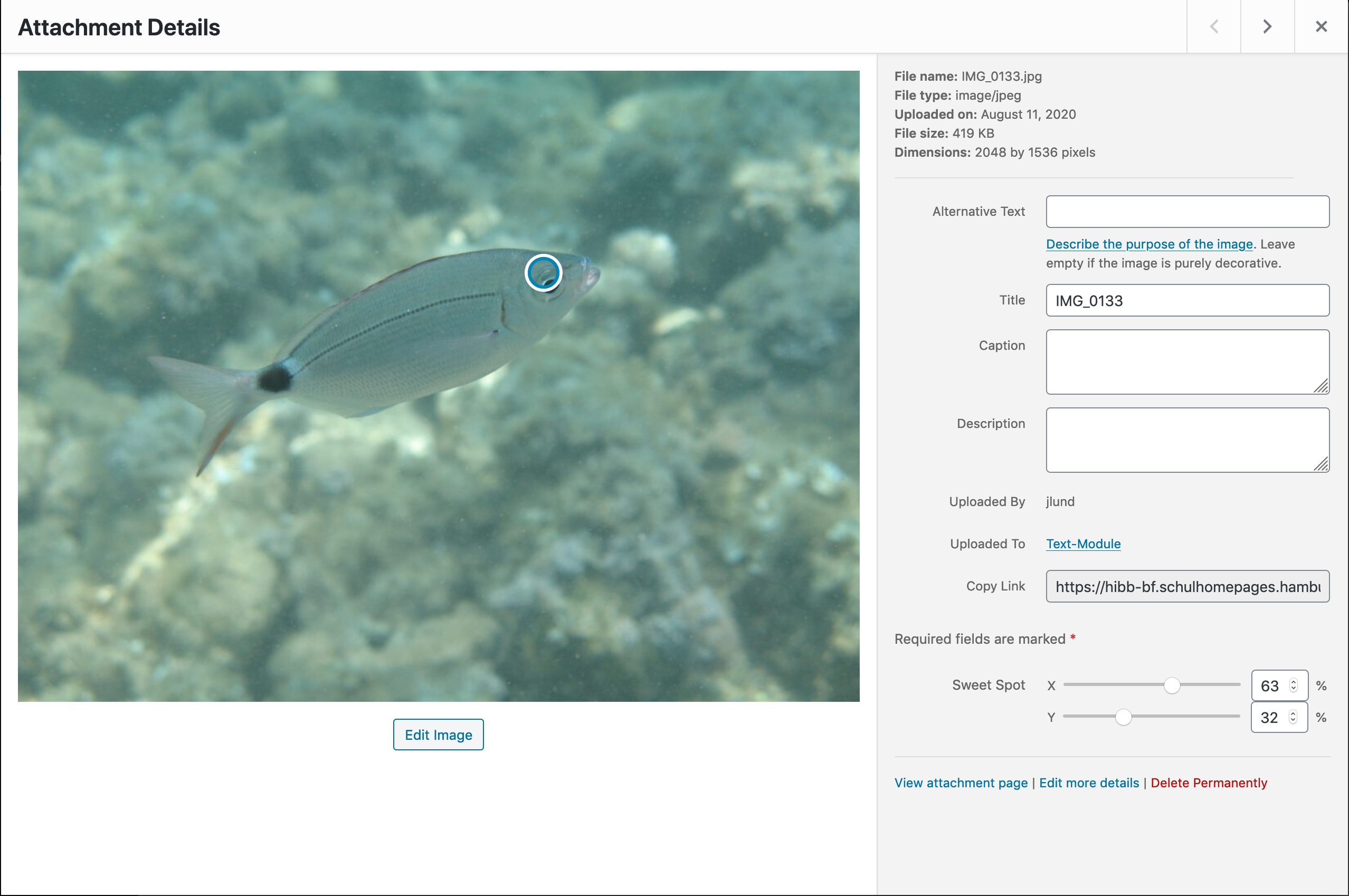
An easy way to choose the right clipping for images having object-fit: cover.
The easyest way to enable the Sweet Spot feature for all images is the following bit of php code, living in your Theme's functions.php or in a mu-plugin.
add_filter( 'acf_image_sweetspot_enable', '__return_true' );The plugin will then register a field group for image attachments including a sweet spot field and in the frontend add an inline style rule to the image attributes, e.g. object-position: 12.3% 81.4%;.
JSON I18n
ACF provides support for WPML to localize Field groups.
ACF WP Objects offers a different approach through .po files.
acf_localize_field_groups(
    'my-textdomain',
    function( $field_group ) {
        // callback which should return true, if the field group
        // localization is available under the given textdomain
        return $field_group['key'] === 'group_my_fieldgroup_key';
    });
If you are using local json, here is a node script allowing you to extract the strings src/run/json-i18n.js and add them to a pot file:
Install WP CLI.
Place src/run/json-i18n.js and src/run/lib/json-extract.js in your package directory.
Extract strings from json files and add them to a PHP file:
node ./src/run/json-i18n.js 'my-texdomain' ./path/to/json ./php-output.phpGenerate pot with WP CLI:
wp i18n make-pot . languages/my-textdomain.pot --domain=my-textdomainTemplate Files (ACF Pro only)
-
Filter template types
add_filter('acf_wp_objects_template_types', function( $types ) {
 $slug = 'foo-plugin';
 $key = 'Items Template';
 $theme_location = 'foo-plugin';
     // will point to wp-content/themes/<current-theme>/foo-plugin/
     // default: $slug
 $plugin_location = 'templates';
     // will point to wp-content/plugins/foo-plugin/templates/
     // null: use default, false: no plugin location, string: custom location inside plugin

 $types[ $slug ] = [
     'header_key' => $key,
     'theme_location' => $theme_location,
     'plugin_location' => $plugin_location,
 ];
 return $types;
});
WP Objects will scan for template files having a header key in theme and plugin locations.
- Create a Template select field with name
my_fabulous_template. Use it like this:get_template_part( get_field('my_fabulous_template') ); - Place some template files in location
/*
Items Template: List
*/
$settings = get_field('my_fabulous_template_settings');
Page layouts (ACF Pro only)
Generate a flexible content field and turn field groups to Layouts. Ideal if you need an extendible Set of Layouts to choose from.
- Add a layout section:
acf_add_page_layout([ 'title' => 'My Layout', 'name' => 'my-layout', ]); - Create field groups. Set "Page Layouts" "equals" "My Layout" as a location, and enter a row layout slug at the very bottom.
- Create template files in your theme corresponding to the slugs chosen above. Filenames should match
acf/layout-<row_layout_slug>.php. Don't forget to useget_sub_field(), you are inside a flexible content field! - In your page.php template file call this inside the loop:
acf_page_layouts( 'my-layouts' );
Repeater Choices with repeater row return
ACF doesn't load the field groups in the frontend by default. To retrieve the value of a Repeater Choice in the frontend, ACF has to know about this.
You can achieve this by adding do_action( 'acf_wpo_load_fields' );
ACF Options Page
Some new options for acf_add_options_page() and acf_add_options_sub_page().
acf_add_options_page([
    'import' => false,
    'import_message' => __( 'Options Imported', 'acf-wp-objects' ),
    'import_error_message' => __( 'Invalid Import Data', 'acf-wp-objects' ),
    'import_button' => __( 'Import', 'acf-wp-objects' ),
    'import_select_file' => __( 'Select File…', 'acf-wp-objects' ),

    'export' => false,
    'export_references' => false,
    'export_button' => __( 'Export Settings', 'acf-wp-objects' ),

    'reset' => false,
    'reset_button' => __( 'Restore defaults', 'acf-wp-objects' ),
    'reset_message' => __( 'Options Reset to Defaults', 'acf-wp-objects' ),
]);
Args
importBooleanEnable Import featureimport_messageStringMessage after sucessful importimport_error_messageStringMessage after failed importimport_buttonStringImport button labelimport_select_fileStringImport file input labelexportBoolean|ArrayEnable export feature.truewill simply export values from the current options page. Passing an array of options page IDs will export from multiple options pages at onceexport_referencesBooleanWhether to export referenced content like posts, images or termsexport_buttonStringExport button labelresetBoolen|StringEnable reset feature. Passing the path to a valid import file will import it.reset_messageStringMessage after a sucessful resetreset_buttonStringReset button label
Examples
Enable import and export.
acf_add_options_page([
    'page_title' => 'Configure Foobar Options',
    'menu_title' => 'Foobar Options',
    'post_id' => 'foobar_options',
    'parent_slug' => 'themes.php',
    'menu_slug' => 'foobar-options',
    'import' => true,
    'export' => true,
]);
Enable reset too.
acf_add_options_page([
    'page_title' => 'Configure Foobar Options',
    'menu_title' => 'Foobar Options',
    'post_id' => 'foobar_options',
    'parent_slug' => 'themes.php',
    'menu_slug' => 'foobar-options',
    'import' => true,
    'export' => true,
    'reset' => true,
]);
Enable reset and get values from an export file.
acf_add_options_page([
    'page_title' => 'Configure Foobar Options',
    'menu_title' => 'Foobar Options',
    'post_id' => 'foobar_options',
    'parent_slug' => 'themes.php',
    'menu_slug' => 'foobar-options',
    'import' => true,
    'export' => true,
    // pass file path to reset
    'reset' => get_template_directory().'/foobar-defaults.json',
]);
WP-CLI
Create an export file
wp acf-options-page export foobar-options --pretty > wp-content/themes/my-theme/foobar-defaults.jsonImport options from file
wp acf-options-page import wp-content/themes/my-theme/foobar-defaults.jsonReset options page.
Regardless of the configuration passed to acf_add_options_page() this will not import the values from a file. Use wp acf-options-page import to do so.
wp acf-options-page reset foobar-optionsReleases
Newest 25 of 60 recorded releases. Each count is every asset in that release; expand a row for the breakdown.
Active-site estimate ≈10 comes from the median of recent superseded releases. Method.