TOCguide WP Registry grade A. No security issues foundWP RegistryNo security issues foundOpen the reportA
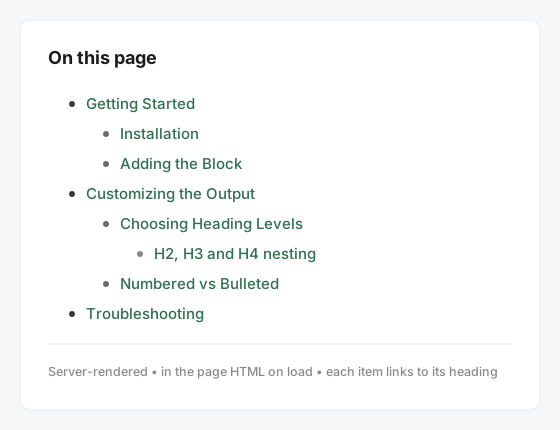
Lightweight, server-rendered Table of Contents block for Gutenberg. TOCguide builds an accessible, SEO-friendly outline from your headings — numbered or bulleted, zero setup. Independent plugin. GPLv2+.
Install
Upload it under Plugins → Add New Plugin → Upload Plugin, then activate.
Install straight from GitHub with WP-CLI:
wp plugin install https://github.com/matthummel-pa/tocguide/releases/download/v1.6.15/tocguide.zip

The Table of Contents that reads with your reader.
One Gutenberg block. A linked outline from your headings — plus an optional Reading Guide:
section previews, read time, study tools, and citations. Server-rendered. No accounts. No tracking.
Docs · Support · Download tocguide.zip · Issues · GPLv2 or later






Independent plugin by Matt Hummel. Slug, folder, text domain, block, and GitHub repo: tocguide.
Not affiliated with any other company or plugin.
Why TOCguide
Most Table of Contents plugins stop at a list of links. TOCguide starts there and then helps people read the post.
| You get | Why it matters |
|---|---|
| The outline is in the HTML | Search engines and screen readers see it before JavaScript. |
| Anchors match the list | IDs are injected from the same heading map. Custom HTML anchors win. |
| Reading Guide (opt-in) | Previews, density bars, ~N min badges, progress fade — computed from your content, not an API. |
| Study tools (opt-in) | Progress bar, resume bookmark, private note pads, citations, export — all localStorage or clipboard. |
| Works where you write | Gutenberg block, [tocguide] shortcode, auto-insert, Elementor / Divi / Bricks and the other builders we document. |
| Theme-native | The published TOC inherits the theme. No branded font on the front end. |
Zero config for the default path: insert the block, get an accessible <nav>.
Releases at a glance
timeline
    title TOCguide
    1.5.0 : One identity — tocguide everywhere
         : Breaking prefix rename
         : Docs + support URLs
    1.4.0 : Directory name TOCguide
         : Guideline 17 independence
    1.3.0 : Global design + a11y settings
    1.2.0 : Study assistant tools
    1.1.0 : Reading Guide + builders
1.0.0 : Block, shortcode, auto-insert| Version | Ship | What people notice |
|---|---|---|
| 1.5.0 | Now | One slug everywhere: PHP, CSS, block tocguide/table-of-contents, [tocguide], settings key. Re-insert the block if you used an earlier zip. |
| 1.4.0 | Sep 2026 | Public name TOCguide for WordPress.org guideline 17. |
| 1.3.x | Sep 2026 | Sitewide colors/fonts, focus rings, and the color-picker escape fix. |
| 1.2.x | Sep 2026 | Progress bar, bookmark, reader notes, Section Planner. |
| 1.1.0 | — | Reading Guide, citations, hover previews, page-builder headings. |
| 1.0.x | — | Core TOC block, shortcode, auto-insert, five Block Styles. |
Full prose: CHANGELOG.md · directory copy: readme.txt.
v1.5.0 — one identity
| Surface | Value |
|---|---|
| Display name | TOCguide |
| Slug / folder / text domain | tocguide |
| Main file | tocguide.php |
| Block | tocguide/table-of-contents |
| Shortcode | [tocguide] |
| Option | tocguide_settings |
| CSS | .tocguide, --tocguide-* |
| Skip a heading | no-toc or tocguide-skip |
| GitHub + Pages | matthummel-pa/tocguide |
Upgrade: re-insert the Table of Contents block, update any custom CSS, and save Settings → TOCguide. Old keys are not migrated.
v1.3.3 — colours and focus actually print
| Fix | Detail |
|---|---|
$guide_attrs order |
Focus-ring data-tocguide-focus was wiped before render |
| Global design props | --tocguide-bg, --tocguide-color, borders, fonts reach the <nav> |
v1.3.0 — design & accessibility settings
| Feature | Where |
|---|---|
| Background, text, link, type, border, padding | Settings → Design & Appearance (--tocguide-*) |
| Reading Guide / study / export defaults | Settings → TOCguide |
| Focus ring: default / bold / high-contrast | Settings → Accessibility |
v1.2.0 — study assistant
| Feature | Enable | State |
|---|---|---|
| Reading progress bar | Study Tools or rprogress="1" |
IntersectionObserver |
| Resume bookmark | bookmark="1" |
localStorage tocguide-bm-{post} |
| Reader note pads | rnotes="1" |
localStorage tocguide-rn-… |
| Section Planner | Block sidebar | sectionStatus attribute (editor only) |
All off by default. Nothing writes to a custom table. Nothing phones home.
v1.1.0 — Reading Guide & builders
Reading Guide, hover previews, emoji reactions, academic citations, export/print, Elementor / Bricks / Divi / WPBakery / Oxygen / Beaver / Breakdance heading maps. See the feature tables in older README history via git if you need the original grid.
WordPress.org listing notes
Written for Plugin Directory review (FAQ + 18 guidelines). This is a Plugin Directory plugin (settings + shortcode + auto-insert), not Block Directory.
| Guideline | How TOCguide handles it |
|---|---|
| 1 GPL | Entire zip is GPLv2 or later (LICENSE / license.txt). |
| 4 Human-readable | Unminified src/ ships; npm run build is documented. |
| 5 No trialware | Full feature set in this free plugin. |
| 7 No tracking | No analytics, no phone-home, no accounts. See PRIVACY.md. |
| 8 No remote code | No CDN JS/CSS in the plugin. Assets enqueued from build/. |
| 10 No forced credits | No front-end “powered by” link. |
| 11 Admin | Settings under Settings → TOCguide. Welcome notice is dismissible. |
| 12 Readme | Five tags. Copy is for humans, not keyword stuffing. |
| 13 Core libraries | No bundled jQuery. Gutenberg packages via wp-scripts. |
| 17 Trademarks | Independent name TOCguide / slug tocguide. |
Third-party services: none. Do not confuse the GitHub Pages site (Outfit from Google Fonts in docs/*.html) with the plugin zip — WordPress sites do not load that font from this plugin.
Capabilities: settings require manage_options. Welcome dismiss uses a nonce (tocguide_dismiss_welcome).
Uninstall: uninstall.php runs on delete, not deactivate. Options are removed only if the owner opted in.
Source: src/ (JS/SCSS) + includes/ (PHP). Compiled assets in build/ (gitignored; CI and plugin-zip build them).
Features
- Live editor preview as you add or edit headings
- H1–H6 (H1 off by default), numbered or bulleted, five Block Styles
- Smooth scroll + offset (
prefers-reduced-motionrespected) - Collapse/expand, sticky outline, scroll-spy
- Auto-insert (top of content or after the first heading)
[tocguide]shortcode for classic content and page builders- Skip a heading with
no-tocortocguide-skip - Optional ItemList JSON-LD (off by default)
- Settings + Docs & Support in wp-admin
Performance
TOCguide is built to add zero measurable overhead on pages that don't use it, and minimal overhead on pages that do.
| Concern | How TOCguide handles it |
|---|---|
| Assets on unrelated pages | JS + CSS only load on singular posts/pages that contain the block, shortcode, or auto-insert target. The enqueue_front_assets() check gates all enqueues. |
| Front-end JavaScript | view.js — ~12 KB minified. Loaded via block.json viewScript. No jQuery. No framework. |
| Front-end CSS | style-index.css — ~20 KB minified. One file; no render-blocking imports. |
| Scroll event handlers | Features use IntersectionObserver. Any scroll listener is { passive: true }. |
| localStorage writes | Reader notes ~400 ms debounce; bookmark ~500 ms. Nothing is written until a study tool is enabled. |
| PHP database queries | Heading maps cache in a static array — at most one get_post() per post per request. |
| Remote calls | None. |
the_content filters |
Priority 12 and 999, guarded by is_singular() && in_the_loop() && is_main_query(). Builder ID injection short-circuits on Gutenberg-only posts. |
prefers-reduced-motion |
Smooth scroll and CSS transitions respect the OS preference. |
Install
Current version: 1.5.0.
- Download
tocguide.zipfrom Releases. - In WordPress: Plugins → Add New → Upload Plugin.
- Activate. Optional: Settings → TOCguide.
Or clone this repo into wp-content/plugins/tocguide, run npm install && npm run build, and activate.
Use the block
- Edit a post that has Heading blocks.
- Insert Table of Contents (usually right after the intro).
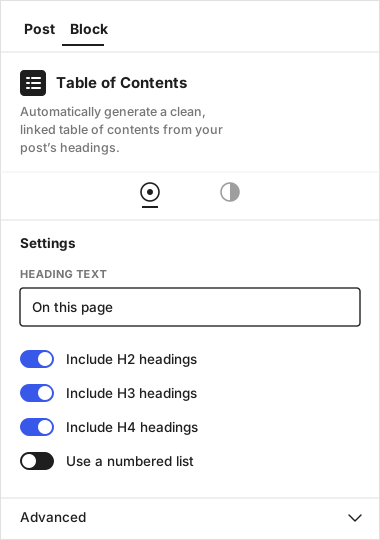
- In the sidebar: title, heading levels, list style, preset, collapse, sticky, Reading Guide.
Shortcode
[tocguide]
[tocguide title="On this page" ordered="1" style="boxed"]
Develop
Requires Node.js 20+ (.nvmrc). PHP 7.4+ for runtime; PHPCS via Composer in CI.
git clone https://github.com/matthummel-pa/tocguide.git
cd tocguide
npm install
npm run start          # watch → build/
npm run build          # production
npm run lint:js
npm run lint:css
npx --package=@wordpress/env wp-env start   # optional local WordPress
composer install
composer phpcsbuild/ is gitignored. You must build before the block registers (register_block_type( …/build )).
| Path | Role |
|---|---|
tocguide.php |
Headers, constants, boot |
includes/class-tocguide-*.php |
Settings, headings, plugin, admin |
src/block.json |
Block metadata (apiVersion 3, dynamic) |
src/edit.js / view.js / style.scss |
Editor, front JS, shared CSS |
src/render.php |
Markup only — no function declarations |
admin/ |
Settings + Docs & Support UI |
docs/ |
GitHub Pages (/docs on main) |
.wordpress-org/ |
Banner/icon sources for SVN assets/ (not in the plugin folder) |
Conventions
- Text domain is the literal
'tocguide'(never a constant). - Dynamic block:
save.jsreturnsnull; PHP renders. - Prefix functions
tocguide_, classesTOCguide_, constantsTOCGUIDE_. - Do not load Core copies of jQuery. Do not execute remote JS.
- Front-end TOC must not inject a branded (or serif) font.
Filters (documented in docs/documentation.html): tocguide_headings, tocguide_nav_classes, tocguide_render_nav, tocguide_skip_post_types.
Release: bump tocguide.php, TOCGUIDE_VERSION, package.json, src/block.json, readme.txt Stable tag, then tag vX.Y.Z (Actions builds tocguide.zip).
See docs/DEVELOPER_SOP.md and CONTRIBUTING.md.
Documentation
| Doc | Who it is for |
|---|---|
| Support site | Users, buyers, reviewers |
| Full documentation | Install, sidebar, shortcode, builders |
| Support policy | What we cover |
| User guide | Site owners (repo copy) |
| Developer SOP | Contributors |
| Support policy (repo) | Buyers / WordPress.org users |
| Security · Privacy | Vulns and data handling |
| Marketplace kit | WordPress.org and CodeCanyon |
| Changelog | Release history |
| WordPress.org rules | Plugin Directory FAQ + guidelines |
| Naming | Locked slug / text domain |
License
GPLv2 or later — the whole plugin (PHP, JavaScript, CSS, and images), same family as WordPress.
Copyright © 2026 Matt Hummel.
Releases
Newest 25 of 28 recorded releases. Each count is every asset in that release; expand a row for the breakdown.