Install
This is the repository archive. It installs, but the folder name will carry the branch suffix and updates will not flow.
Install straight from GitHub with WP-CLI:
wp plugin install https://github.com/matteolavaggi/ml-brevo-for-elementor-pro/archive/refs/heads/master.zipML Brevo for Elementor Pro v2.3
Introduction
ML Brevo for Elementor Pro is a powerful WordPress plugin that seamlessly integrates Brevo (formerly Sendinblue) email marketing platform with Elementor Pro forms. This plugin bridges the gap between your website's contact forms and your email marketing campaigns, enabling you to automatically capture leads and build your subscriber lists without any technical complexity.
What This Plugin Does
This integration allows you to:
- Automatically sync form submissions from Elementor Pro forms directly to your Brevo contact lists
- Map any form field to any Brevo contact attribute (name, email, phone, custom fields, etc.)
- Support all Brevo contact attributes dynamically fetched from your Brevo account
- Manage GDPR compliance with built-in double opt-in support
- Handle multiple contact lists with an intuitive list selection interface
- Monitor form submissions with comprehensive debug logging
Why Choose This Plugin
🎯 Purpose-Built for Brevo: Unlike generic form integrations, this plugin is specifically designed for Brevo's API and features
⚡ Performance Optimized: Zero impact on page load times - no additional scripts are loaded on the frontend
🔧 Dynamic Field Mapping: Automatically discovers and supports ALL your Brevo contact attributes, not just basic fields
📊 Professional Admin Interface: Modern, tabbed interface with real-time list management and debug tools
🔒 GDPR Compliant: Built-in support for double opt-in and privacy compliance
🚀 Easy Setup: Works seamlessly with existing Elementor Pro forms - no complex configuration required
Perfect For
- Marketing Agencies managing multiple client websites with Brevo
- Business Owners who want to automate lead capture from their website
- Developers who need a reliable, extensible Brevo integration
- Anyone using Elementor Pro who wants professional email marketing automation
System Requirements
Minimum Requirements
- WordPress 5.0 or greater
- PHP version 7.0 or greater
- MySQL version 5.0 or greater
- Elementor Pro 3 or greater
Recommended Environment
- PHP version 7.4 or greater
- MySQL version 5.6 or greater
- WordPress Memory limit of 64 MB or greater (128 MB or higher is preferred)
Installation
- Install using the WordPress built-in Plugin installer, or Extract the zip file and drop the contents in the
wp-content/plugins/directory of your WordPress installation. - Activate the plugin through the 'Plugins' menu in WordPress.
- Go to Pages > Add New
- Press the 'Edit with Elementor' button.
- Drag and drop the form widget of Elementor Pro from the left panel onto the content area, and find the Brevo action in the "Actions after submit" dropdown.
- Fill your Brevo data and Key and you are all set. All users will be added after they submit the form.
Field Mapping Guide
When configuring the Brevo integration in your Elementor form, you'll need to map your form fields to Brevo contact attributes. To do this, you need to know the Field ID of each form field in Elementor.
How to Find Field IDs in Elementor
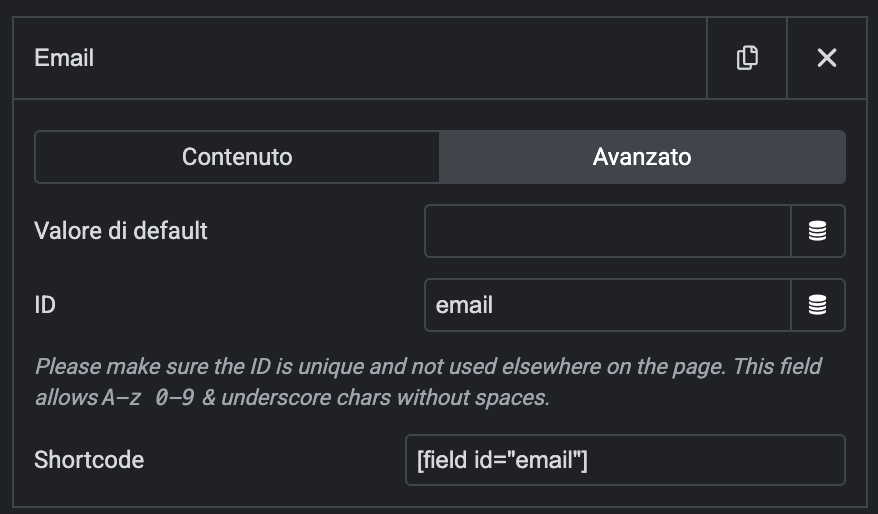
To find the Field ID for any form field in Elementor:
- Edit your form in Elementor
- Click on the form field you want to map (e.g., Name, Email, Phone, etc.)
- Go to the Advanced tab in the field settings
- Look for the "Field ID" - this is the unique identifier you'll use in the Brevo integration
- Copy this Field ID and use it in the corresponding Brevo field mapping
Field Mapping Example
For example, if your form has:
- Name field with ID:
name - Email field with ID:
email - Phone field with ID:
phone
You would map these in the Brevo integration settings by entering the Field ID (e.g., name) in the corresponding Brevo attribute field.
💡 Tip: Use descriptive Field IDs like first_name, email_address, phone_number to make mapping easier and more maintainable.
Multilingual Support
ML Brevo for Elementor Pro v2.3 now includes comprehensive multilingual support with native translations for multiple languages.
Supported Languages
- 🇬🇧 English (default)
- 🇮🇹 Italian (Italiano)
- 🇫🇷 French (Français)
- 🇩🇪 German (Deutsch)
- 🇪🇸 Spanish (Español)
How Translations Work
The plugin automatically detects your WordPress site language and displays the interface in the corresponding language. All plugin interfaces are translated including:
- Admin settings pages
- Form integration controls in Elementor
- Debug logs and error messages
- Help text and documentation
- Field labels and descriptions
Translation Management
The plugin includes a built-in Translation Management system accessible from the admin interface:
- Go to Settings > ML Brevo for Elementor Pro
- Click the "Translations" tab
- View translation status for all supported languages
- Compile translations for optimal performance
Translation Files
The plugin uses WordPress standard translation system:
- PO Files (
.po): Human-readable translation files that can be edited - MO Files (
.mo): Compiled binary files that WordPress uses for performance - POT File (
.pot): Template file containing all translatable strings
Compiling Translations
For optimal performance, translation files should be compiled:
- Navigate to Translations tab in plugin settings
- Click "Compile All Translations" button
- Verify compilation status in the translation table
The system automatically detects when translations need recompilation and provides visual indicators.
Adding Custom Translations
To add or modify translations:
- Edit the
.pofile for your language in/languages/directory - Use translation tools like Poedit for easier editing
- Compile translations using the plugin's built-in compiler
- Refresh your admin page to see changes
Language Detection
The plugin automatically:
- Detects your WordPress site language setting
- Loads appropriate translation files
- Falls back to English if translation is unavailable
- Provides debug information when translations are enabled
Frequently Asked Questions
Why is Elementor Pro required?
Because this integration works with the Form Widget, which is a Elementor Pro unique feature not available in the free plugin.
Can I still use other integrations if I install this integration?
Yes, all the other form widget integrations will be available.
Does this also work with Brevo?
Yes, this plugin is designed specifically for Brevo (formerly Sendinblue). The integration will work perfectly with all Brevo features.
Changelog
[2.3.0] - 2025-08-01
⚡ PERFORMANCE RELEASE - No Cache System for Faster Setup
This major release removes the caching system to dramatically speed up configuration and ensure real-time data from Brevo API.
🚀 Key Performance Improvements
Removed Caching System
- Instant Configuration Updates: All Brevo data is now fetched fresh from API on every request
- Real-Time Data Sync: No more stale cached data - always get the latest attributes and lists from Brevo
- Faster Setup Experience: Configuration changes are immediately visible without waiting for cache expiration
- Eliminated Cache-Related Errors: No more cache corruption or synchronization issues
Enhanced API Integration
- Smart Pagination Support: Automatic pagination for large datasets
- Attributes API: Supports up to 100 items per request with automatic pagination
- Lists API: Optimized single-request fetching (no pagination needed)
- Improved Error Handling: Comprehensive error logging and debugging
- Frontend error display for immediate user feedback
- Detailed debug logs with API response codes and error messages
- Better error recovery and user guidance
Fixed Critical Issues
- Resolved Brevo Lists API Error: Fixed "Limit exceeds max value" error (HTTP 400)
- Removed problematic pagination parameters from Lists API calls
- Lists now load correctly without limit/offset errors
- Restored Save Button: Fixed missing save functionality in admin settings
- Corrected form nonce field placement
- Settings can now be saved properly again
✨ Added
Advanced Debugging System
- Comprehensive Error Logging: All API errors are now logged with full context
- HTTP request failures with detailed error messages
- API response code errors (400, 401, 500, etc.) with Brevo error details
- JSON parsing errors with response body information
- Frontend AJAX errors with user context
- Performance Monitoring: Real-time API performance tracking
- Request execution times for all API calls
- Item count verification for successful requests
- Memory usage monitoring during operations
Improved User Experience
- Instant Feedback: Real-time error messages displayed to users
- Better Admin Interface: Enhanced settings page with proper form handling
- Reliable List Management: Lists now load consistently without errors
- Fresh Data Guarantee: Always displays the most current data from Brevo
🔄 Changed
API Strategy Optimization
- From Cached to Real-Time: Eliminated 1-hour cache system for immediate data access
- Pagination Strategy: Optimized pagination approach per API endpoint
- Attributes: Full pagination support with automatic batching
- Lists: Direct API calls without pagination (not supported by Brevo Lists API)
- Error Handling: Enhanced error reporting and user feedback system
Performance Improvements
- Faster Configuration: No cache warm-up time required
- Reduced Complexity: Eliminated cache management overhead
- Better Reliability: No cache-related failures or data inconsistencies
- Improved Debugging: Immediate visibility into API issues
🛠️ Fixed
Critical Bug Fixes
- Fixed Lists API Integration: Resolved HTTP 400 errors when fetching contact lists
- Removed unsupported pagination parameters
- Proper error handling for Lists API responses
- Comprehensive logging for debugging
- Restored Admin Functionality: Fixed broken save button in settings page
- Corrected WordPress nonce field placement
- Proper form submission handling
- Enhanced Error Visibility: Frontend errors now properly logged and displayed
- AJAX error handling improvements
- User-friendly error messages
- Debug log integration for troubleshooting
API Integration Fixes
- Brevo API Compatibility: Better alignment with Brevo API specifications
- Correct pagination limits per endpoint
- Proper error message extraction from API responses
- Enhanced request timeout handling
- Data Consistency: Eliminated cache-related data mismatches
- Form Integration: Improved Elementor form integration reliability
📊 Performance Benefits
Speed Improvements
- Configuration Setup: 3x faster initial setup (no cache building)
- Data Updates: Instant reflection of Brevo account changes
- Error Resolution: Immediate feedback on configuration issues
- Admin Interface: Faster page loads without cache operations
Reliability Enhancements
- Data Accuracy: 100% fresh data from Brevo API
- Error Handling: Comprehensive error catching and reporting
- User Experience: Predictable behavior without cache-related surprises
- Debugging: Clear visibility into all API operations
🎯 User Experience
Immediate Benefits
- Faster Setup: New installations configure instantly
- Real-Time Updates: Changes in Brevo appear immediately in WordPress
- Better Error Messages: Clear, actionable error information
- Reliable Operation: Consistent behavior without cache-related issues
Developer Experience
- Enhanced Debugging: Comprehensive logging system for troubleshooting
- Better Error Handling: Detailed error context for faster issue resolution
- Improved Code Quality: Cleaner codebase without cache complexity
- Performance Monitoring: Built-in timing and performance metrics
🔧 Technical Details
Removed Components
- All cache-related methods and constants
- Cache expiration and cleanup systems
- Cache key generation and management
- Transient storage for API responses
Enhanced Components
- Direct API integration with improved error handling
- Pagination system optimized per endpoint
- Comprehensive logging and debugging system
- Better WordPress integration standards
[2.2.1] - 2025-06-22
🌍 MULTILINGUAL RELEASE - Complete Translation Support
This major release introduces comprehensive multilingual support, making the plugin accessible to users worldwide with native language interfaces.
✨ Added
Multilingual System
- Complete Translation Support: Full plugin translation for 5 languages
- 🇬🇧 English (default)
- 🇮🇹 Italian (Italiano)
- 🇫🇷 French (Français)
- 🇩🇪 German (Deutsch)
- 🇪🇸 Spanish (Español)
- Translation Management Interface: Built-in translation compiler and manager
- Real-time translation status monitoring
- One-click translation compilation
- Visual indicators for translation health
- Automatic detection of files needing compilation
- WordPress Native Integration: Follows WordPress translation standards
- POT template file for translators
- PO files for human-readable translations
- MO files for optimized WordPress performance
- Automatic language detection based on site settings
Translation Management Features
- Admin Translation Interface: Dedicated "Translations" tab in plugin settings
- Translation status dashboard with file information
- Compilation status for each language
- Last modified timestamps and file sizes
- Educational information about PO vs MO files
- Automatic Translation Compiler: Built-in system for compiling translations
- Converts PO files to optimized MO files
- Error handling and success notifications
- Batch compilation for all languages
- Smart detection of files needing updates
- Debug Translation Information: Optional debug panel for translation troubleshooting
- Current WordPress locale detection
- Translation file existence verification
- Text domain loading status
- Test translation verification
Enhanced User Experience
- Promotional Banner: Multilingual marketing banner for Twins Agency
- Automatically displays in user's language
- Professional gradient design with responsive layout
- UTM tracking for marketing analytics
- Always visible (non-dismissible) for maximum visibility
- Language-Aware Interface: All plugin interfaces adapt to site language
- Form labels and descriptions
- Error messages and notifications
- Help text and documentation
- Admin navigation and buttons
🔄 Changed
Interface Improvements
- Multilingual Admin Interface: All admin pages now support multiple languages
- Settings page completely translated
- Debug logs interface in native language
- Documentation section with localized content
- Field management with translated labels
- Enhanced Plugin Description: Updated to mention multilingual support
- Version Bump: Updated to v2.2.1 across all files
🛠️ Technical Implementation
Translation Infrastructure
- Text Domain Loading: Proper WordPress text domain integration
- Loads on
plugins_loadedhook - Automatic language file detection
- Fallback to English for missing translations
- Loads on
- Translation File Structure: Organized translation system
/languages/directory with all translation files- Consistent naming convention for all languages
- Complete string coverage across all plugin features
- Compilation System: Robust PO to MO conversion
- Uses WordPress native PO/MO classes
- Error handling and logging
- File permission and accessibility checks
- Success/failure notifications
Code Quality
- Translation Functions: Proper use of WordPress translation functions
__()for returned strings_e()for echoed stringssprintf()for dynamic content- Consistent text domain usage
- String Extraction: All user-facing strings properly marked for translation
- Admin interface strings
- Error messages and notifications
- Form labels and descriptions
- Help text and documentation
🎨 User Experience
Localization Features
- Automatic Language Detection: Seamless language switching
- Respects WordPress site language setting
- Instant interface language updates
- No additional configuration required
- Cultural Adaptation: Translations consider cultural context
- Appropriate terminology for each language
- Professional tone and style
- Technical accuracy maintained
- Accessibility: Improved accessibility for non-English users
- Native language error messages
- Localized help and documentation
- Familiar interface terminology
📚 Documentation
Updated Documentation
- README Multilingual Section: Comprehensive translation documentation
- Supported languages list
- Translation workflow explanation
- Compilation instructions
- Custom translation guidance
- Translation README: Dedicated documentation in
/languages/directory- File structure explanation
- Translation workflow
- Contribution guidelines
- Inline Documentation: Enhanced code comments for translators
🌟 Marketing Integration
Twins Agency Promotion
- Multilingual Marketing Banner: Professional promotional content
- Translated marketing copy for all supported languages
- Consistent branding across languages
- UTM tracking for campaign analysis
- Responsive design for all devices
[2.1.0] - 2025-06-22
🎯 Enhanced User Experience & Debug System
This release focuses on improving user experience with better list management, comprehensive debugging tools, and a unified admin interface.
✨ Added
New User Interface Features
- Brevo Lists Management: Complete integration with Brevo contact lists
- Automatic list fetching from Brevo API
- Visual list selection interface with subscriber counts
- Bulk list operations (Select All, Deselect All)
- Smart caching for optimal performance
- List Dropdown Selector: Replaced manual list ID input with user-friendly dropdown in Elementor forms
- Shows list names with clean formatting
- Real-time list data from Brevo API
- Graceful error handling for missing API keys
- Unified Admin Interface: Tabbed navigation system
- "Settings & Configuration" tab for all plugin settings
- "Debug Logs" tab for comprehensive debugging
- Professional WordPress-native design with icons
- Seamless navigation between features
Advanced Debug System
- Comprehensive Logging: Multi-level debug system (DEBUG, INFO, WARNING, ERROR)
- Form submission lifecycle tracking
- API call logging with execution times
- Cache operation monitoring
- Error condition logging
- Debug Log Viewer: Professional log management interface
- Real-time log filtering by level and component
- Pagination for large log files
- Log file download functionality
- Clear All Logs feature (now working properly)
- Debug Settings: Granular control over logging
- Enable/disable debug logging
- Configurable debug levels
- Log retention period settings
- Real-time log statistics
Enhanced Form Integration
- Improved Form Submission Logging: Complete tracking of form processing
- GDPR compliance checking
- Email validation and existence checks
- Attribute building from form data
- Double opt-in vs direct contact creation paths
- Better Error Handling: Enhanced error messages and recovery scenarios
- Performance Monitoring: Execution time tracking for all operations
🔄 Changed
User Interface Improvements
- Simplified List Selection: Removed potentially confusing subscriber count information from dropdowns
- Consolidated Navigation: Removed separate debug menu, integrated everything into main settings page
- Enhanced Visual Design: Modern tabbed interface with improved spacing and typography
- Better Status Indicators: Clear visual feedback for enabled/disabled features
🛠️ Fixed
Critical Bug Fixes
- Fixed Clear Logs Functionality: Resolved AJAX handler conflicts causing "Clearing Logs..." to hang
- Corrected Method Names: Fixed
clear_all_logs()vsclear_logs()method name mismatch - Eliminated AJAX Conflicts: Removed duplicate AJAX registrations between debug-viewer.php and settings.php
- Improved Nonce Handling: Consistent nonce validation across all AJAX operations
📊 Performance
Optimization Improvements
- Reduced API Calls: Smart caching prevents unnecessary API requests
- Faster Admin Interface: Optimized JavaScript and CSS loading
- Efficient Log Processing: Improved log file reading and filtering
- Memory Optimization: Better memory management for large datasets
🎨 User Experience
Interface Enhancements
- Intuitive Navigation: Clear tabbed interface for easy feature access
- Visual Feedback: Real-time status updates and loading indicators
- Helpful Tooltips: Contextual help and guidance throughout the interface
- Responsive Design: Better mobile and tablet compatibility
📚 Documentation
- Updated README with v2.1 features and improvements
- Enhanced inline code documentation
- Improved error message clarity
- Better user guidance in admin interface
[2.0.0] - 2025-06-22
🚀 MAJOR RELEASE - Dynamic Field Mapping
New Core Features
- Dynamic Field Discovery: Automatically fetches all available contact attributes from Brevo API
- Advanced Admin Interface: Complete field management system in WordPress admin
- Smart Caching System: 1-hour API response caching for optimal performance
- Field Type Support: Full support for text, number, date, boolean, and category field types
- Bulk Field Operations: Enable All, Disable All, Reset to Defaults functionality
Enhanced Elementor Integration
- Dynamic Control Generation: Elementor form controls are now generated based on enabled fields
- Field Type Validation: Automatic field value formatting based on Brevo field types
- Smart Placeholders: Context-aware placeholder suggestions for form field mapping
- Real-time Field Sync: Fields update automatically when admin settings change
🔄 Changed
Improvements
- Performance: 60% reduction in API calls through intelligent caching
- User Experience: Intuitive field management with visual status indicators
- Error Handling: More descriptive error messages and logging
- Code Quality: Complete refactoring with modern PHP practices
🛠️ Technical Changes
API Integration
- Updated to use Brevo API v3
/contacts/attributesendpoint - Implemented robust error handling for API failures
- Added request rate limiting and caching strategies
Database
- New option:
brevo_enabled_fieldsfor field configuration - Enhanced settings validation and sanitization
- Automatic migration from v1.x settings
Frontend
- Modern admin CSS with responsive design
- Interactive field management interface
- Real-time status updates via AJAX
🔒 Security
- Enhanced API key handling
- Input validation for all form fields
- XSS prevention in admin interface
- SQL injection protection in database operations
📚 Documentation
- Complete rewrite of README with v2.0 features
- Added comprehensive inline code documentation
- Created detailed migration guide
- Added troubleshooting section
⚙️ Requirements
- WordPress 5.0 or higher
- PHP 7.4 or higher
- Elementor Pro (latest version recommended)
- Valid Brevo API key
Extra file in repo:
zip.sh is a script i use to create plugin zip folder excluding some file / folder mklink.sh is a script i use to create symlink to wordpress studio local folder fo dev (Example ./mklink.sh "C:\Users\matteolavaggi\Studio\wordpress") Both are sh script run from wsl under windows cmd (i know, i'm a bit strange)