Install
This is the repository archive. It installs, but the folder name will carry the branch suffix and updates will not flow.
Install straight from GitHub with WP-CLI:
wp plugin install https://github.com/mathesonlj16-eng/community-resource-workflow-demo/archive/refs/heads/main.zipCommunity Resource Hub
Independent WordPress workflow demo using fictional content. A community team can maintain a searchable directory and review public suggestions in WordPress before adding them to the directory.
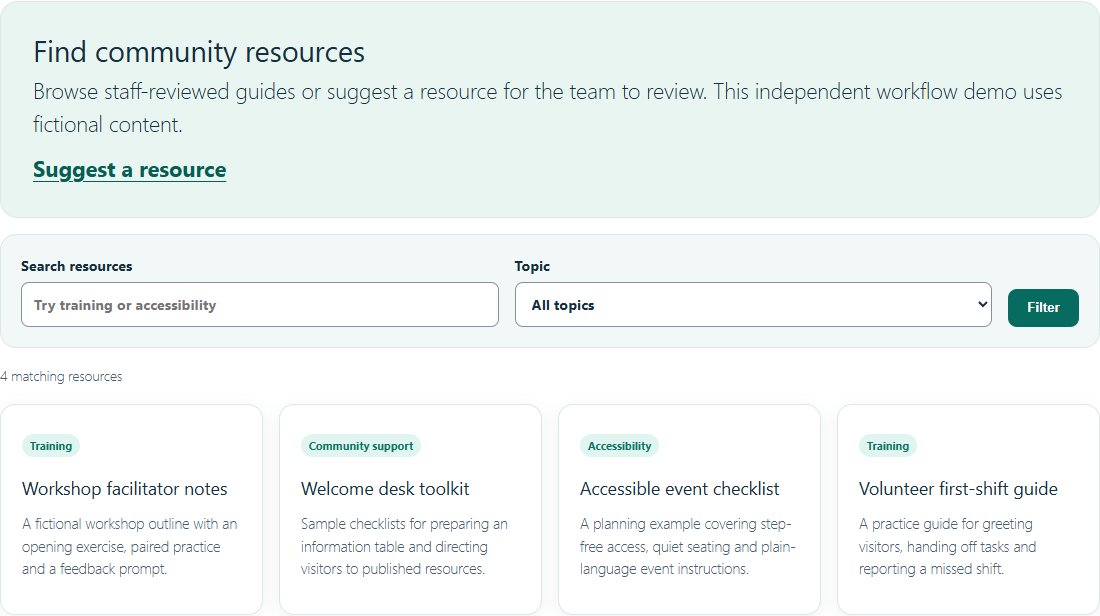
- Find useful guides. Search published resources by keyword, narrow by topic, and clear filters from the same page.
- Collect suggestions. An anonymous visitor can suggest a fictional resource and receive a confirmation that it is pending.
- Review before publishing. A staff member finds the Pending item in WordPress, reviews the text, topic and optional link, and publishes it. Visitors can then find it in the same topic and search results.
Visitor confirmation · Pending staff queue · Published search result · Mobile form
The images show Edge Chromium connected to the local Docker WordPress instance with the default block theme. Screenshots are cropped to the relevant frontend section where applicable. The staff screenshot shows the actual WordPress admin queue with a demo-only account. Static design preview is a separate HTML illustration.
Run in three steps
-
Start Docker Desktop and, from this folder in Windows PowerShell, run
./start-local.ps1. Open http://127.0.0.1:8088 and complete WordPress installation with unique demo-only credentials. For another Compose platform, create an ignored.envwith distinct strong random values forDEMO_DB_PASSWORDandDEMO_ROOT_PASSWORD, then rundocker compose up -d. -
In Plugins, activate Community Workflow Demo, then seed the two shortcode pages, three topics and four fictional resources.
Get-Content -Raw ./seed-local.php | docker compose exec -T wordpress phpThe script prints both page URLs and leaves existing pages and records with the fixture slugs intact. Use a clean local WordPress installation. To set up manually, publish Resources with
[cwd_directory]and Suggest a resource with[cwd_submission]. Create the Accessibility topic under Resources → Topics. -
Open the printed Resources URL in a private browsing window and follow the walkthrough below. Stop the stack with
docker compose down. Local volumes preserve the database across restarts.
Two-minute walkthrough
- Select Accessibility in the directory. Open Suggest a resource, enter Practice workshop accessibility guide, add A fictional checklist for captions and quiet spaces, choose Accessibility, and send it for review.
- Check the pending confirmation. Search for that title with Accessibility selected and confirm the public directory has no match. In a signed-in staff window, open Resources → Pending and review the suggestion.
- Publish it and reload the same public search. Verify one matching resource under Accessibility, then clear the filters.
Implementation and checks
community-workflow-demo.php registers a resource type and topic taxonomy, two frontend shortcodes, and a POST handler. It uses WordPress capabilities for staff publishing. It checks the submission nonce, sanitizes text, validates existing topic slugs and HTTPS links without credentials, and escapes output. It uses a redirect after POST and keeps the page URL in directory filters under plain permalinks. assets/style.css styles the shortcodes and the active theme supplies page layout. seed-local.php creates the fictional walkthrough data without changing plugin activation behavior.
For PHP checks, run php -l community-workflow-demo.php, php -l seed-local.php and php tests/validate.php with PHP 8+. The validation harness uses small WordPress stubs. The runtime checks used Docker Compose, WordPress 7.1.4, PHP 8.3 and Edge Chromium on Windows. See standalone test evidence and known coverage limits for the executed validation and WordPress runtime checks.
Scope and license
This self-directed example contains no client assets or real service records. Use fictional text and keep the Compose listener on localhost. WordPress guest nonces are shared for anonymous visitors and the honeypot is a basic spam check. Production use would require rate limiting, privacy and retention workflows, accessibility testing with assistive technology, and operational hardening. Staff should review destinations before publishing external links. The directory shows up to 12 results.
Original plugin and seed source are MIT licensed. WordPress, the default theme and MariaDB retain their own licenses and are obtained at runtime. The folder includes no third-party images or fonts. Public distribution requires owner approval of the extracted standalone copy.