KRA eTims Integration WP Registry grade D+. High-severity findings · 2 findingsWP RegistryHigh-severity findings · 2 findingsOpen the reportD+
A WordPress plugin that integrates WooCommerce Online Sales with the Kenya Revenue Authority (KRA) Electronic Tax Register (ETR) System.
Install
Upload it under Plugins → Add New Plugin → Upload Plugin, then activate.
Install straight from GitHub with WP-CLI:
wp plugin install https://github.com/matatashadrack/kra-etims-woocommerce/releases/download/v1.0.1/kra-etims-integration.zipKRA ETR Integration for Wordpress/Woocommerce
A WordPress plugin that integrates WooCommerce with the Kenya Revenue Authority (KRA) Electronic Tax Register (ETR) System.
Description
This plugin allows WooCommerce store owners to automatically submit sales transactions to the KRA ETR system when orders are completed and generate ETR-compliant receipts. It provides a seamless integration between your WordPress WooCommerce store and the KRA ETR API, ensuring compliance with KRA's electronic tax invoice requirements for online sales.
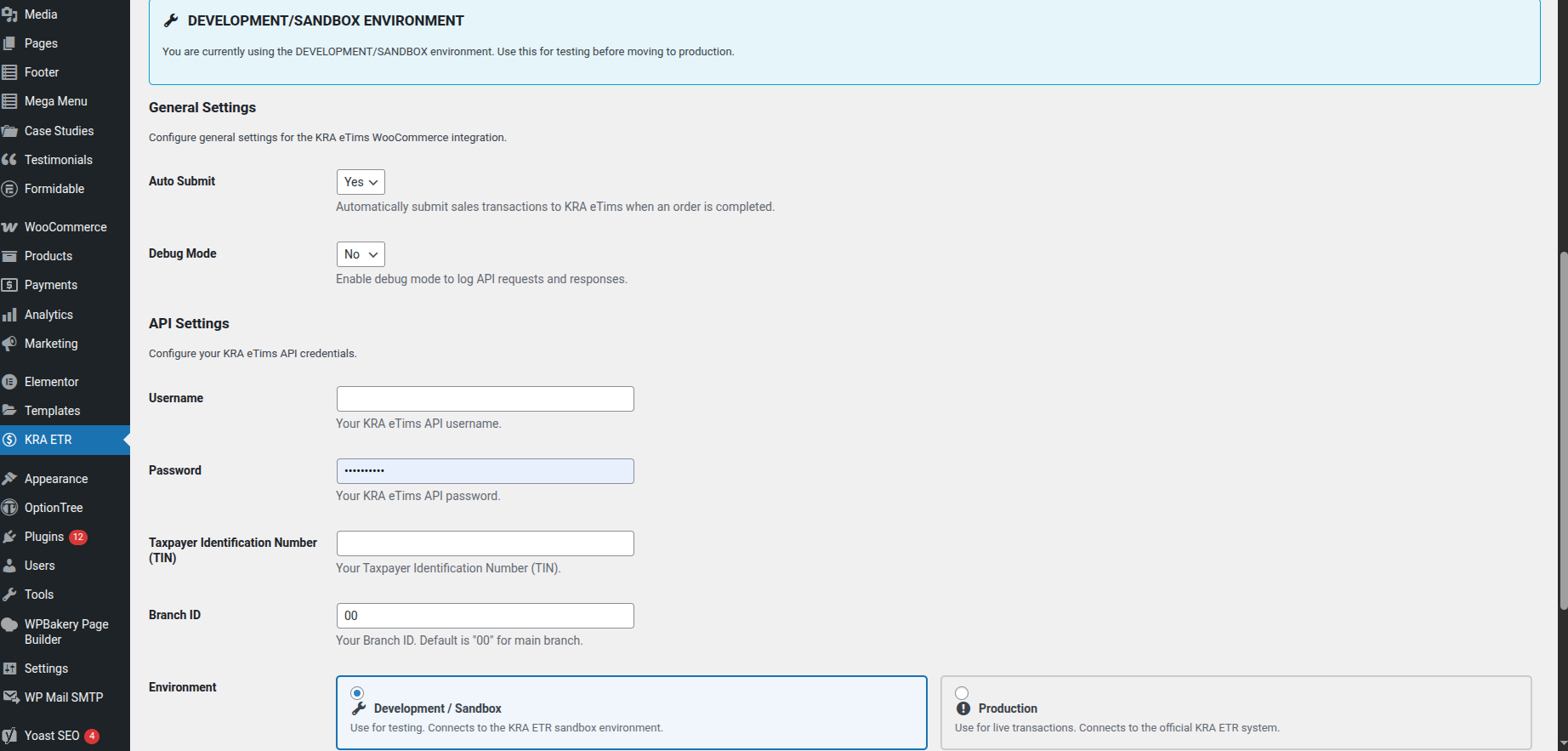
Screenshot: The KRA ETR visual configurator for WordPress WooCommerce
Features
- Automatic submission of sales transactions to KRA ETR when orders are completed
- Generation of ETR-compliant receipts for online sales on WordPress WooCommerce websites
- Manual submission of orders from the WooCommerce order edit screen
- Visual configurator with intuitive environment switching between development and production
- Configurable settings for API credentials, TIN, Branch ID, and more
- Detailed logging for debugging purposes
- Test connection functionality to verify API credentials
Installation
- Download the plugin files and upload them to your
/wp-content/plugins/directory - Activate the plugin through the 'Plugins' menu in WordPress
- Go to the 'KRA ETR' menu in your WordPress admin to configure the plugin settings
Configuration
- Navigate to the 'KRA ETR' menu in your WordPress admin
- Enter your KRA ETR API credentials:
- Username
- Password
- Taxpayer Identification Number (TIN)- KRA PIN number in other words
- Branch ID (default is "00" for main branch)
- Select the environment (Development/Sandbox or Production) using the visual environment selector
- Configure general settings:
- Auto Submit: Enable/disable automatic submission of orders when they are completed
- Debug Mode: Enable/disable detailed logging for debugging purposes
- Click "Save Changes" to save your settings
- Use the "Test Connection" button to verify your API credentials
Usage
Automatic Submission
When an order is marked as "Completed" in WooCommerce, the plugin will automatically submit the sales transaction to KRA ETR if the "Auto Submit" option is enabled. This works with both manual order completion and automatic completion through payment gateways like PayPal or M-Pesa.
Manual Submission
You can manually submit an order to KRA ETR from the WooCommerce order edit screen:
- Go to WooCommerce > Orders
- Edit an order
- In the "KRA ETR Integration" meta box, click the "Submit to KRA ETR" button
Alternatively, you can use the order actions dropdown:
- Go to WooCommerce > Orders
- Click the "Actions" button for an order
- Select "Submit to KRA ETR" from the dropdown
Requirements
- WordPress 5.6 or higher
- WooCommerce 5.0 or higher
- PHP 7.4 or higher
ETR-Compliant Receipts
The plugin automatically calculates VAT at 16% of the item price as required by KRA regulations. For example, if an item costs 100 shillings, the tax amount will be 16 shillings. This ensures that all receipts generated are compliant with KRA ETR requirements for online sales.
Support
For support, please contact the plugin author:
- Shadrack Matata
- Email: kisamba.debug@gmail.com
- Tel: +254722854082 / +254733854082
License
This plugin is licensed under the ISC License.
Releases
2 releases. Each count is every asset in that release; expand a row for the breakdown.