Install
This is the repository archive. It installs, but the folder name will carry the branch suffix and updates will not flow.
Install straight from GitHub with WP-CLI:
wp plugin install https://github.com/masteryang59/woo-ai-product-writer/archive/refs/heads/main.zipA WordPress plugin that writes WooCommerce product descriptions, short descriptions and SEO meta (title, description, focus keyword) with the OpenAI API, or with any OpenAI-compatible endpoint.
Stores with hundreds of products usually have thin or copied descriptions and no meta descriptions, because writing them by hand takes too long. This plugin takes the facts the store already has (name, categories, attributes, price, size, weight) plus a short note from the owner and turns them into product copy. A shop manager reviews and edits every field before anything is saved, then clicks Apply, and Undo puts back what was there before. The plugin checks each answer before showing it: HTML is reduced to a safe subset, overlong meta fields are cut at word boundaries, and numbers that aren't in the product data are flagged, because invented capacities or warranty years are the most common way AI product copy goes wrong. Whole catalogs can be done with a bulk action that runs in the background through Action Scheduler.
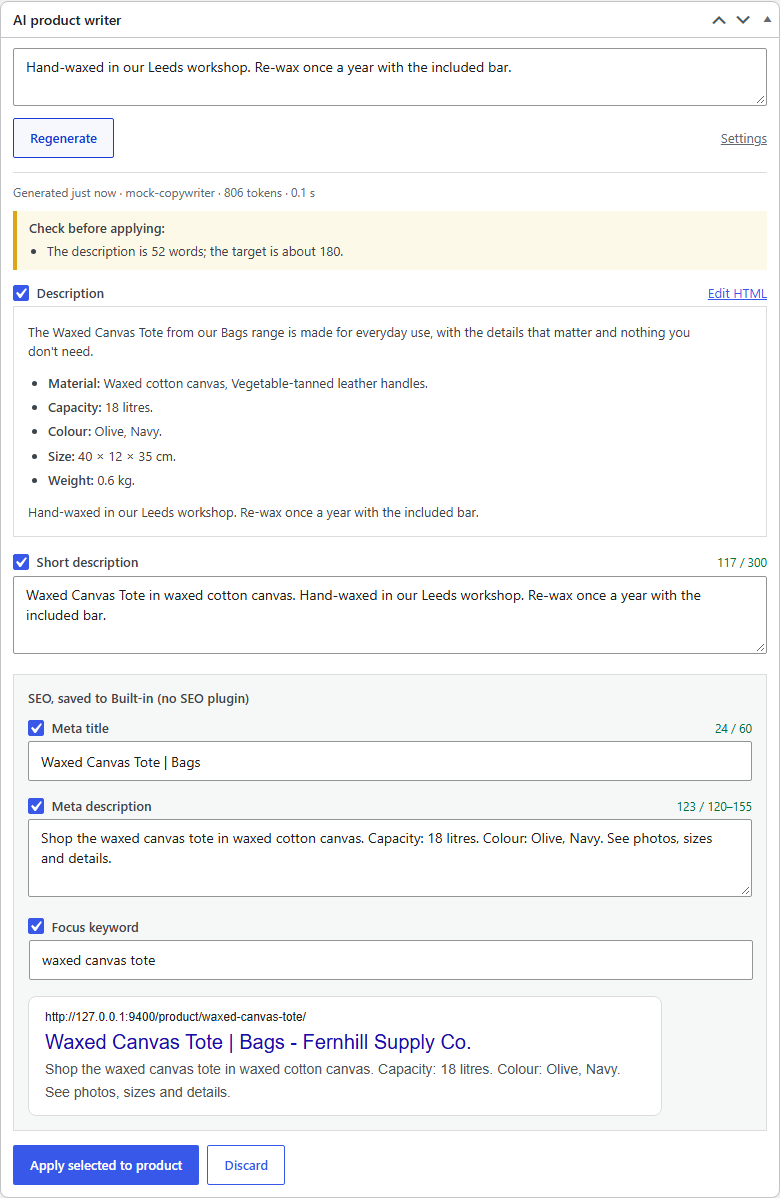
Captured from a real run in WordPress Playground with the plugin's mock OpenAI server (see Limitations).
How it works
sequenceDiagram
    actor M as Shop manager
    participant UI as Meta box (admin.js)
    participant R as REST /wapw/v1
    participant G as Generator
    participant AI as OpenAI-compatible API
    participant P as Product + SEO meta

    M->>UI: notes + "Generate copy"
    UI->>R: POST /products/42/generate
    R->>G: rate limit ok → generate()
    G->>G: ProductFacts (name, categories, attributes, price, size…)
    G->>AI: POST /chat/completions (JSON mode, retries on 429/5xx)
    AI-->>G: {"description_html", "short_description", "meta_title", …}
    G->>G: parse → sanitize → check (length, keyword, numbers not in facts)
    Note over G: unreadable answer → one repair round with the error
    G-->>R: suggestion stored in post meta (nothing on the product yet)
    R-->>UI: suggestion + warnings
    M->>UI: edits fields, unticks some, "Apply selected"
    UI->>R: POST /products/42/apply {copy, fields}
    R->>P: backup current values → write SEO meta → $product->save()
    M->>UI: "Undo last AI apply" (optional)
    UI->>R: POST /products/42/undo → restore the backup
What gets generated
| Field | Where it goes | Checks |
|---|---|---|
| Description | post_content |
wp_kses to p ul ol li strong em h3 br, no attributes. Plain text is wrapped in paragraphs. Warns when it's under half or over twice the target length |
| Short description | post_excerpt |
Plain text, max 300 characters (cut at a sentence). Taken from the description's first paragraph if the model leaves it out |
| Meta title | Yoast, Rank Math or built-in | Max 60 characters, cut at a word boundary |
| Meta description | Yoast, Rank Math or built-in | 120–155 characters. Longer ones are shortened with "…", shorter ones get a warning |
| Focus keyword | Yoast, Rank Math or built-in | Lowercased. Warns if it isn't in the title or meta description (word order doesn't matter) |
Across all fields, numbers in the copy are compared with the numbers in the product facts. 1,200 matches 1200 and 2.5 matches 2.50, and single digits are ignored. Placeholder text ("lorem ipsum", "as an AI") gets a warning too.
The prompt
src/Content/PromptBuilder.php sends a system message with the rules (language, tone, length, the JSON keys, "use only the facts provided", no health or superlative claims) and a user message with the product facts as JSON. Facts come from src/Content/ProductFacts.php: visible attributes only (a hidden "Supplier code" never leaves the site), category names without "Uncategorized", a sale price with the regular price, a variable product's price range, and the current description as plain text so a rewrite keeps its facts. The settings page adds tone, brand voice, language (defaults to the site's) and store rules.
If the answer isn't usable JSON or is missing fields, the generator sends the answer back once with the error ("The model's answer is missing: meta_title") and asks again. Small local models need this more often than GPT-4.1.
Talking to the API
src/Ai/OpenAiClient.php uses wp_remote_post and the Chat Completions endpoint only, so it works with OpenAI, Azure OpenAI's v1 endpoint, OpenRouter, Ollama and LM Studio.
- Retries on timeouts, connection errors, 408/409/429/5xx and empty answers, up to 3 attempts. It honours
retry-after-msandRetry-After(capped at 20 s), otherwise backs off 1 s, 2 s, … plus jitter. - No retry when retrying can't help: a bad key (401),
insufficient_quota, a 400, a refusal, or an answer cut off at the token limit. - Readable errors. "The API key was rejected (401). Check it under WooCommerce → AI Product Writer.", "The OpenAI account is out of credit", "Could not reach api.openai.com: cURL error 28…". These show in the meta box and on the product list.
- Key handling.
WAPW_OPENAI_API_KEYin wp-config.php, then theOPENAI_API_KEYenvironment variable, then the settings page. The settings field never shows the saved key, only its last 4 characters. No key is needed for a local endpoint.
Bulk generation
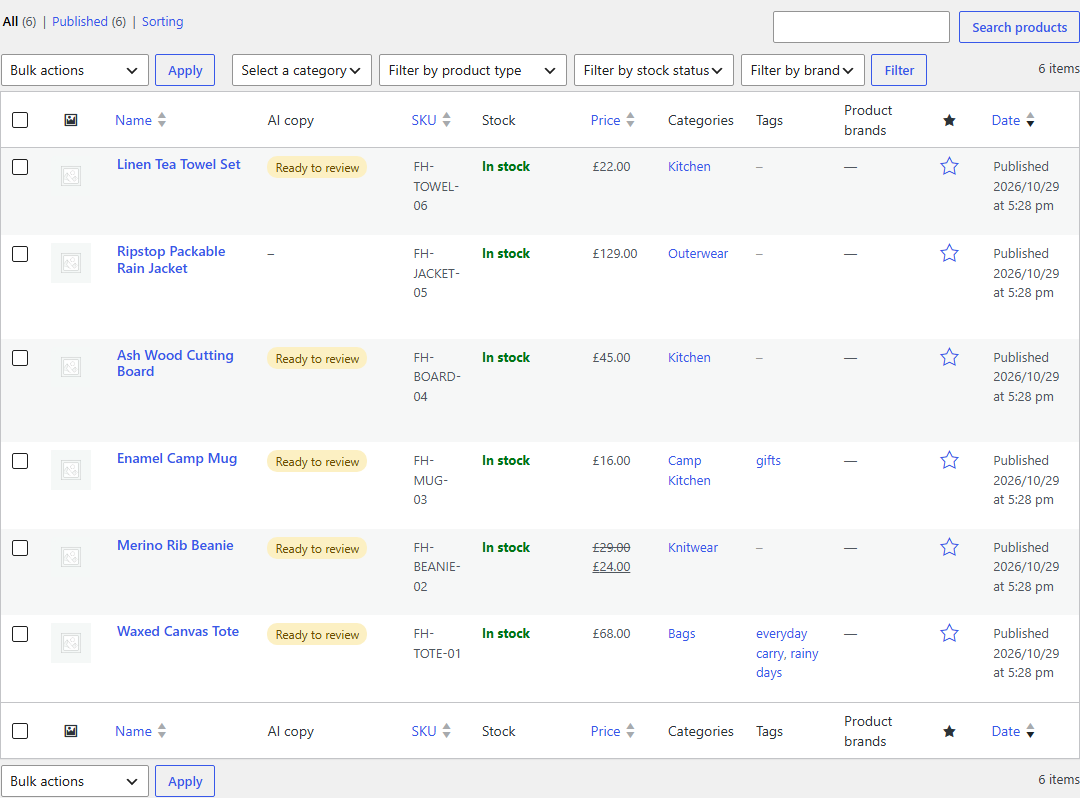
"Write copy with AI" on Products → All Products queues one Action Scheduler job per product (src/Jobs/Queue.php). Products that already have a description are skipped by default. A product that's already queued isn't queued twice. Rate limits and outages are retried after 1 and then 2 minutes, then the product is marked failed with the error, which also goes to the WooCommerce log. Depending on the setting, finished copy either waits for review in the product's meta box or is applied straight away, with undo available either way. The "AI copy" column shows Queued, Ready to review, Applied or Failed (hover for the error).
SEO plugins
src/Seo/SeoAdapter.php maps the three SEO fields to Yoast's (_yoast_wpseo_title, _metadesc, _focuskw) or Rank Math's (rank_math_title, _description, _focus_keyword) post meta, picked automatically. With neither installed, the plugin stores them itself and src/Seo/NativeSeo.php prints <meta name="description"> and swaps the title part of <title> on product pages. The SEO meta is written before $product->save(), because Yoast rebuilds its indexable on save_post. Undo writes back to the plugin the backup came from, even if the store switched SEO plugins in between.
Guard rails
- REST routes check
edit_productfor that product. The connection test needsmanage_woocommerce. Bulk actions skip products the user can't edit. - 30 generations per user per hour from the product screen (configurable,
wapw_rate_limitfilter). - Copy edited in the browser is sanitized again on apply.
- Monthly request and token counts on the settings page.
- Uninstall removes settings, usage, queued jobs and the plugin's bookkeeping meta. Applied descriptions stay, since they're the store's content now.
Extending it
| Hook | Use |
|---|---|
wapw_product_facts |
Add custom fields (ACF, materials, care instructions) to what the model sees |
wapw_prompt_messages |
Change the prompt |
wapw_request_body |
Add max_completion_tokens, seed, … |
wapw_generated_copy |
Post-process the result |
wapw_allowed_description_html |
Allow more tags |
wapw_copy_applied (action) |
React to an apply (purge caches, log) |
wapw_max_attempts, wapw_rate_limit |
Tune retries and the per-user limit |
Tech stack
- PHP 8.1+ WordPress plugin (no Composer dependencies at runtime): WooCommerce CRUD, REST API, Settings API, Action Scheduler, WP-CLI command
- OpenAI Chat Completions over the WordPress HTTP API, JSON mode
- Vanilla JS meta box on
wp.apiFetch(no build step) - PHPUnit 11 integration tests against real WordPress 7.1.4 + WooCommerce 11.2.1 on SQLite, run on PHP-WASM so no local PHP or MySQL is needed
- WordPress Playground CLI for the demo, plus a zero-dependency Node mock of the OpenAI API
- Docker Compose (WordPress 7.1.4, MariaDB 11.4, WP-CLI) as an alternative
Run it
Option 1: WordPress Playground (Node only)
npm install
npm run demo
This opens WordPress + WooCommerce at http://127.0.0.1:9400 (already logged in) with the plugin mounted from this folder and six demo products from a made-up store, Fernhill Supply Co. Five of them have no description yet. By default the plugin talks to the bundled mock API, which builds tidy but formulaic copy from the product data, so no key is needed. For real output:
OPENAI_API_KEY=sk-... npm run demo                 # OpenAI, gpt-4.1-mini (OPENAI_MODEL to change)
npm run demo -- --ollama                           # local Ollama, llama3.2:3b-instruct-q8_0 (OLLAMA_MODEL); not tried here, see Limitations
The site lives in memory and resets on every start. npm run demo reuses WooCommerce from .wp-test/ if npm run setup:wp has run; otherwise Playground downloads it.
Option 2: Docker
cp .env.example .env          # add OPENAI_API_KEY and OPENAI_BASE_URL=https://api.openai.com/v1 for real output
docker compose up
The setup service installs WordPress and WooCommerce, activates the plugin and seeds the demo products. Then open http://localhost:8080/wp-admin/edit.php?post_type=product (admin / password). The plugin folder is mounted read-only, so code changes show up on reload.
Option 3: An existing store
npm run zip builds dist/woo-ai-product-writer-1.0.0.zip (plugin files only, 28 files, ~45 KB). Upload it under Plugins → Add New → Upload, then go to WooCommerce → AI Product Writer, add a key and click Test connection.
Try it
- Open Waxed Canvas Tote. The notes field is already filled in. Click Generate copy, edit something, untick the focus keyword and click Apply selected to product. Then click Undo last AI apply.
- View the product page source:
<title>and<meta name="description">come from the generated meta. - On the product list, select everything and choose Write copy with AI. The rain jacket is skipped because it has a description, and the others show "Ready to review" once Action Scheduler has run.
- Break things:
MOCK_FAILURE_RATE=0.5 MOCK_LATENCY_MS=1500 npm run demo(or the same in.envfor Docker) makes the mock slow and return 503s half the time. Generations retry, and bulk jobs that still fail are rescheduled, then marked "Failed" (reason on hover) after three tries.
WP-CLI
wp ai-writer generate 42 57              # suggestions to review
wp ai-writer generate 42 --apply --notes="Mention the brass rivets"
wp ai-writer generate --all --only-empty --limit=50 --queue
wp ai-writer apply 42
wp ai-writer undo 42
In Docker: docker compose run --rm --entrypoint wp setup ai-writer generate --all --queue.
Tests
npm test                      # first run downloads WordPress, WooCommerce, the SQLite drop-in and PHPUnit (~60 MB)
npm test -- --filter Applier  # extra arguments go to PHPUnit
npm run setup:wp builds a real WordPress 7.1.4 + WooCommerce 11.2.1 site in .wp-test/ on SQLite. scripts/php.mjs runs PHP 8.3 as WebAssembly with the repo mounted, and PHPUnit loads that site with the plugin active. Each test runs in a database transaction that is rolled back, and HTTP calls are answered by a fake (pre_http_request), so no API key or network is needed. With PHP installed, composer install && vendor/bin/phpunit runs the same suite after npm run setup:wp.
107 tests, about 17 s:
- Copy parsing and checks (19): code fences and chatter around JSON, alternate key names, missing fields, broken JSON, `