CMB2 Select Plus WP Registry grade A. No security issues foundWP RegistryNo security issues foundOpen the reportA
Smart Select field for CMB2 with "optgroup" and "multiple" attribute support
Install
This is the repository archive. It installs, but the folder name will carry the branch suffix and updates will not flow.
Install straight from GitHub with WP-CLI:
wp plugin install https://github.com/manzoorwanijk/cmb2-select-plus/archive/refs/heads/master.zipOn Packagist as manzoorwanijk/cmb2-select-plus:
composer require manzoorwanijk/cmb2-select-plusCMB2 Field Type: select_plus
Description
select_plus field type for CMB2.
This plugin gives you an additional field type in CMB2: select_plus
The field acts much like the default select field. However, it adds the support for optgroup and saving of values with multiple attribute.
Installation
You can install this field type as you would a WordPress plugin:
- Download the plugin
- Place the plugin folder in your
/wp-content/plugins/directory - Activate the plugin in the Plugin dashboard
Alternatively, you can include this field type within your plugin/theme.
You may also install this field type using composer:
composer require manzoorwanijk/cmb2-select-plusUsage
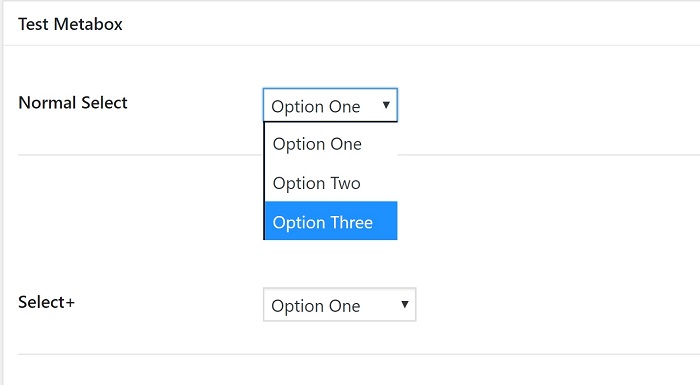
Normal Select Field
// Select Field without optgroup
$cmb->add_field( array(
    'name'      => 'Normal Select',
    'id'        => $prefix . 'normal_select',
    'type'      => 'select_plus',
    'options'   => array(
        'standard' => 'Option One',
        'custom'   => 'Option Two',
        'none'     => 'Option Three',
    ),
) );
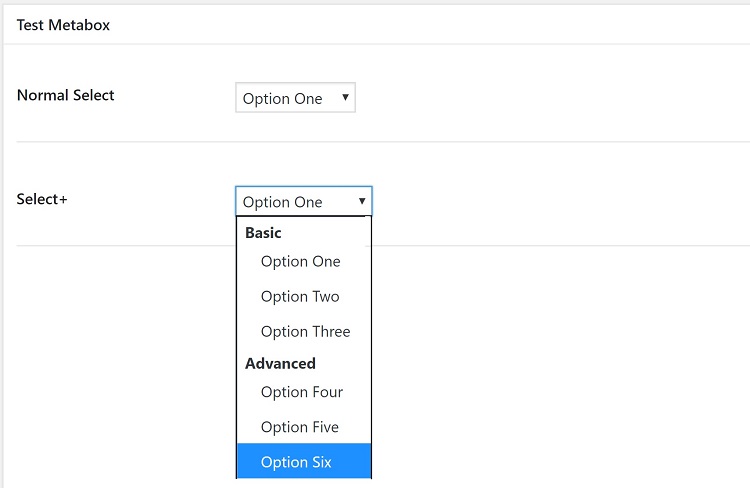
Select Field with optgroup
$cmb->add_field( array(
    'name'      => 'Select+',
    'desc'      => 'field description (optional)',
    'id'        => $prefix . 'smart_select',
    'type'      => 'select_plus',
    'options'   => array(
        'Basic' => array( // optgroup
            1   => 'Option One',
            2   => 'Option Two',
            3   => 'Option Three',
        ),
        'Advanced'  => array( // optgroup
            4   => 'Option Four',
            5   => 'Option Five',
            6   => 'Option Six',
        ),
    ),
) );
multiple attribute
You can use the multiple attribute and the field value will be saved as array
// Select Field without optgroup and with multiple attribute
$cmb->add_field( array(
    'name'      => 'Normal Select',
    'id'        => $prefix . 'normal_select_multi',
    'type'      => 'select_plus',
    'options'   => array(
        'standard' => 'Option One',
        'custom'   => 'Option Two',
        'none'     => 'Option Three',
    ),
    'attributes'    => array(
        'multiple'  => 'multiple',
    ),
) );
// Select Field with optgroup and multiple attribute
$cmb->add_field( array(
'name' => 'Select+',
'desc' => 'field description (optional)',
'id' => $prefix . 'smart_select_multi',
'type' => 'select_plus',
'options' => array(
'Basic' => array( // optgroup
1 => 'Option One',
2 => 'Option Two',
3 => 'Option Three',
),
'Advanced' => array( // optgroup
4 => 'Option Four',
5 => 'Option Five',
6 => 'Option Six',
),
),
'attributes' => array(
'multiple' => 'multiple',
),
) );Why Select_Plus_CMB2_Types class?
- This enables you to use it flexibly in case you need to just render the field, not the whole row.
- It allows you to override the default args of the field
// field args
$args = array(
  'field_args'    => array(
      'id'        => 'some_id_here',
      'type'      => 'select_plus',
      'options'   => array(
          'standard' => 'Option One',
          'custom'   => 'Option Two',
          'none'     => 'Option Three',
      ),
) );
// create field
$field = new CMB2_Field( $args );
// pass the field to custom class $types = new Select_Plus_CMB2_Types( $field );
// render the field with new id and name echo $types->select_plus( array( 'id' => 'new_id_0_here', 'name' => 'smart[param][value]', ) );
Releases
2 releases.
These releases are tags only. The author does not attach a packaged zip, so there are no download counts to report.