WP Manifestindependent plugin directory
manifest / developer / cbxwpwritelog

CBX WP Write Log WP Registry grade D+. High-severity findings · 3 findingsWP RegistryHigh-severity findings · 3 findingsOpen the reportD+

A simple dev plugin that helps to write something to debug log file and view log file

★ 12stars
46release downloads
≈10active sites
V1.0.4latest · 3 years ago

Install

Download cbxwpwritelog.zip From the V1.0.4 release on GitHub, Mar 7, 2023

Upload it under Plugins → Add New Plugin → Upload Plugin, then activate.

Install straight from GitHub with WP-CLI:

wp plugin install https://github.com/manchumahara/cbxwpwritelog/releases/download/V1.0.4/cbxwpwritelog.zip
No built-in updater. New versions won't appear under Dashboard → Updates. Install new releases yourself, or let Git Updater track the repository.

This plugin adds a helper function to write log in wordpress debug file. This plugin also writes email send fail logs

Usages:

  1. Write log
    if (function_exists( 'write_log' ) ) {
    write_log('testing a variable output');
    write_log($name);
    }
  2. View Log http://your_domain/?cbxwpwritelog=1

For any query contact us

Installation

This section describes how to install the plugin and get it working.

e.g.

  1. Upload cbxwpwritelog folder to the /wp-content/plugins/ directory
  2. Activate the plugin through the 'Plugins' menu in WordPress
  3. call function <?php write_log('your content, variable or object here'); ?> in your templates or plugin anywhere where you need to
  4. There are other ways to install a plugin please check WordPress Codex https://codex.wordpress.org/Managing_Plugins

To enable debug you need put following in your WordPress wp-config.php file


//to enable debug
define('WP_DEBUG', true); //enable debugs
define( 'WP_DEBUG_DISPLAY', true); //displays debug , if you don't show set it false
define( 'WP_DEBUG_LOG', true); //stores debug in wp-content/debug.log  or as you configure your wp content folder

//to enable/disable email fail or success debug
define('CBXWPWRITELOG_EMAIL_FAILED', false); //set true to enable email fail debug
define('CBXWPWRITELOG_EMAIL_SENT', false); //set true to enable email success debug

Screenshots
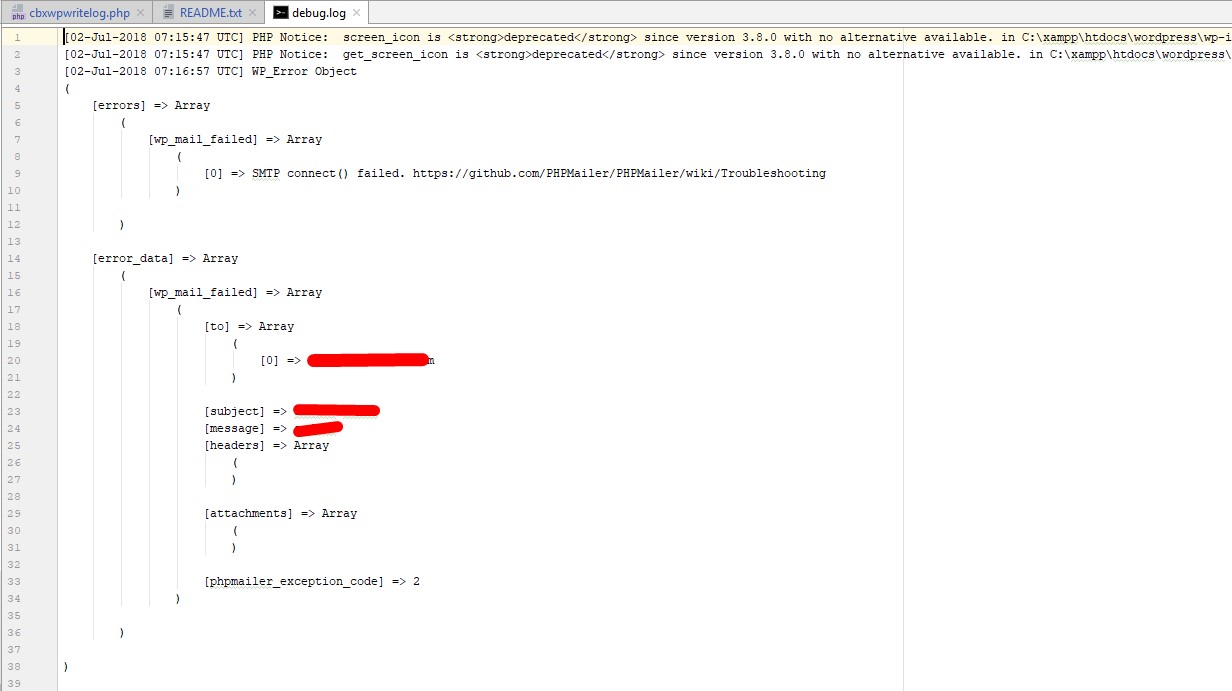
screenshot

Changelog

1.0.4

1.0.3

  • Debug boolean in better way

1.0.2

  • Email sent or fail debug

1.0.1

  • Initial version released

Releases

3 releases. Each count is every asset in that release; expand a row for the breakdown.

Tag
Published
Assets
Downloads
V1.0.4 latest
Mar 7, 2023 3 years ago
cbxwpwritelog.zip
23
Feb 18, 2020 6 years ago
cbxwpwritelog.zip
16
Jan 12, 2020 6 years ago
cbxwpwritelog.zip
7

Active-site estimate ≈10 comes from the median of recent superseded releases. Method.

D+ grade

Security

CBX WP Write Log 1.0.4 · audited by WP Registry

High-severity findings.

1 high 2 medium
Audited release
1.0.4
Findings
3
Worst severity
high
Content hash
3068ec81b0242550b46fd561…

Findings

  • high Unauthenticated debug.log disclosure via ?cbxwpwritelog=1

    information_disclosure

    cbxwpwritelog_log_viewer is hooked to template_redirect and, when WP_DEBUG is true, treats $_REQUEST['cbxwpwritelog']==1 as sufficient authorization. There is no current_user_can, is_user_logged_in, or nonce check. The handler instantiates Php_Error_Log_Viewer\LogHandler with file_path = WP_CONTENT_DIR.'/debug.log', then AjaxHandler::handle_ajax_requests() which, on GET get_log, prints json_encode of the parsed log and dies. Visiting /?cbxwpwritelog=1 without get_log echoes the bundled Vue GUI (templates/log_view.php), which auto-polls ?get_log&cbxwpwritelog=1 every 4s. The admin-bar "View Error Log" node is gated on manage_options, but that function never runs on this path — it only adds a link. WP_DEBUG is the plugin's intended operating mode (README instructs defining it and documents http://your_domain/?cbxwpwritelog=1). Observable: an unauthenticated GET to /?cbxwpwritelog=1&get_log returns the contents of wp-content/debug.log as JSON (paths, stack traces, query/API failures, and mail errors if email logging constants are enabled), bypassing web-server rules that deny the raw debug.log URL.

    cbxwpwritelog.php:145-176

    Recommendation

    Require current_user_can('manage_options') (or a dedicated capability) and a valid nonce before rendering the viewer or serving get_log/filesize/delete_log. Do not treat WP_DEBUG as an access-control check. Keep the viewer in wp-admin rather than a public query var, and deny HTTP access to vendor/php-error-log-viewer/index.php (standalone copy of the same AjaxHandler with no WordPress auth).

  • medium Unauthenticated GET truncates wp-content/debug.log

    missing_auth

    The same unauthenticated template_redirect handler calls AjaxHandler::handle_ajax_requests() on every ?cbxwpwritelog=1 request. If $_GET['delete_log'] is set, ajax_delete() invokes LogHandler::delete(), which fopen()s WP_CONTENT_DIR.'/debug.log' in r+ and ftruncate()s it to zero bytes, then echoes 'Emptied file'. There is no capability check and no nonce; the Vue UI triggers it with axios.get('?delete_log&cbxwpwritelog=1'). Because the action is a GET, a cross-site img/prefetch or a logged-in admin visiting an attacker page will empty the log whenever WP_DEBUG is on. Observable: GET /?cbxwpwritelog=1&delete_log returns JSON/text 'Emptied file' and debug.log size becomes 0, destroying forensic evidence. Limited blast (one file, not RCE), so medium rather than high.

    vendor/php-error-log-viewer/src/AjaxHandler.php:20-33,70-75

    Recommendation

    Gate delete_log on manage_options plus check_admin_referer / check_ajax_referer. Use POST (not GET) for a destructive action. Refuse the request for unauthenticated users even when WP_DEBUG is true.

  • medium Stored XSS in log viewer via vscode_link_filter and v-html

    xss_stored

    Log lines are htmlspecialchars(..., ENT_QUOTES) then passed to link_vscode_files(), which wraps filesystem-like matches in <a href='$link'> with $link built from the already-encoded match. HTML character references such as ' (from a single quote in the original log line) are decoded by the browser when parsing the href attribute, so a path like /x.php'onclick='alert(1)'/y.php on line 1 becomes <a href='vscode://file//x.php'onclick='alert(1)'/y.php:1'> and breaks out to an onclick handler. templates/log_view.php inserts item.msg with Vue v-html (innerHTML); event handlers in that markup execute. vscode_links defaults to true and the WordPress wrapper does not disable it. Consumer is the public log GUI at /?cbxwpwritelog=1 (and any admin using the toolbar link). Exploitation needs a matching line in debug.log (PHP notices/warnings that interpolate attacker-influenced strings, or write_log() of request data). Not a free-form reflected XSS from this plugin's own query args.

    vendor/php-error-log-viewer/src/LogHandler.php:132-145,174-175

    Recommendation

    Build vscode hrefs with esc_url() / htmlspecialchars on the full attribute value, or skip HTML and let the frontend create links from structured path/line fields. Prefer v-text over v-html. Disable vscode_links unless explicitly enabled in wp-admin. Fixing the missing-auth gate on the viewer also stops unauthenticated users from hitting this sink.

WP Registry hashes the installable build and reports on that exact bytes-for-bytes copy. Embargoed findings are withheld until they are disclosed, so a clean verdict means nothing public is outstanding. WP Manifest does not audit code itself.