Install
This is the repository archive. It installs, but the folder name will carry the branch suffix and updates will not flow.
Install straight from GitHub with WP-CLI:
wp plugin install https://github.com/maib-ecomm/maib-checkout-payment-gateway-for-woocommerce/archive/refs/heads/main.zipAccept Visa / Mastercard / Apple Pay / Google Pay / MIA Instant Payments on your WooCommerce store using MAIB Checkout.
Repository: https://github.com/maib-ecomm/maib-checkout-payment-gateway-for-woocommerce
Features
- Payments: Visa, Mastercard, Apple Pay, Google Pay, MIA Instant Payments
- Works with WooCommerce checkout (customers will see this payment method after you save settings and the gateway is enabled)
- Refunds: Full/Partial
- Optional logging (Debug mode)
Getting Client ID / Client Secret / Signature Key
To receive Client ID, Client Secret, and Signature Key, email ecomm@maib.md and ask MAIB to create a payment profile for your merchant.
- Client ID / Client Secret are used for authentication (token generation).
- Signature Key is used to verify and sign payment callback data.
Configuration (WooCommerce → Payments → MAIB Checkout)
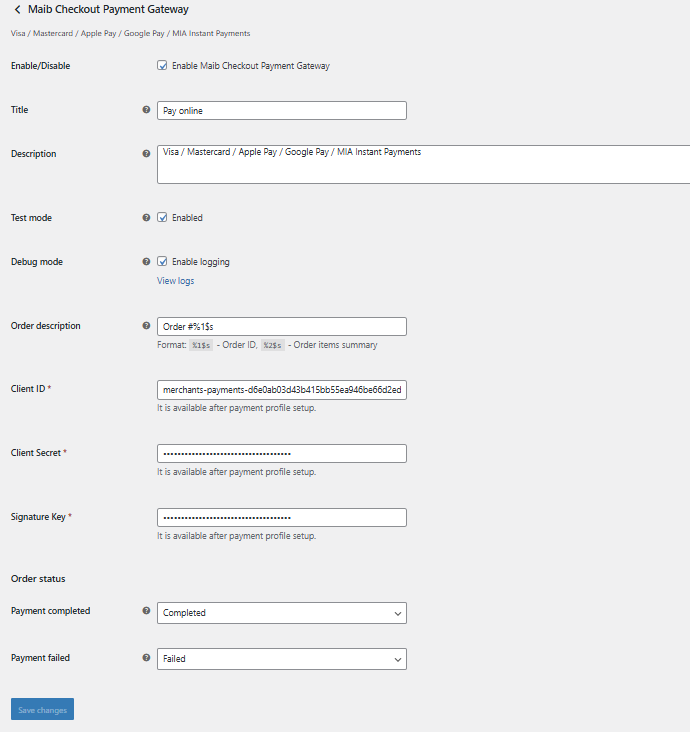
Below is a description of the settings shown on the gateway configuration screen.
Enable/Disable
Turns the gateway on/off. When enabled and settings are saved, customers can select it at checkout.
Title
The name shown to customers at checkout (e.g., Pay online).
Description
Additional text shown under the payment method at checkout (e.g., supported payment types).
Test mode
- Enabled → payments go through Sandbox:
https://sandbox.maibmerchants.md/v2/ - Disabled → payments go through Production:
https://api.maibmerchants.md/v2/
Debug mode
Enables WooCommerce logging for troubleshooting. You can view logs in WooCommerce → Status → Logs.
Order description
Template used to generate a description for MAIB (for example: Order #%1$s).
Typically includes the order ID and/or order items summary.
Client ID
Provided by MAIB after your merchant payment profile is created.
Client Secret
Provided by MAIB after your merchant payment profile is created.
Signature Key
Provided by MAIB after your merchant payment profile is created. Used to validate/sign callbacks.
Order status mapping
Configure which WooCommerce status should be set when:
- Payment completed
- Payment failed
Screenshots
- Plugin settings
Notes
- If you change credentials or environment (sandbox/production), always save changes and run a test payment.