Reading Progress Indicator
Reading Progress Indicator adds a sleek, customizable progress bar to your WordPress site that shows readers how far they've scrolled through the current page or post. When they reach the end, an animated congratulations overlay with confetti celebrates their achievement.
Install
This is the repository archive. It installs, but the folder name will carry the branch suffix and updates will not flow.
Install straight from GitHub with WP-CLI:
wp plugin install https://github.com/mademi5/reading-progress-indicator/archive/refs/heads/main.zip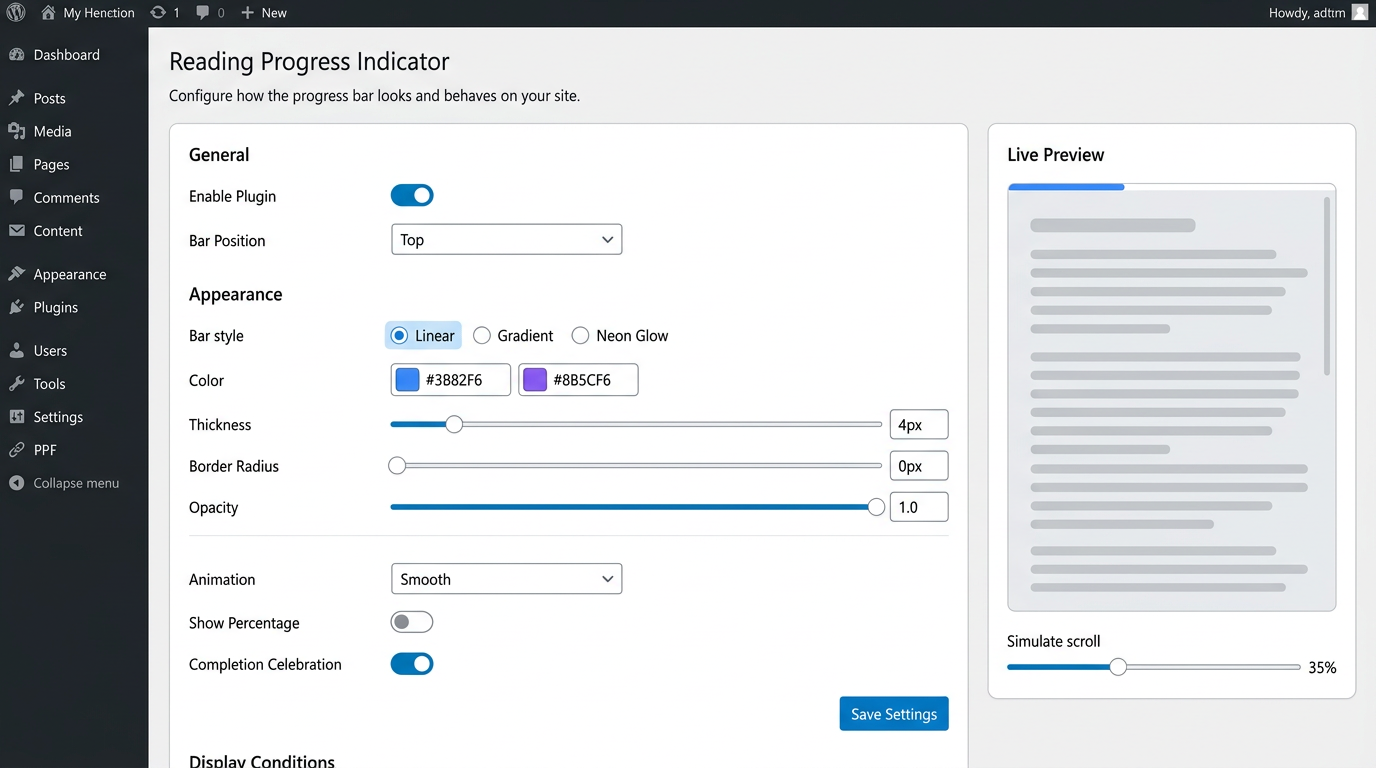
Reading Progress Indicator
Contributors: merve Tags: reading progress, progress bar, scroll indicator, reading bar, congratulations Requires at least: 5.8 Tested up to: 6.7 Requires PHP: 7.4 Stable tag: 1.0.0 License: GPLv2 or later License URI: https://www.gnu.org/licenses/gpl-2.0.html
A customizable animated reading progress bar for WordPress with a celebratory confetti animation when readers finish an article.
Description
Reading Progress Indicator adds a sleek, customizable progress bar to your WordPress site that shows readers how far they've scrolled through the current page or post. When they reach the end, an animated congratulations overlay with confetti celebrates their achievement.
Features
- 4 Position options – Top, Bottom, Left side, or Right side of the viewport
- 3 Bar styles – Linear (flat color), Gradient (two-color blend), and Neon Glow (pulsing box-shadow)
- 3 Animation types – Smooth transitions, Pulse effect at 25% milestones, and continuous Color Shift
- Completion celebration – Full-screen congratulations overlay with confetti particles, animated checkmark, and gradient typography when the reader finishes the article
- Percentage badge – Optional floating badge showing the current scroll percentage
- Full customization – Color pickers, thickness slider, border radius, opacity control
- Display conditions – Show on all pages, posts only, pages only, or specific custom post types
- Live preview – See your changes in real time on the settings page, including the celebration animation
- Lightweight – Pure vanilla JavaScript with zero dependencies (no jQuery)
- Accessible – Proper ARIA attributes on the progress bar element
- Responsive – Works perfectly on all screen sizes
How It Works
The plugin calculates the scroll percentage of the current page and renders an animated bar that fills as the user scrolls down. When the reader reaches the bottom of the content, an elegant congratulations animation appears with confetti, a checkmark animation, and a motivational message. All styling is controlled through CSS variables injected dynamically, keeping the footprint minimal.
Installation
- Upload the
reading-progress-indicatorfolder to the/wp-content/plugins/directory, or install directly through the WordPress plugin screen. - Activate the plugin through the Plugins menu in WordPress.
- Go to Settings > Reading Progress to configure the bar appearance, position, and display conditions.
- That's it! Visit your site to see the progress bar in action.
Frequently Asked Questions
Does this plugin slow down my site?
No. The plugin loads a single lightweight CSS file and a small vanilla JavaScript file (no jQuery). Both are under 5 KB combined and only load on pages where the bar is configured to appear. The congratulations overlay is created dynamically only when triggered.
Can I show the progress bar only on blog posts?
Yes. In Settings > Reading Progress > Display Conditions, you can choose to show the bar on single posts only, pages only, all pages, or specific custom post types.
Can I use a gradient or glowing style?
Absolutely. Under Appearance, choose the "Gradient" style and pick two colors, or select "Neon Glow" for a pulsing box-shadow effect. You can preview all styles live on the settings page.
Can I disable the congratulations animation?
Yes. Go to Settings > Reading Progress > Animation and toggle off "Completion Celebration". The progress bar will still work normally without the end-of-article overlay.
Screenshots
- Settings page – General and Appearance sections with live preview
- Top position progress bar on a blog post
- Gradient style with neon glow animation
- Vertical (left side) progress bar
- Percentage badge floating near the bar
- Congratulations overlay with confetti when article is finished
- Mini celebration preview in the admin settings page
Changelog
1.0.0
- Initial release
- 4 position options: top, bottom, left, right
- 3 bar styles: linear, gradient, neon glow
- 3 animation types: smooth, pulse, color shift
- Completion celebration with confetti, animated checkmark, and gradient text
- Auto-dismiss after 6 seconds, or close via click/Escape key
- Optional percentage badge
- WordPress color picker integration
- Live preview on settings page with simulated scroll and mini celebration
- Display condition filters for post types
- Fully responsive, vanilla JS, no jQuery